On this page
What is technical SEO? It is the work that lets search engines find, index and understand your pages: your sitemap and robots.txt, which pages belong in Google and which do not, redirects when addresses change, languages, speed and structured data. Visitors never see it. Your rankings do: one wrong line in a two-line file can keep an entire site out of Google.
Want to know where your site stands now? Run the SEO checker. For SEO as a whole, see the glossary entry on SEO. This guide walks through the three steps a search engine takes through your site.
What technical SEO is, and what it is not
| Technical SEO | Content and search terms | Authority | |
|---|---|---|---|
| Question | Can Google find and read your pages? | Does your page answer what people search for? | Do others trust your site? |
| Examples | Sitemap, robots.txt, canonical, 301, hreflang, speed | A page per service, guides, titles on search terms | Links from other sites, reviews, mentions |
| Who does it | A developer or technical SEO specialist | A copywriter or SEO specialist | You, your network, PR |
| How often | At the build, at every move, and a quarterly check | Ongoing | Ongoing |
Technical SEO is the foundation. Without it the rest achieves little, but a perfect foundation without content brings no visitors either. What a specialist does beyond this is in what does an SEO specialist do.
A search engine's route through your site
01Crawling
Can Google reach your pages?
- /services/guides/price/contactSitemapThe list of every page you want in Google.
- User-agent: *Disallow: /adminRobots.txtWhich parts search engines may not visit.
- Internal linksGoogle follows links. A page nothing links to gets little attention.
02Indexing
Which pages belong in Google?
- /thank-younoindexNoindexA thank-you page or login stays out.
- yourcompany.comwww.yourcompany.comCanonicalThe same content at two addresses: you say which is the real one.
- /old301/new301 and 404An old address redirects, a page that is gone returns a real 404.
03Understanding
Can Google read what is there?
- <title><h1>Titles and headingsIts own title per page, with the search term up front.
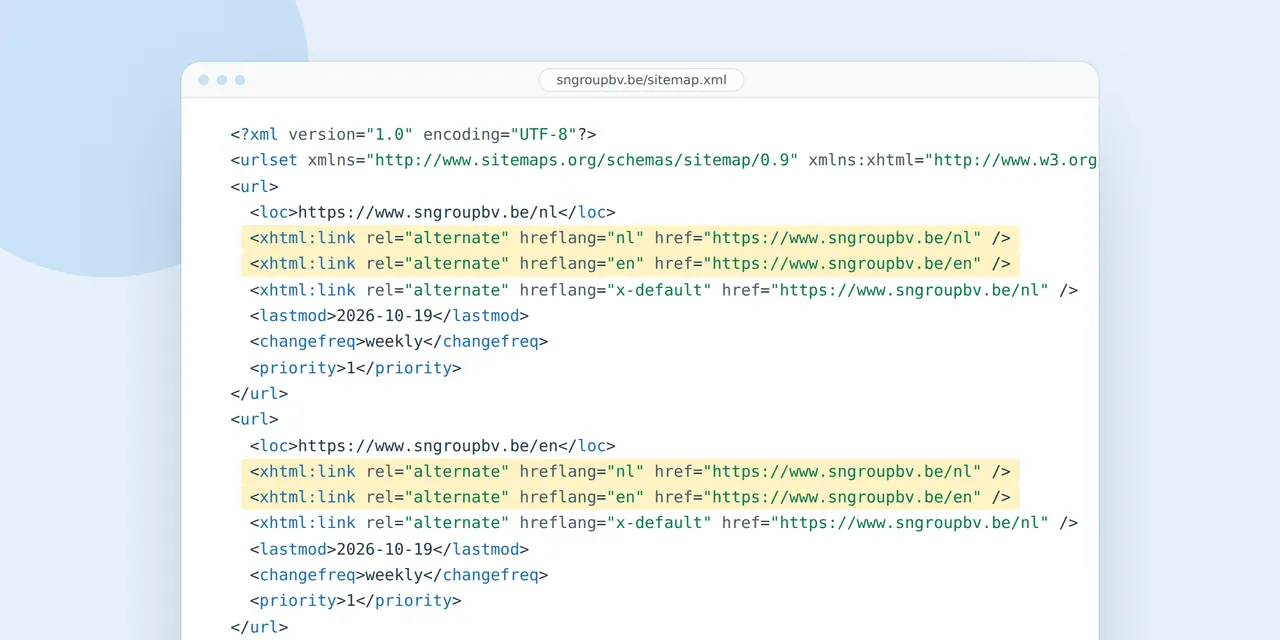
- endefrnlHreflangWhich pages are versions of each other.
- "@type": "Organization"Structured dataYour company, your address or an article in a fixed format.
Step 1: crawling, can Google reach your pages?
Sitemap
A sitemap is an XML list of the pages you want in Google. You submit it in Google Search Console. One sitemap holds up to 50,000 URLs and 50 MB; a bigger site splits it. Google ignores the priority and changefreq fields, and uses lastmod only when that date reliably matches real changes. So list only real, indexable pages, with an honest date.
Robots.txt
This file tells search engines which parts of your site they may not visit. A line like "Disallow: /" keeps the whole site out. It happens more often than you think: a staging site that goes live with the block still in place. Note: robots.txt does not keep a page out of the index. That is what noindex does, and Google can only read it if it may visit the page.
Robots.txt also decides whether AI crawlers such as GPTBot may read your site. What to choose is covered in how to get found in ChatGPT; check yours with the AI crawler checker.
Internal links
Google follows links. A page linked from your menu, your services and your guides gets more attention than one nothing points to. A page without any link to it is an orphan, and Google struggles to find it, even if it is in your sitemap.
Step 2: indexing, which pages belong in Google?
Not every page belongs in Google. A thank-you page, a login or a staging area stays out with a noindex tag. Conversely, check that your important pages do not carry one by accident.
If the same content lives at several addresses, with and without www, with and without a trailing slash, or a product in two categories, a canonical tag tells Google which version is the real one. Otherwise Google picks, and not always the right one.
What Search Console tells you
The Page indexing report in Search Console says, per page, why it is or is not in Google. The messages you see most:
| Message | What it means | What you do |
|---|---|---|
| Excluded by noindex tag | The page asks not to be indexed | If intended, nothing. An important page: remove the tag |
| Crawled, currently not indexed | Google read the page and did not (yet) find it useful enough | Strengthen the content, add internal links, be patient |
| Discovered, currently not indexed | Google knows the URL but has not visited it yet | Internal links, sitemap, and on big sites your server speed |
| Alternate page with proper canonical tag | A duplicate that points to the real one | Nothing, that is how it should be |
| Duplicate, Google chose different canonical than user | Google disagrees with your canonical | Check which version really is best, and align internal links |
| Not found (404) | The address does not exist | If a page used to be there, redirect it with a 301 |
How long a new site takes to appear is in how long until my website shows on Google.
Redirects and error pages
When a page's address changes, send the old address to the new one with a permanent redirect, a 301 or 308. Visitors and Google find the page again and the new page inherits the value of the old. Google advises keeping such redirects for at least a year, preferably longer. A page that is truly gone returns a real 404, with an error page that helps the visitor on.
For SN Group, a construction company in Ghent, we moved the site to a fast static version with real 404 pages, redirects and a correct canonical tag.

Worked example: a move plan for 120 pages
A company moves from an old site with 120 URLs to a new one with 60 pages. The plan looks like this:
| Old addresses | Count | What happens | Redirect |
|---|---|---|---|
| Pages that return at a new address | 45 | One to one to the new page | 45 x 301 |
| Pages that merge (three old services become one) | 30 | To the page that takes over the topic | 30 x 301 |
| Blog posts without visitors or links | 35 | Removed | Real 404, or a 301 to the blog if links point to them |
| Test pages, tags and archives | 10 | Removed | Real 404 |
| Total | 120 | 75 redirects |
Take the old addresses from your current sitemap and from Search Console, under Performance and Pages: there you see which pages earn impressions and clicks. Those you never lose. After the move, submit the new sitemap and watch the Page indexing report for a few weeks. For a small to medium site it takes a few weeks for most pages to move. More in moving a website to a new host.
Step 3: understanding, can Google read what is there?
Titles and headings
Each page has its own title and a clear heading, with the search term up front. Two pages with the same title compete with each other. See how your title looks in Google with the SERP preview.
Languages and countries
If your site has several languages or serves several countries, hreflang tells Google which pages are versions of each other. Each version points to all the others and to itself. A French searcher gets the French page, a German buyer the German one. Put languages in folders on one domain (/fr/, /de/) rather than a domain per language; see country domain vs .com and our approach to a multilingual website. At Business Centrum that means four languages and hundreds of pages per language.
Structured data
Structured data (schema.org, usually in JSON-LD) describes in a fixed format what is on a page: your company, your address, an article, a product, a job. Google can use it for richer results. It is no trick for higher rankings: it helps Google understand what is already on the page.
Content without JavaScript
Some sites only show their text after JavaScript has loaded in the browser. Google can usually read that, though not always right away, and many other crawlers, including those of AI assistants, cannot. A site whose text is already in the HTML is safer.
Speed and mobile
Google indexes the mobile version of your site. What is missing on a phone does not exist for Google. Speed belongs here too: read how to improve website speed.
A technical SEO check in twelve points
- Your sitemap is submitted in Search Console and lists only real, indexable pages.
- Your robots.txt blocks nothing that belongs in Google.
- Important pages carry no noindex tag.
- Every page has its own title and description.
- Your site has one version: with or without www, always on https.
- Old addresses redirect with a 301 to the right new page.
- A page that does not exist returns a real 404.
- Language versions point to each other with hreflang.
- Every important page gets links from other pages on your site.
- The text of your pages is in the HTML, not only after JavaScript.
- Your pages meet the Core Web Vitals on mobile.
- Search Console shows no large groups of errors.
The mistakes that cost most
| Mistake | What it costs | How you notice |
|---|---|---|
| A block in robots.txt after a launch | Pages drop out of Google within days | Search Console reports blocked pages; traffic falls |
| A new site without redirects | You lose the rankings of your old pages; winning them back takes months | Many 404s in Search Console |
| Noindex in a template | A whole group of pages disappears at once | Excluded by noindex tag jumps up |
| Two versions of your site (www and without) | Google splits the value over two addresses | Duplicates in the indexing report |
| Hreflang that points one way only | The wrong language in the wrong country | French visitors landing on your English page |
Do it yourself or hire someone?
| Situation | Yourself | Hire |
|---|---|---|
| A small site of 5 to 20 pages, one language | Yes, with Search Console and the checklist above | Only for a move |
| Moving to a new site | Risky without experience | Yes, with a move plan per URL |
| A site in several languages or countries | Hard, hreflang easily goes wrong | Yes |
| A store with filters and thousands of URLs | No | Yes, canonical and indexing per filter |
More on that choice in do SEO yourself.
What that base carried at Business Centrum
- pages in four languages, all findable for Google
- 1,680+
- internal links between the pages of the keyword map
- 771
- impressions a day in Google after five weeks, up from 220
- 10,200
- non-brand search terms on page one, up from 13
- 1,593
Questions about technical SEO
What is technical SEO in simple terms?
Making sure search engines can find, index and understand your pages: a correct sitemap and robots.txt, the right pages in Google, redirects, languages, speed and structured data. It is the foundation under your content.
What is the difference between technical SEO and on-page SEO?
On-page SEO is about what is on your pages: search terms, copy, headings. Technical SEO is the base underneath, so Google finds and understands those pages. You need both; a technically perfect site without content attracts nobody.
How do I check my technical SEO myself?
Start in Google Search Console: the Page indexing report shows which pages are not in Google and why. Check that your sitemap is submitted, that robots.txt blocks nothing important and that your pages meet the Core Web Vitals. The SEO checker gives a first read.
What happens to my rankings when I change websites?
If every old URL redirects with a 301 to the right new page, Google and your visitors find the pages again. Expect a few weeks before most pages have moved. Without redirects you lose what you built.
Do I need structured data?
It is not required and gives no ranking by itself. It helps Google understand a page and enables richer results, such as an article with a date or a product with a price. For a company site, Organization or LocalBusiness is a good start.
How often should technical SEO be checked?
Right away at every move, new language or big change, and otherwise a quarterly look at the indexing report and Core Web Vitals in Search Console. Large sites that add many pages check monthly.