Time tracking app
Custom time tracking software your crew fills in
Custom time tracking software: hours per employee, site or trip on the phone, exported for payroll and invoicing.
Hours that come from memory on Friday
Custom time tracking software solves a simple problem: hours filled in at the end of the week are rarely right, and hours nobody records never get invoiced.
In many businesses the crew writes its hours on a sheet, sends a photo of a diary or says them over the phone. Someone in the office retypes it all for payroll, and again for the customer's invoice. Finding out how many hours went into a site, a trip or a customer costs an afternoon of sums. And when an inspector or an employee asks exactly when work was done, there is no answer that holds up.
Time tracking software built around your business asks for a few taps a day: start, break, end, and which site, trip or customer. The system counts per employee, per project and per week, logs every correction with name and date, and produces the export for payroll and invoicing. This page is about the hours themselves. What a technician records on a work order, and how an installer runs the whole firm, have pages of their own. We build it from Ghent, Belgium, in English, for teams across Europe.
What EU and Belgian rules ask of time records
On 14 May 2019 the EU Court of Justice ruled in case C-55/18 that member states must require employers to set up an objective, reliable and accessible system that records the daily working time of every worker. Member states choose the form, and may take account of the sector and the size of a business. How each country fills that in differs. As an example of how deep we go, these are the rules that most often touch a time tracking app in Belgium, next to the EU baseline.
| Situation | What the rule asks | What it means for your app |
|---|---|---|
| EU Working Time Directive (2003/88/EC) | 11 hours of daily rest, a weekly rest, at most 48 hours a week on average | A warning before a late shift is followed by an early one |
| Part-time workers in Belgium | Deviations from the schedule recorded; ideally start, end and breaks at the moment, kept 5 years | Clocking in at the moment is your register; without one, full time is presumed |
| Variable part-time schedules in Belgium | Given in advance, in writing and dated, kept a year after | Schedule and hours side by side, with the date given |
| Working time limits in Belgium | 8 hours a day, 40 a week, 38 on average; overtime under an internal limit of 143 hours | Counts per employee and warns in time |
| Building sites in Belgium from 500,000 euros | Attendance registered; from 1 April 2027 on arrival and departure | Planned and worked next to the official registration |
| Location tracking (GPS) | Not to calculate working time when another system does, never outside working hours | At most when clocking in on a site, and your team knows |
| AI that assesses workers (EU AI Act) | High risk from 2 December 2027 | Counting hours is not; rating people is |
Payroll stays with your payroll provider; the app delivers hours in the format they import. Check whether an AI feature falls under the strict rules with the EU AI Act compliance checker. Whether you need an AI policy as an employer is answered on do I need an AI policy?
A week of hours per site, entered on the phone
Week 43, one employee
- Site Wetteren
- Site Aalst
- Workshop
- Mon8 h
- Tue8 h
- Wed8.5 h
- Thu8 h
- Fri7 h
39.5 hours, of which 6.5 in the workshop
Export for payroll
Hours per day and per pay code, in the format your payroll provider imports.
Example with made-up hours.
Days and nights per driver, from the trips themselves
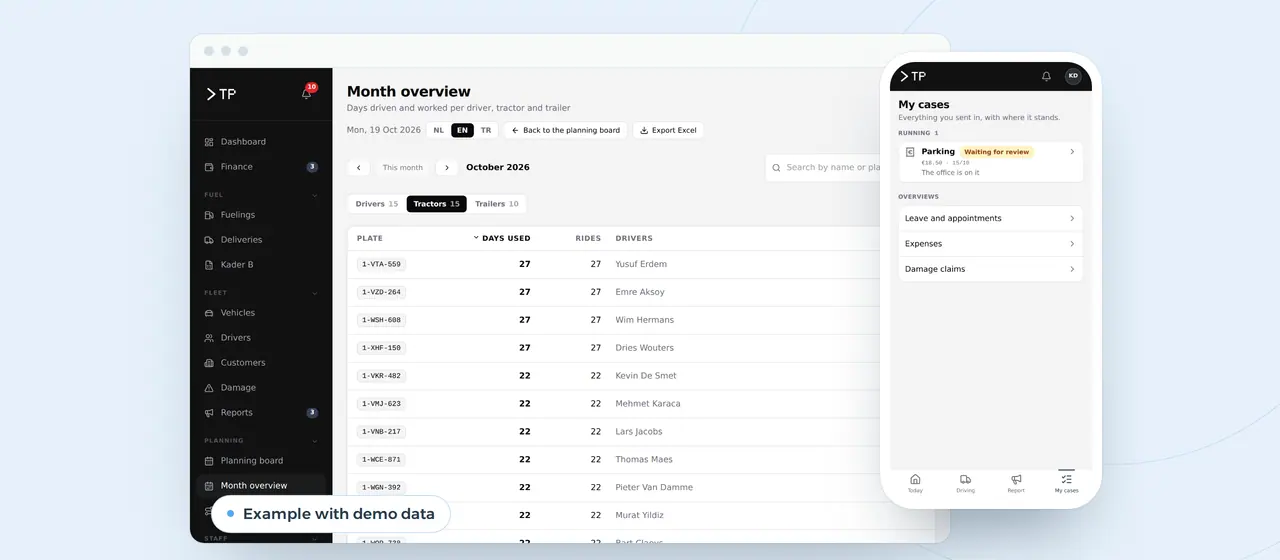
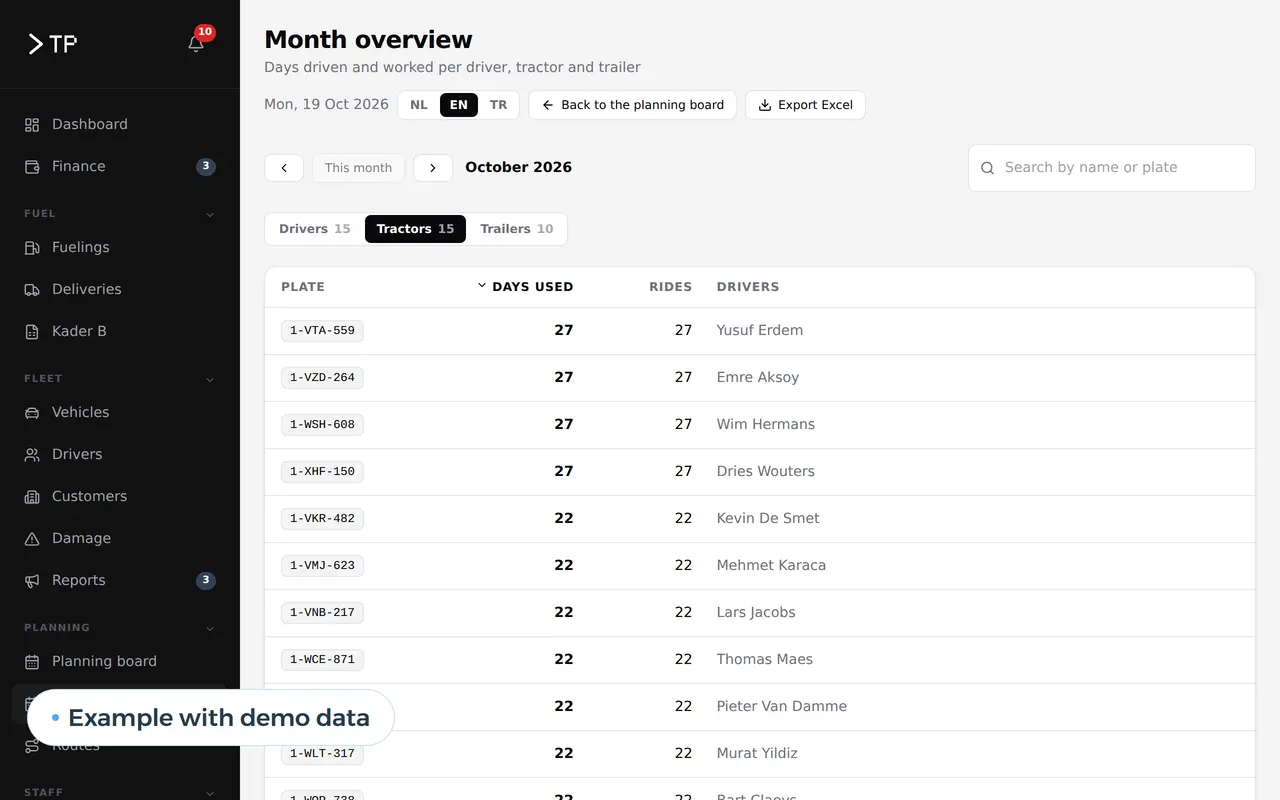
For DA Logistics, a Belgian haulier, we built a monthly overview that counts per driver what was worked: days on duty, trips, weekdays, Saturdays and Sundays, day and night trips. Nobody fills it in separately. It comes from the schedule and the trips already in the platform, and goes to a spreadsheet in one click.
That is time tracking per trip. For a construction firm the trips become sites, for an installer jobs.
The steps the app takes over
The gain is in what nobody retypes any more, and in hours that finally reach the right customer.
| Process | Today | With your own app | What you gain |
|---|---|---|---|
| Start and end | Written down on Friday, from memory | Clocking in on the phone at the moment itself, breaks included | Hours that add up, and a record for part-timers |
| Hours per site, trip or customer | A daily total, no project | Every entry belongs to a site, trip or customer | You know what a project really cost |
| Forgetting to clock out | Nobody notices | A reminder to the employee, a list of open entries in the office | No sixteen-hour days in your export |
| Corrections | Crossed out on paper | A correction with name, date and reason, the original stays visible | No arguments afterwards |
| Billing time and materials | Hunting hours per customer | Billable hours per customer ready for the invoice | Hours you used to give away |
| Payroll | Retyping for the payroll provider | An export per employee and pay code in their format | Fewer payslip corrections |
| Job costing | An estimate after the job | Planned next to worked hours, per site | Better quotes for the next job |
Recording hours is half the story; whoever plans them works with custom scheduling software, or for crews on sites with construction scheduling software. Planning trips and drivers is on transport management software. If a technician also records parts, photos and a signature, the hours live in the work order app and need no separate entry. If customers or employers should enter hours themselves, see client portal; a screen with hours per site and per week is on custom dashboard development. Installers who want hours, work orders and maintenance in one system read software for installers, and why a team in Belgium can work for you is on nearshore software development.
Hours, leave and absences in one file
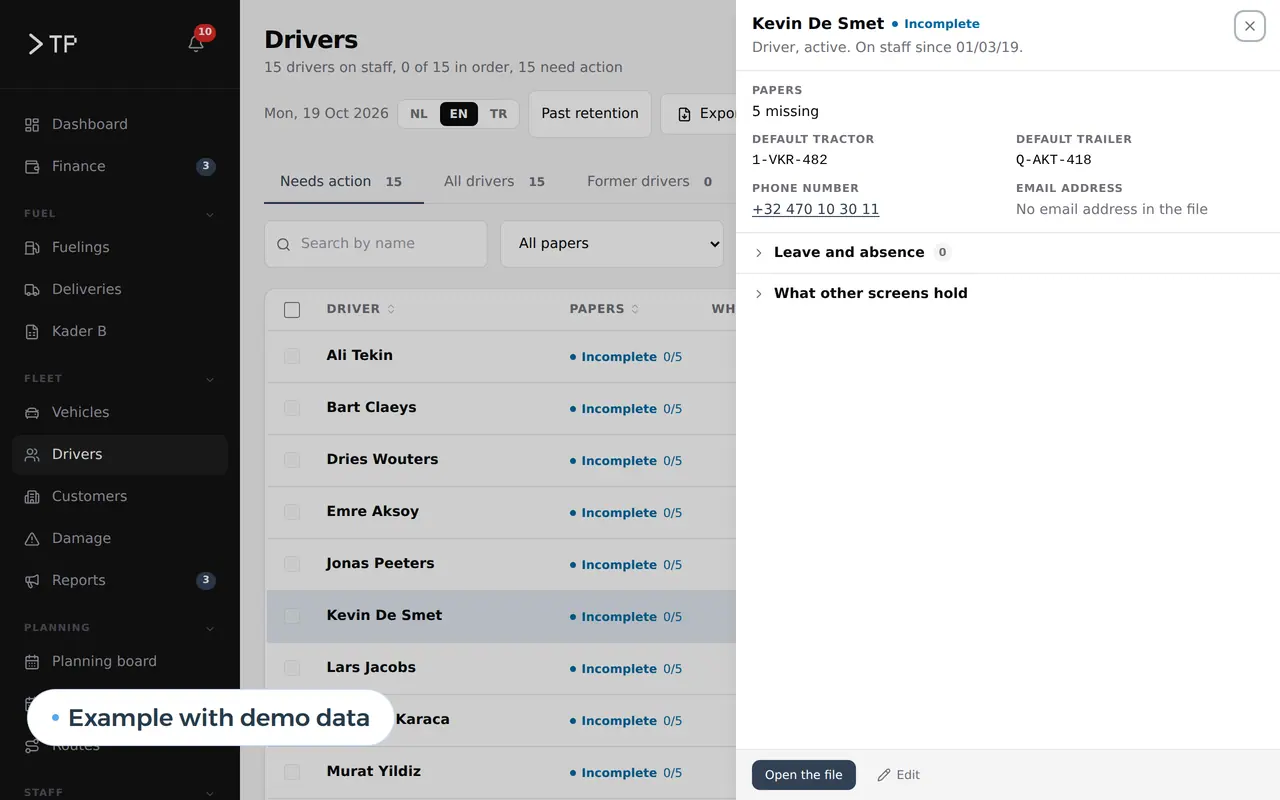
Time tracking does not stand apart from leave and sickness. In the DA Logistics platform, leave sits in each driver's staff file, next to his papers and what is still missing. What was planned, what was worked and who was absent come from one source.
Drivers request leave in the app; the office approves it in a queue. A crew that records hours does so in the same app.
25 people in the field, worked out
Take a business with 25 people in the field, 10 of whom regularly bill by the hour, and an office that processes the hours. This is a worked example with assumed figures: 46 working weeks, an office cost of 45 euros an hour, an hourly billing rate of 50 euros. Run it again with your own team.
| Task per week | Sheets and messages | Time tracking app |
|---|---|---|
| Collecting and retyping hours | 4 hours | 0.5 hours |
| Checking, chasing and correcting | 3 hours | 1 hour |
| Gathering billable hours per customer | 3 hours | 0.5 hours |
| Export for payroll | 2 hours | 0.25 hours |
| Total | 12 hours | 2.25 hours |
That is 9.75 hours a week, or 448.5 hours over 46 weeks. At 45 euros an hour: 448.5 x 45 = 20,182.50 euros a year. Add the billable hours nobody wrote down. Say each of the 10 people on hourly work misses one hour a week: 10 x 46 x 50 = 23,000 euros. Together 20,182.50 + 23,000 = 43,182.50 euros a year.
Renting a time tracking app is cheap. For 25 users:
| Option | Price | For 25 people per year |
|---|---|---|
| Clockify Standard | 5.49 dollars per user per month billed yearly; location tracking only from Pro, 7.99 dollars | 1,647 dollars |
| Shiftbase Premium | 72 euros a month with 12 employees, 5 euros per extra employee, 10 percent off for yearly billing; rosters, hours and leave | about 1,480 euros |
| Odoo Standard | 19.90 euros per user per month in the first year, then 24.90; with Timesheets and Planning | 5,970 euros, then 7,470 euros |
| Robaws Go | 59 euros a month with one user, 49 per extra user; time tracking together with work orders and scheduling | 14,820 euros |
| Custom time tracking software | Built once, then hosting and maintenance; every extra employee is free | A price after a call |
Honestly: if you only want to know how long someone worked, rent an app. Build when the hours must live inside your own work: per site, trip or customer in your schedule, your invoices and your job costing, with the rules of your sector and an export your payroll provider reads without corrections. An app that saves 43,182 euros a year earns back an investment of about 43,000 euros in one year, and 86,000 euros in two. Weighing it up: build vs buy software. What Odoo really costs: Odoo pricing.
Six weeks to the first export
- Week 1Your current hours on the tableYour timesheets, your rules for breaks and billable work, part-time schedules and the export your payroll provider gets today. We see where hours get lost. On site or on a video call.
- Week 2 to 4Clocking in on the phoneA first version with your sites, trips or customers. One crew tests it next to the sheet; the office sees hours coming in.
- Week 5 to 6The first exportHours go out in your payroll provider's format and to your invoices. The sheet disappears.
- After thatScheduling and job costingPlanned next to worked, hours per site in your quotes, leave in the app. We maintain it.
We already record leave and daily attendance for: DA Logistics, Business Centrum platform and Zuco Logistics.
The parts already run in two platforms
A standalone time tracking app is not in our portfolio yet; the parts are. In the DA Logistics platform about thirty drivers log in every day with their name tile and four digits, in Dutch, English or Turkish, and request their leave; the monthly overview above counts days and trips per driver from the schedule. Zuco Logistics runs on the same core. For Business Centrum we built a client portal where employers enter their employees' hours per day: worked, sick, leave, public holiday.
What we do for your hours:
- We start from your rulesbreaks, billable work, part-time schedules, night work and what your payroll provider asks.
- We build it as a web appthat runs on any phone, in your crew's language, without an app store.
- We tie the hours to your workscheduling, invoices, job costing.
- You own itcode, data and a server in the EU, under the GDPR.
This is how we build an app for your team. Tell us how your team reports hours today: book a call.
What employers ask about time tracking
Is time tracking mandatory in the EU?
The EU Court of Justice ruled on 14 May 2019 that member states must require employers to have a system that records daily working time. How and for whom is set nationally, so the details differ per country. In Belgium, for example, deviations from part-timers' schedules must be recorded, and attendance on building sites from 500,000 euros.
Does an app count as a recording system for part-time staff in Belgium?
If it logs the start and end of work and of every break per worker at the moment they happen, keeps the data for 5 years and makes it accessible to the worker and the inspectorate. That is how we build it.
May we use GPS to determine working hours?
The Belgian data protection authority says location may not be used to calculate working time when another system already does, and never outside working hours. We record a location at most when someone clocks in on a site, if you have a reason and your team knows in advance.
Can it follow our country's rules instead of Belgium's?
Yes. Rest periods, overtime limits, break rules and pay codes are settings. We set them up with you, or with your HR adviser, for the countries you operate in.
Can the export go to our payroll provider?
Yes. We build the export in the format your provider imports, per employee, per day and per pay code. The provider runs payroll; the app delivers the hours.
What does custom time tracking software cost?
It depends on the number of employees, how you record and which exports and integrations you need. You get a fixed price for the first version once we know your rules and your payroll export. If a rented app is enough, we will say so.
App development
How VBS helps you with this
We build an app for your clients or your staff, simple and in their own language, linked to what the office sees.
- Sign-in without fuss, also for people who rarely use a phone
- Reports, photos and documents that land at the office at once
- Multilingual, the way your team speaks
How we approach it is on our page about App development.
Hours that add up without Friday evenings?
Tell us how your team reports hours today. We will show you how it works in an app of your own, and what it saves per year.
Rather get in touch right away?