On this page
An SEO checklist is a list of what a site needs to be found in Google. This one has twenty checks, in the order that pays off most, each with the free tool that tests it. It is the list we run on every site before we write a single new page, whether that site sells in one language or five.
Why the order of an SEO checklist matters
Most checklists are forty items with the same weight. This one runs in the order we work on a site, because the top checks decide whether the rest can pay off: a page Google cannot find gains nothing from a better title, and a better title does little when three pages target the same term. So you work in five rounds, top to bottom, and move on only when a round is green. Why the order works and what to measure in Search Console for each check is in how to improve SEO.
Who uses it? An owner who wants to know why the site is not found. A developer handing over a new site. A marketing team abroad that wants to check what its Belgian or Dutch agency delivered. Every check can be tested without paid software: with Google Search Console, your own phone, and the tools on this site, such as the SEO checker and the SERP preview tool.
The five rounds of the checklist
- Can Google find youAre your pages in Google, does nothing block them, and does every page have one address? Without this, the rest pays nothing.
- Does every page say what it is aboutOne search term per page, first in the title and the H1, and the answer in the first paragraph.
- Fast and usableThe three Core Web Vitals in the green, images sized, readable on a phone.
- Links and trustEvery important page gets links from other pages, and your details are complete.
- Extra layersStructured data, hreflang if you run several languages, and AI crawlers that may read.
What Google Search Central says per check
Every check rests on a rule from Google Search Central, Google's own documentation for site builders. Several of them contradict what you often read elsewhere:
| Check | What Google says | What we hold to |
|---|---|---|
| Sitemap | At most 50,000 URLs or 50 MB per file; priority and changefreq are ignored | Only pages that exist and return 200 |
| robots.txt | Does not keep a page out of Google; noindex does | robots.txt only to steer crawling |
| Canonical | Redirects and canonicals are strong signals, the sitemap a weak one | Every page canonical to itself |
| Title | No length limit; Google shortens to the screen width | 50 to 60 characters, search term first |
| Meta description | No length limit; used only when it describes the page better | 120 to 155 characters that answer the question |
| hreflang | Every version lists itself and all others, or Google ignores it | Plus an x-default |
| AI Overviews | No extra requirements and no special markup | The answer in the first paragraph |
So the lengths for title and description are a working rule, not Google's. They keep the important words in view when Google shortens. Google is just as clear on page length: it has no preferred word count. A page is long enough when it answers the question in full.
The speed thresholds
Check 10 asks for the three Core Web Vitals in the green. Google measures them at 75 percent of visits, for phone and desktop separately:
| Metric | What it measures | Good | Poor |
|---|---|---|---|
| LCP | When the largest image or text block shows | up to 2.5 seconds | over 4 seconds |
| INP | How fast the page responds to a click | up to 200 milliseconds | over 500 milliseconds |
| CLS | How much the page shifts while loading | up to 0.1 | over 0.25 |
In between, Google calls it 'needs improvement'. Test your site with the website speed test. If it runs on WordPress and LCP is red, read why WordPress is so slow before you buy another plugin.
The filled-in example: an online coffee shop in two languages
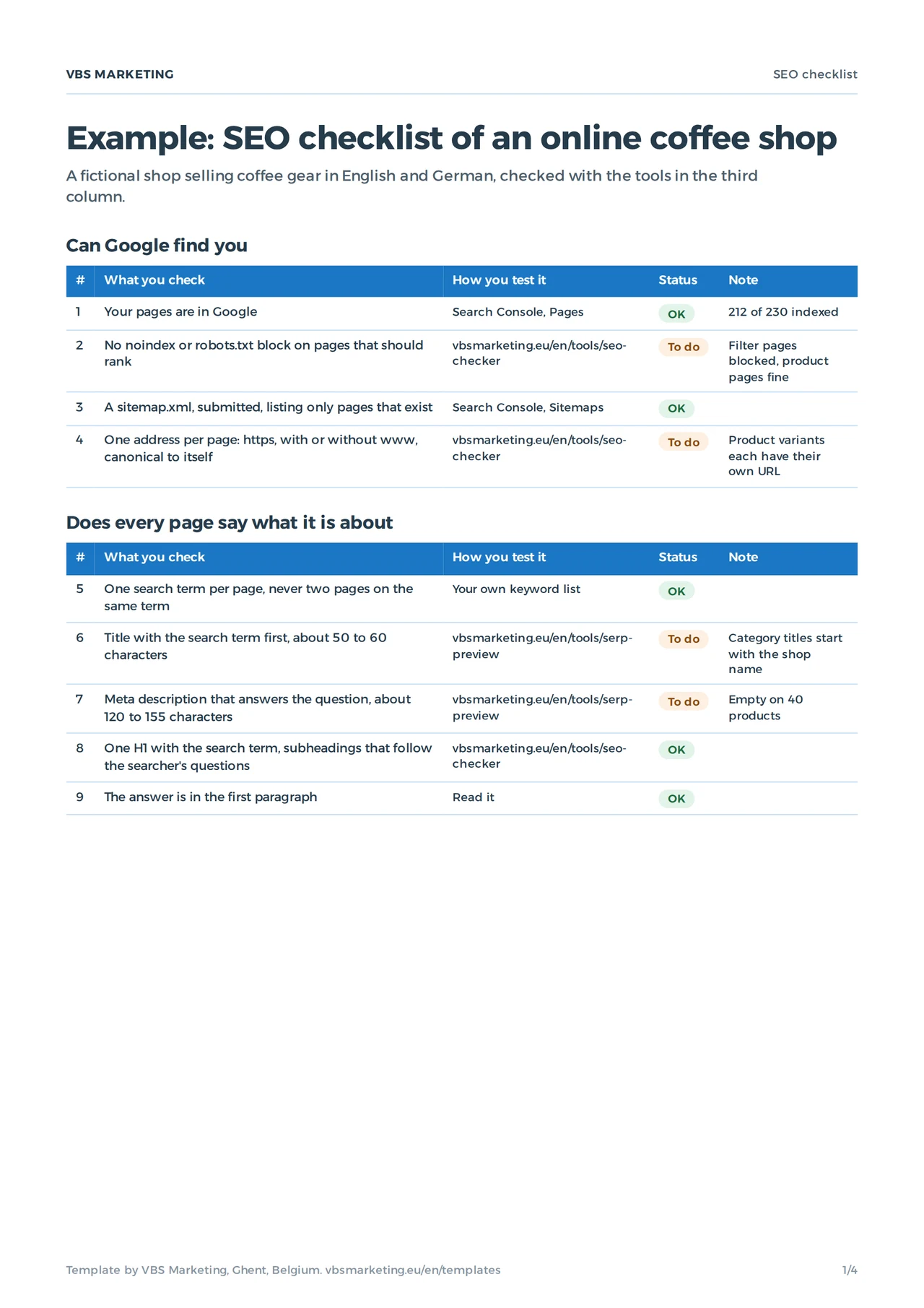
The Example tab is a fictional shop selling coffee gear in English and German, with 230 pages. Twelve of twenty checks are OK, seven are to do, and one does not apply: the shop sells online only, so there is no Google Business Profile to check. These are the seven open points, as they appear in the file:
| # | Check | What was wrong |
|---|---|---|
| 2 | No noindex or robots.txt block | Filter pages blocked, product pages fine |
| 4 | One address per page | Product variants each have their own URL |
| 6 | Title | Category titles start with the shop name |
| 7 | Meta description | Empty on 40 products |
| 10 | Core Web Vitals | CLS 0.21 from the cookie banner |
| 14 | No broken links | Old blog links to deleted products |
| 18 | hreflang | German pages point to English as canonical |
Running a site in several languages is where most of these mistakes happen, and where most of our work sits. Business Centrum runs in Dutch, French, English and Turkish; see the Business Centrum case and how we approach multilingual website development.
What changed in 2026
Two checks weigh more than a few years ago. AI assistants such as ChatGPT and Perplexity read sites with their own crawlers; whoever wants to appear in their answers lets them in through robots.txt (check 19). Test it with the AI crawler checker. And the answer up front counts for more, because search engines and assistants quote a page in pieces (check 9).
Google says you need nothing extra for its AI Overviews and AI Mode: no separate file, no special markup. A page that may appear in Search with a snippet can appear there too. Google-Extended, the setting for whether Google uses your pages to train Gemini and its other AI systems, is separate from Search. The difference between ranking in Google and being cited by an assistant is in SEO vs GEO, and how often AI already shows your pages is in the new Search Console AI performance report.
Which template or tool when
- Choose the SEO checklist ifyou want to know what is wrong across your whole site, in which order.
- Choose the visibility check ifyour site does not show in Google at all. That is a round 1 problem, and website not showing on Google finds the cause faster.
- Choose the content calendar ifthe checklist is green and you want to plan new pages or articles. The content calendar template lays them out per week and per market.
- Choose the website brief ifthe checklist shows your site needs more than fixes. The website brief template lets three agencies quote on the same questions.
- Choose an audit ifyou would rather not work through it yourself, or your site has hundreds of pages. What that costs is in how much SEO costs in Europe.
Mistakes that take a whole site out of Google
- robots.txt to hide a pageA blocked page can still show in Google when other sites link to it. Use noindex.
- A noindex that staysA staging site with noindex that goes live with it takes the whole site out of Google. Check after every move; see moving a website to a new host.
- One canonical for all languagesPointing every translation at the English page tells Google the other languages are copies.
- A sitemap full of redirectsOld addresses in a sitemap are a weak signal for the wrong pages.
- Judging after a weekSeeing a fix in Google can take days to weeks, because Google has to read the page again. Read how long until a website shows on Google to set expectations.
Round 1 this week
- Download the checklist and open the tab Your site.
- Run round 1 with Search Console and the SEO checker.
- Write down what you saw for every To do.
- Plan the fixes in the order of the list, and run the check again in three months.
If your shop has traffic but no sales, the cause may sit outside SEO; why is my online store not selling covers the other half. To have the checklist run for you, see SEO services or get in touch through contact.
Asked about the SEO checklist
How often should I run the checklist?
After every big change to your site, and at least twice a year.
Can I test every check myself?
Most of them, with Search Console and the free tools on this site. Structured data you test with Google's Rich Results Test.
Does the checklist work for a site in several languages?
Yes. Run it per language version, and give check 18 extra attention: hreflang and canonicals decide which version Google shows in which country.
Does a full checklist guarantee page one?
No. The checklist removes the obstacles. Whether you rank on top also depends on your competitors and on how well your page answers the question.