Construction planning
Construction scheduling software that moves with the rain
Construction scheduling software for your sites and crews per week, with everyone informed when a day moves.
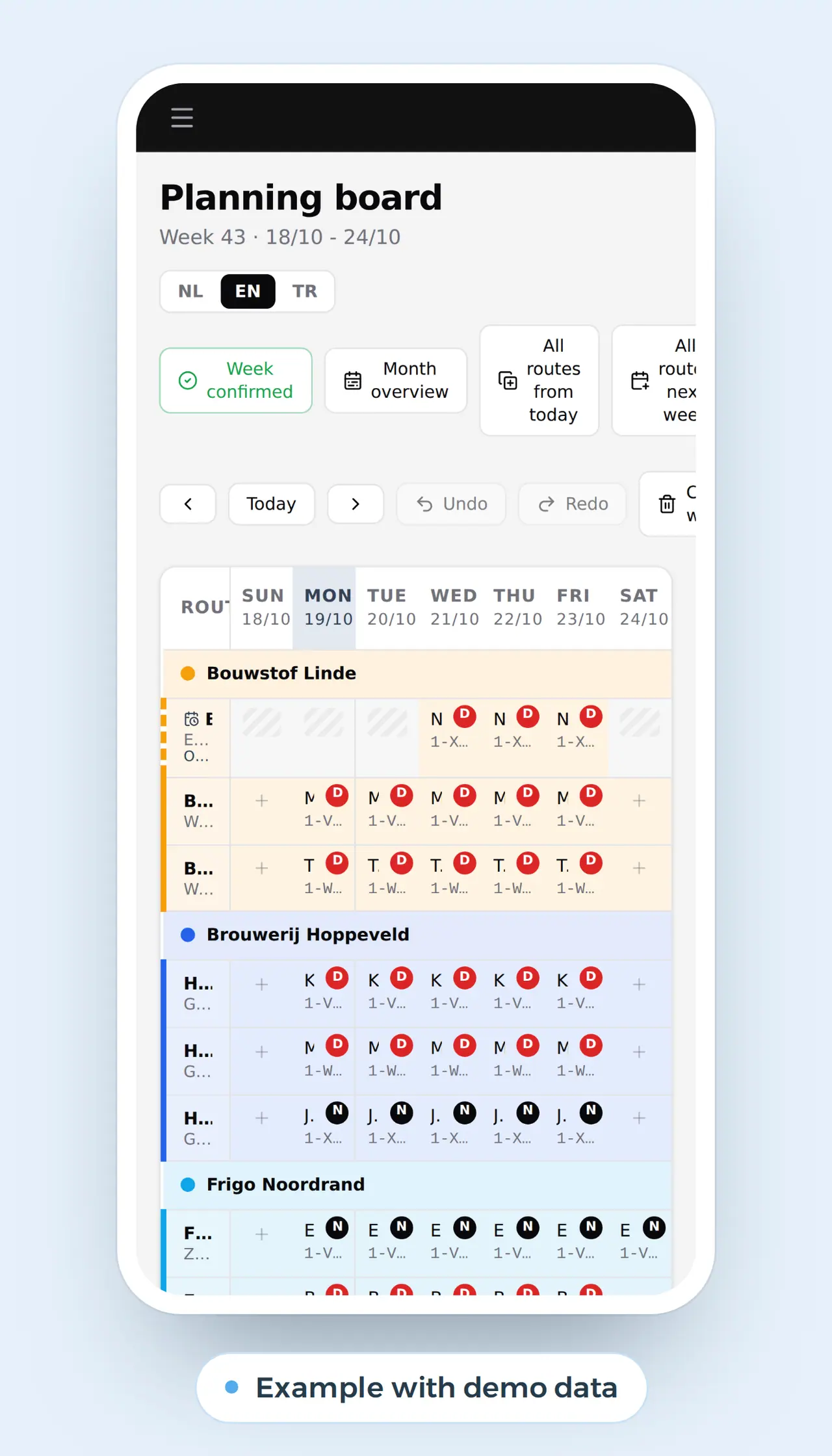
Site planning that starts again with every rainy day
Who is where this week? Which crew pours on Monday, when does the crane come, is the tiler confirmed? In many construction firms the answer lives in one person's head, on a whiteboard or in a spreadsheet only the owner understands.
That works until it rains on Tuesday. The roof work moves a day, the crane has to be rebooked, the next site starts later and the client needs to know. The same week the tiles arrive a day late and a crew swaps two days. The whiteboard does not change by itself. Someone spends the afternoon on the phone.
Construction scheduling software built for your firm puts the week on a board everyone sees, on the phone too. Move a site and what comes after it moves along, and everyone it affects is told. A double booking turns red before it becomes a problem.
Rain on Tuesday, and the week moves along
Jan's crewShell, indoors
- Molenstraatscreed
- Molenstraatscreed
- Molenstraatwalls
- Molenstraatwalls
- Molenstraatwalls
Ahmet's crewRoofing
- Kouterroof
- Rain: no roof work
CraneHired with operator
Sofie's crewFinishing
- Vijverhofpaint
- Vijverhofpaint
- Vijverhofpaint
- Ahmet's crew sees the new week on their phones.
- The crane hire gets Wednesday instead of Tuesday.
- The Kouter client hears the roof is done one day later.
- Sofie swaps Thursday and Friday; the tiles arrive Friday.
Example with made-up sites and crews. This is what we can build; the planning board of DA Logistics moves lines and drivers the same way.
Rules tied to the dates of your sites
A construction schedule is more than who stands where. It has to respect rules tied to the dates of your sites. Every country has its own; we are a team in Ghent, so here are the Belgian ones as an example of how deep we go. If you build in Belgium, they apply to you.
| Rule (Belgium) | What it asks | What it means for your schedule |
|---|---|---|
| Declaration of works (art. 30bis) | From 30,000 euros excl. VAT, or 5,000 euros with a subcontractor; before work starts | The start date on your board is also a deadline |
| Site attendance registration | Sites from 500,000 euros excl. VAT: everyone, each day, subcontractors included | The board knows who should be there, the registration who was |
| Check in and out at work | From 1 April 2027 on arrival and departure on those sites | Planned against worked, per day |
| Builders' holiday | Three summer weeks, a week in winter and the reduced-hours days of the sector | Suppliers and subcontractors close; plan the critical step before it |
Your own rules go into the board the same way: national holidays, permit dates, noise hours, delivery windows. The registration itself happens in the government's systems; the board adds the overview next to it. How hours per site are tracked is on time tracking app.
Crews on a board that shows its own conflicts
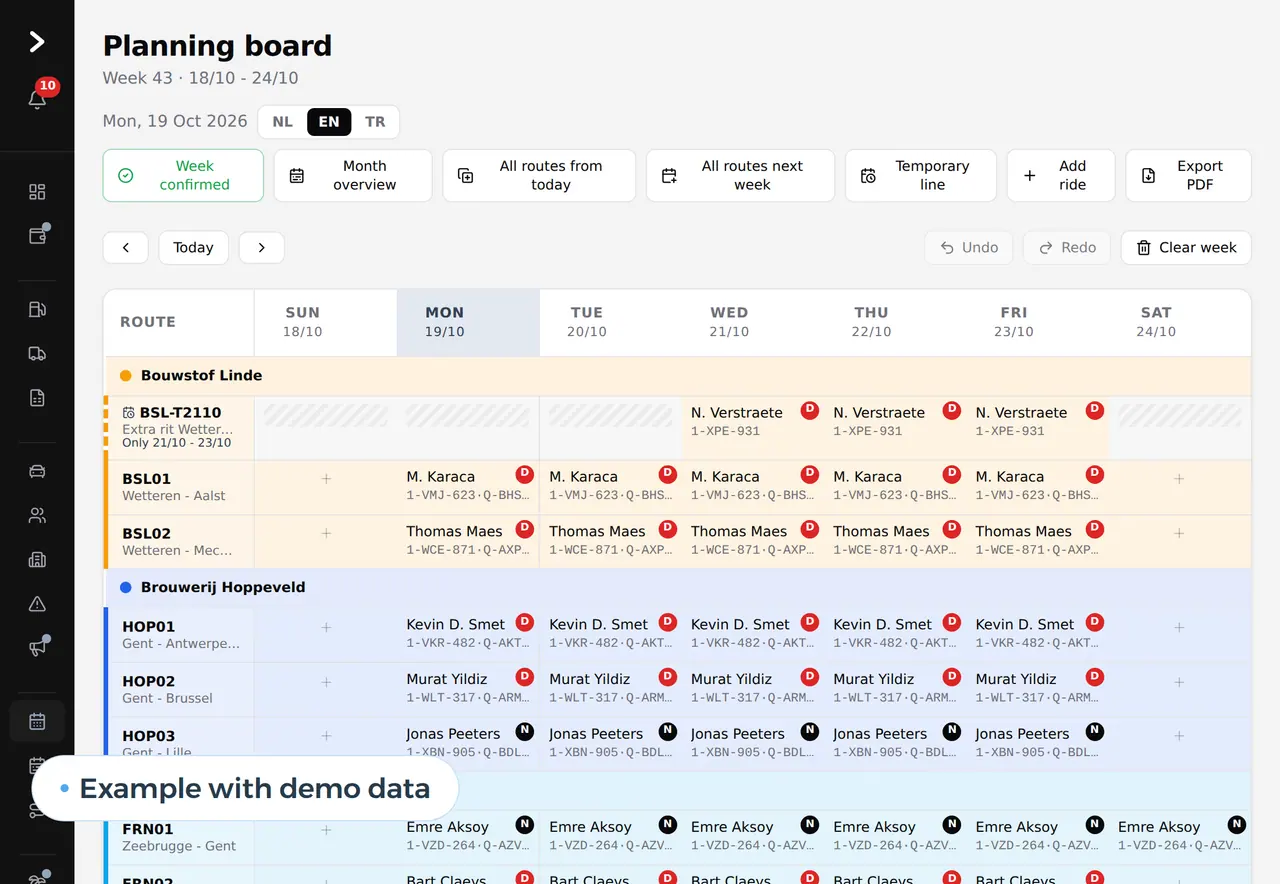
This is the planning board we built for DA Logistics, a haulier: a row per job, a box per day, day and night, temporary jobs. For a construction firm the rows become your sites and the drivers your crews. The principle stays: if someone is booked twice or on leave, the board turns red.
Confirming a week, copying last week or making a PDF for a client or subcontractor is one click.
- Drag a crew to another site or day
- Leave and absence visible in the plan
- Confirm the week and share it as a PDF
- Undo a change when you make a mistake
Step by step, the work the board takes over
A planning board earns its place when it takes over the work that now costs hours. This is what construction scheduling software does at each step of your week.
| Process | Today | With your own board | Gain |
|---|---|---|---|
| Building the week | Whiteboard or spreadsheet, every Monday again | Running sites are there with their phases; you change what is different | Hours a week, and no forgotten site |
| Rain or a late delivery | Calling everyone, forgetting the rest | You move one day; the tasks after it, the equipment and the messages follow | A quarter of an hour instead of an afternoon |
| Subcontractors | Calling a week ahead to confirm | Their own login showing only their sites and days | No roofer on a wet screed |
| Equipment and deliveries | Crane and skip in a separate list | On the same day as the crew that needs them | No crane waiting for a crew that is not there |
| Leave and certificates | Notes, messages and memory | Requests from the app, certificates with an expiry date per person | Nobody planned while on leave or without a valid certificate |
| Planned against worked | Searching afterwards who was where | Per day and per site, ready for payroll and job costing | You know what a site really cost |
When the schedule feeds your quotes, job files and invoices, the board becomes one module of a larger system: see software for construction companies. Rosters and shifts for teams outside construction are on staff scheduling software. What happens on site itself, with photos and extra work, belongs in a work order app. What AI can add later, such as a site report from a voice memo, is on AI for construction. Planning vehicles and drivers instead of crews? See transport management software. How we work with firms in other countries: nearshore software development.
Crew leads see their own week on the phone
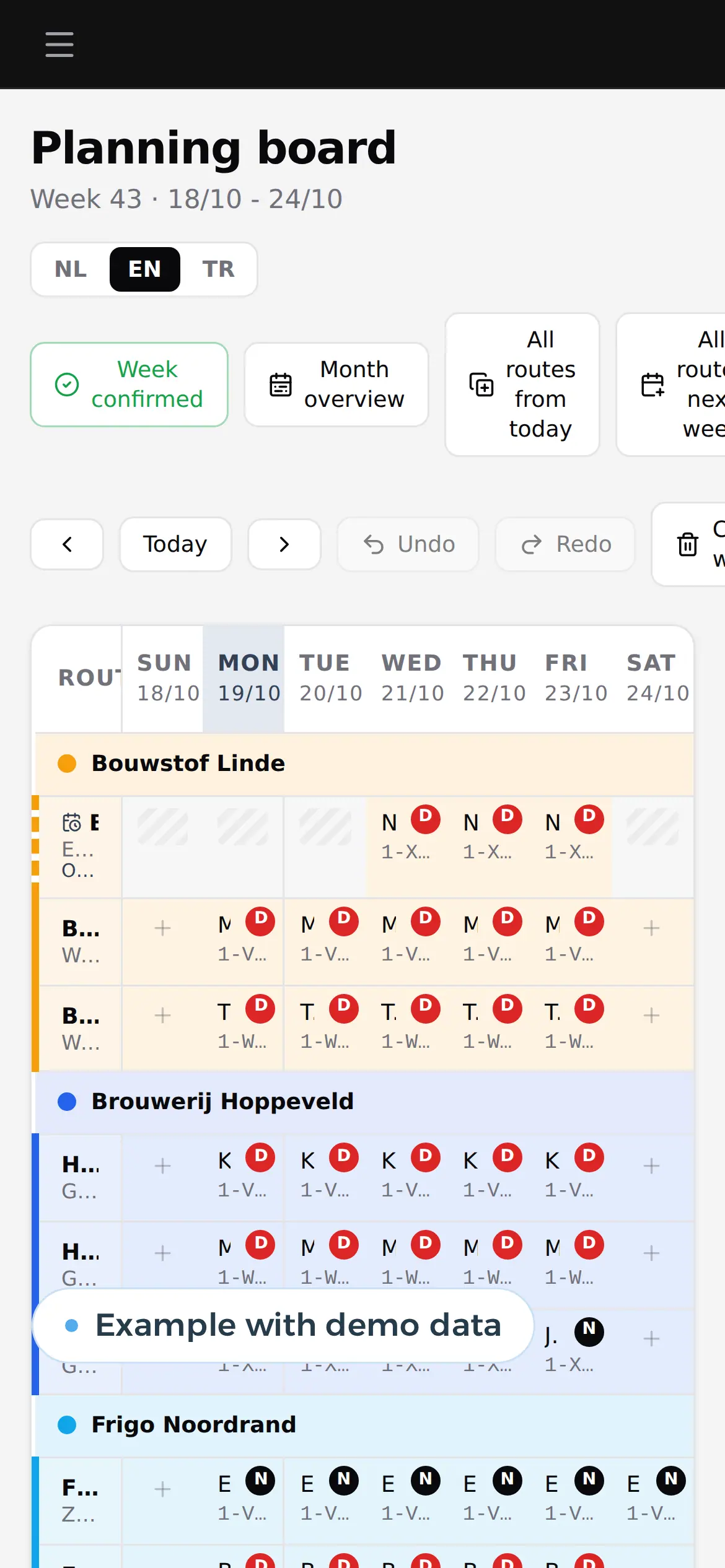
Your own week, day by day. A change at the office shows here at once. Example with demo data. 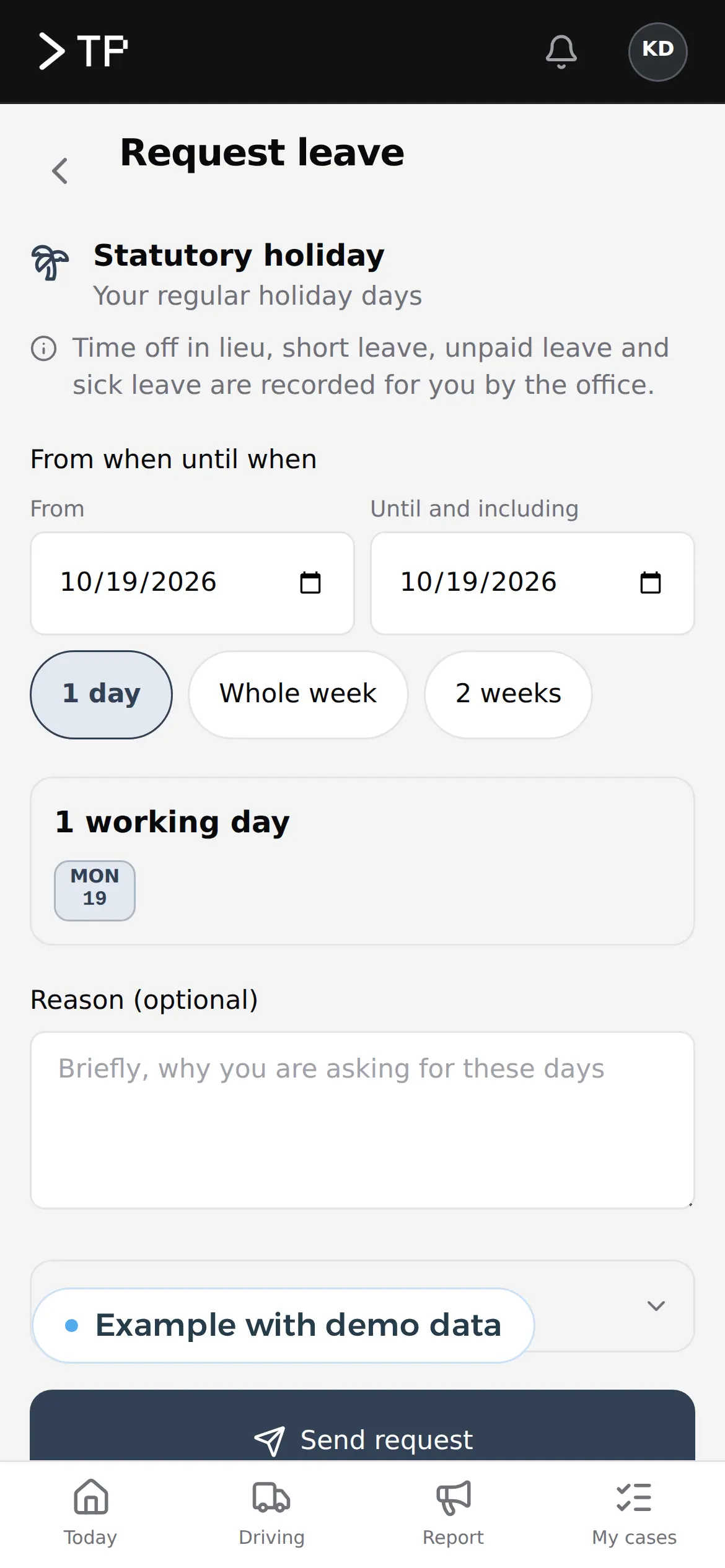
Leave requested in the app lands in the schedule. Example with demo data. 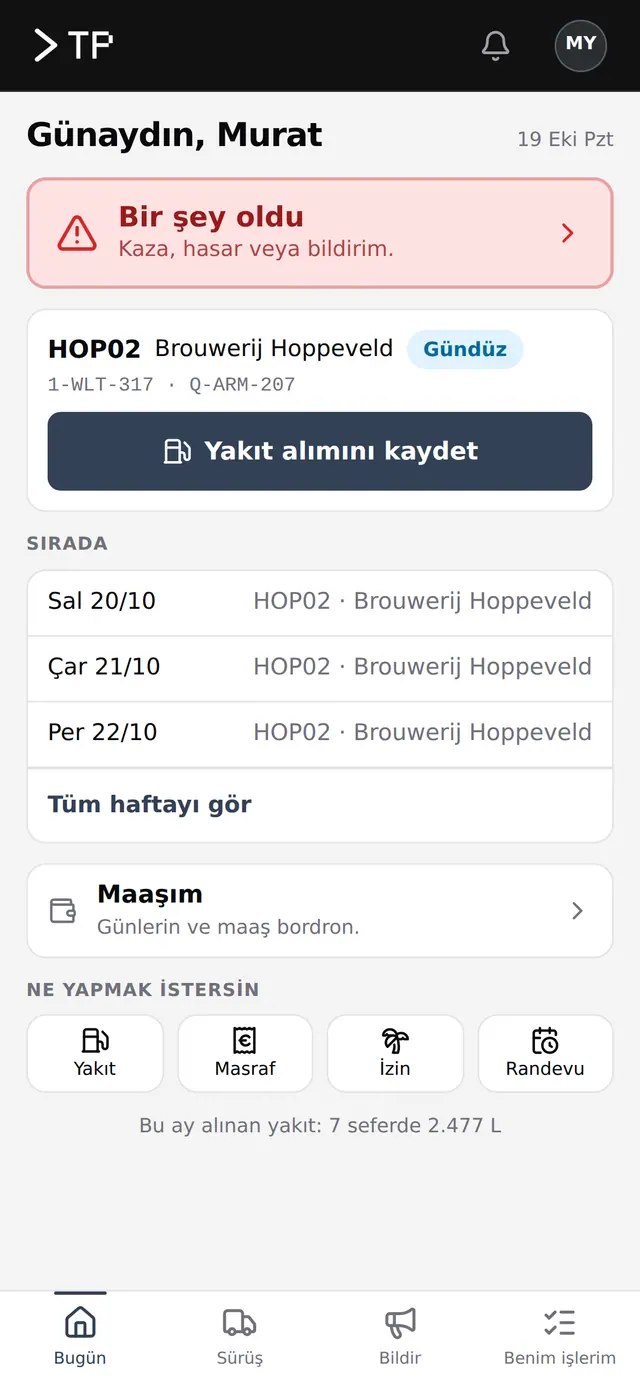
The same app in Turkish: every crew in its own language, English included. Example with demo data.
Six crews and a planner: the sum
Take a construction firm with six crews of four, subcontractors for roofing and services, and an owner who plans. These are assumed figures. We count 44 working weeks, after holidays, and a cost of 55 euros an hour for whoever plans.
| Task per week | Whiteboard and spreadsheet | Own planning board |
|---|---|---|
| Building the week | 4 h | 1 h |
| Replanning after rain or a late delivery | 4 h | 1 h |
| Calling crews and subcontractors | 3 h | 0.5 h |
| Checking hours and attendance | 2 h | 0.5 h |
| Total | 13 h | 3 h |
That is 10 hours a week, 440 hours over 44 weeks. At 55 euros an hour: 24,200 euros a year. Then there is the crew in the wrong place. Say once a month a crew of four loses half a day: 16 working hours at an assumed 45 euros, 720 euros each time, 7,920 euros over eleven months. Together 24,200 + 7,920 = 32,120 euros a year.
What does a package cost?
| Package | Built for | Price |
|---|---|---|
| Fieldwire | Tasks, drawings and documents on site | Pro 39, Business 64, Business Plus 89 dollars per user per month, annual |
| Procore | Project management for larger contractors | On quote, a yearly fee on your construction volume |
| Shiftbase | Rosters, hours and leave | Premium 72 euros a month for 12 employees, 5 euros per extra |
| Odoo | ERP with a planning app | From 19.90 euros per user per month, first year |
| Your own board | Your sites, crews and subcontractors as you plan them | The build once, then hosting and maintenance |
Six crew leads and a planner on Fieldwire Business cost 7 x 64 x 12 = 5,376 dollars a year. A fair price, if the package plans the way you do. Your own board that saves 32,120 euros a year pays back an investment of about 30,000 euros in one year, or 60,000 euros in two. For the wider choice, read build vs buy software and Odoo pricing; put your questions for a quote in the software requirements template.
Eight weeks to the first confirmed week
- Week 1Your current week on the tableBy video call or at your office, you show us the whiteboard, the spreadsheet and a week with rain. We see who plans, who calls and where the hours go.
- Weeks 2 to 5A first board with your own sitesYour running sites, crews and subcontractors are in it, on a test environment. The planner uses it next to the spreadsheet.
- Weeks 6 to 8Live at the office and on siteThe first confirmed week goes out. Crew leads open their week on the phone, the spreadsheet closes.
- After thatGrowing module by moduleEquipment, hours to payroll, job files or a link with your quotes come in when you want them.
The board already runs, at a haulier
The DA Logistics board plans lanes per week every day, day and night, with temporary lanes and a PDF for whoever needs the week. For Zuco Logistics we set up the same core for a second company, live in 57 minutes. No builder plans on it yet; for the builder SN Group we did build the calculators that bring in enquiries.
If you are outside Belgium:
- Same working hours as Amsterdam, Berlin and Stockholm, one hour ahead of London.
- Your data in the EU, on AWS in Europe, under the GDPR. You own the code and the data.
- An app for people on site that works on any phone, in the language of the crew, as on app development.
The board is a web application built for you. Show us how you plan now: book a call.
What crew leads and planners ask us
Does my crew lead see the schedule on his phone?
Yes. He logs in with his name and a short code and sees his own week. A change at the office shows at once, and he gets a message when his day changes.
Can subcontractors see their part?
Yes, with their own login that shows only their sites and days. They confirm their day in the app, so you stop calling every week.
Can we bring our spreadsheet?
Yes. We import your current schedule, sites and people, so your first week on the new board is already filled.
Does it handle holidays and closed days?
Yes. Builders' holidays, public holidays and your own closed days stand as closed on the board, and a site that would run over them turns red.
Can the board propose a schedule itself?
It can propose a free crew when someone is double-booked, with fixed rules you can explain. A proposal with AI can be added, but a system that allocates tasks based on how your people behave or perform is high risk under the EU AI Act. So the decision stays with the planner.
What does our own board cost?
That depends on your crews, sites and integrations. After a call you get a price for the first version, in euros. No licence per user comes on top.
Web application
How VBS helps you with this
We build software in the browser for your whole team, on every computer and phone, around the way you work.
- Roles and permissions per person
- Links to your accounting and your email
- Releases without downtime, with backup and rollback
How we approach it is on our page about Web application.
Your week on a board everyone sees?
Show us how you plan today. We sketch what your weekly board would look like.
Rather get in touch right away?