On this page
A canonical tag fixes a problem most site owners do not know they have: their pages exist more than once. The same page is often reachable with and without www, over http and https, with and without a trailing slash, and with a tail of tracking parameters such as UTM codes or a Google click ID. To you that is one page. To Google it can be eight addresses, each collecting a share of your links, and Google will pick one of them itself if you do not say which. In the source code the line looks like this:
<link rel="canonical" href="https://www.example.com/services/">
Google, Yahoo and Microsoft announced the tag together in February 2009 to tame online shops, where one product page appeared under dozens of filter and sort combinations. It became an internet standard in 2012. Google treats it as a strong signal, not an order: it weighs your canonical against your redirects, internal links, sitemap and https, and when those disagree it may choose a different address than you intended. Search Console then reports that Google chose a different canonical than the user.
Seven addresses, one page
http://example.com/serviceshttp://www.example.com/services/https://example.com/services/https://www.example.com/serviceshttps://www.example.com/services/?utm_source=newslettercanonicalhttps://www.example.com/services/?gclid=Cj0Kcanonicalhttps://www.example.com/services/index.html
The canonical URL
https://www.example.com/services/Example. Addresses a visitor need not see get redirected; addresses that must keep working, like links with ad parameters, get a canonical.
Canonical, redirect, noindex or hreflang
A canonical is one of four tools for duplicate addresses, and the most misused. Pick by asking whether the duplicate needs to keep working for visitors.
| Situation | Use | Why |
|---|---|---|
| http and https, www and non-www | 301 redirect to one version | Visitors should never land on the others |
| Tracking parameters on links | Canonical to the clean URL | The link has to keep working |
| Filter and sort pages in a shop | Canonical to the main category | Each combination is not a page of its own |
| An article republished by a partner | Canonical on the copy, pointing to your original | Your page gets the credit |
| The same page in English and German | Hreflang, each version canonical to itself | Both should rank, each in its own market |
| Two pages chasing the same search | Merge them and redirect | A canonical only hides the problem |
The fifth row is where international sites go wrong most. If your German page carries a canonical pointing to the English one, you have told Google the German page is a copy, and it disappears from German results. Each language version is canonical for itself and linked to its siblings with hreflang. The last row is a different problem altogether, duplicate content or cannibalisation: you solve it by writing one better page, not by hiding one of the two.
What the source of a multilingual site looks like
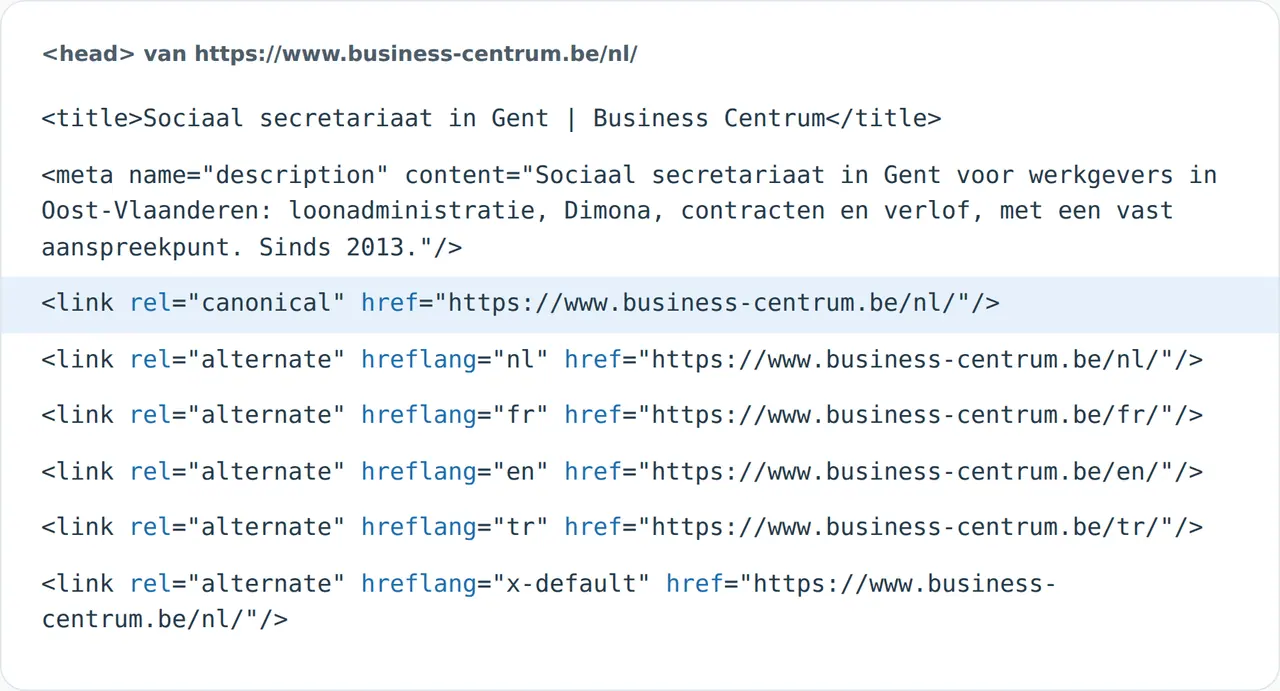
The image at the top is the head of the home page of Business Centrum, a site we built in four languages. Its canonical points to its own Dutch address, and beneath it sit the hreflang lines for the Dutch, French, English and Turkish versions plus a default. Every page on that site works the same way, in its own language. It looks redundant, but it absorbs every variant that ads and newsletters bolt onto an address. How we set this up across languages is on our multilingual website development page.
Five canonical mistakes that cost rankings
- Every page points to the home page. A template that prints the same canonical everywhere tells Google your whole site is one page.
- The canonical points to an address that redirects or returns an error. Google ignores it.
- The canonical says http while the site runs on https. Conflicting signals.
- Language versions point to the main language. Your other markets vanish from search.
- The canonical sits in the body or is added late by JavaScript. Google may miss it. For PDFs and other files, send it as an HTTP header instead.
To see what your pages declare, run the SEO checker; it shows the canonical, the title and what Google reads per page. If a page is missing from Google altogether, the website not showing on Google check finds the cause, and our guide to technical SEO covers the rest of the foundations.
What developers and marketers ask
Does every page need a canonical tag?
It is not required, but a self-referencing canonical on every page is a good habit: it catches every variant with parameters you did not foresee.
Is a canonical the same as a redirect?
No. A 301 redirect sends visitors and Google to another address. A canonical leaves the page available and only says which version belongs in search.
Why does Google ignore my canonical?
Because other signals disagree: internal links to the other version, a sitemap listing the other address, or pages that are not actually the same.