
On this page
Excel vs Airtable is not a choice between two spreadsheets. Excel is a calculation tool: free-form cells where you compute, analyse and chart. Airtable is a database dressed as a spreadsheet: every row is a record with fixed fields, tables point to each other, and several people work in the same data at once. Compare them on formulas and Excel wins. Compare them on a team keeping one list up to date and Airtable wins.
Most comparisons you will find are written by software vendors with something to sell. This one puts the prices and limits side by side as Microsoft and Airtable publish them, and says plainly when neither is the right answer. We build software for small and mid-sized companies in Belgium and abroad, so the angle is the one of a business owner, not a power user.
Five copies of one file, or one shared source
Five versions
Thursday, Harrogate site: who is going?
- rota_wk44.xlsxEmail from Sarah, Mon 08:12Tom
- rota_wk44 (2).xlsxShared folderKieran
- rota_wk44_final.xlsxThe planner's desktopTom and Kieran
- rota_wk44_final_v2.xlsxAttached for the clientTom
- rota_wk44 copy.xlsxForwarded in the chatempty
One source
Thursday, Harrogate site
ThuHarrogate
Permissions
- The planner edits
- An engineer sees his own days
- Accounts see the hours only
History
- Mon 08:12 Sarah puts Tom on Harrogate
- Tue 16:40 the planner switches to Kieran: Tom is off sick
Integration
- Kieran sees the site on his phone
- His hours go to the accounts
Signs that Excel has reached its limit
- You ask who has the right version
- Someone overwrote a formula and nobody knows when
- You type the same data over into a second file
- One person understands the macros, and they are on holiday
- Everyone sees everything, wages and margins included
- A client or an engineer gets an old version
Example with made-up names and files.
Spreadsheet and database on the same points
Seven points where a small business feels the difference day to day.
- What a row is
- ExcelCells you fill in freely, with formulas across rows and columns
- AirtableA record with fixed fields: text, number, date, single select, attachment or a link to another table
- Calculating
- ExcelStrong: formulas across the whole sheet, pivot tables, charts, Power Query
- AirtableFormulas per record; totals across records through linked fields and rollups
- Size
- Excel1,048,576 rows and 16,384 columns per worksheet
- Airtable1,000 records per base on Free, 50,000 on Team, 125,000 on Business, counted across all tables
- Working together
- ExcelCo-authoring in Microsoft 365 through OneDrive or SharePoint
- AirtableSimultaneous editing, comments per record, forms and share links for people who should not edit
- History
- ExcelFile version history in OneDrive or SharePoint
- AirtableRevision history per record: 2 weeks on Free, 1 year on Team and Business
- Automation
- ExcelMacros, Office Scripts and Power Automate
- AirtableBuilt-in automations: 100 runs a month on Free, 25,000 on Team, 100,000 on Business
- Price
- ExcelUsually included in Microsoft 365
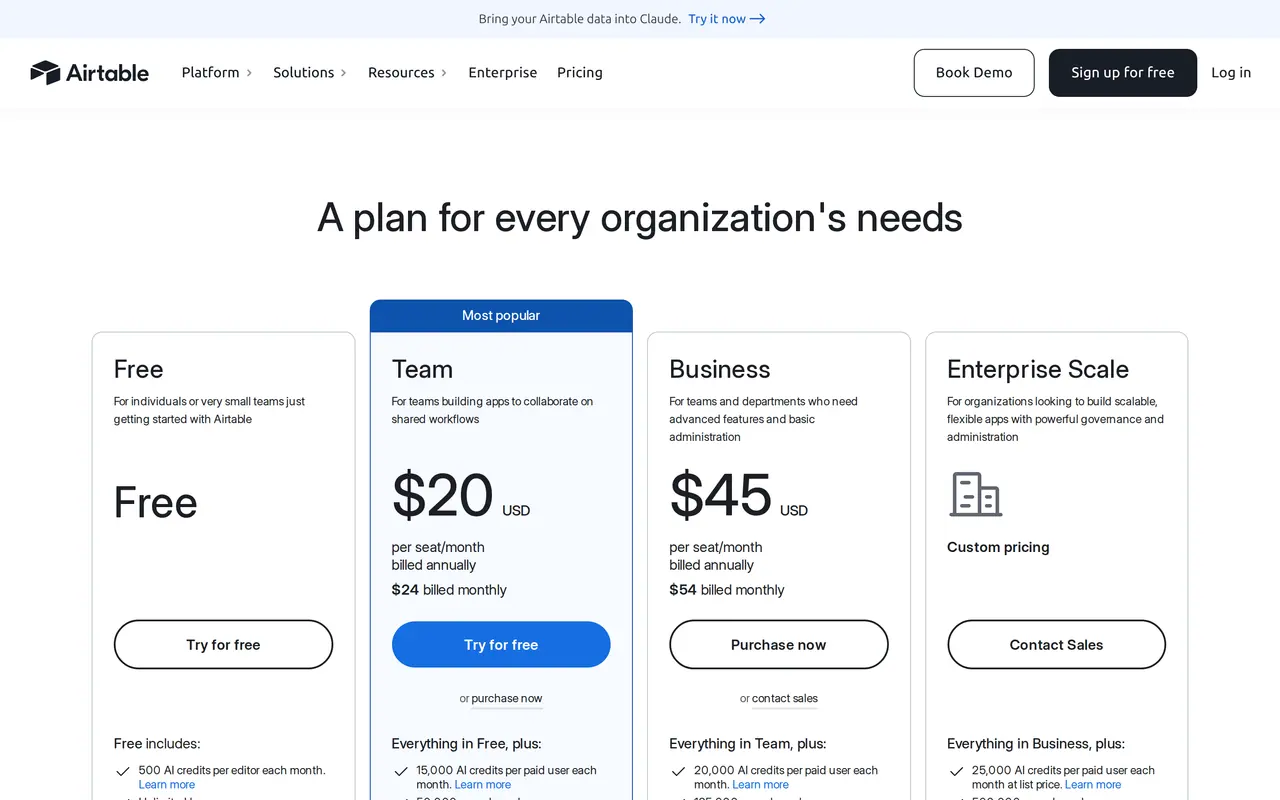
- Airtable20 dollars per editor per month billed annually on Team, 45 on Business; read-only users are free
Excel wins when the job is calculating. Airtable wins when the job is keeping track, with several people at once. Neither really solves access per person.
One example, two tools
Take an installation company with a list of jobs. In Excel each job is a row, with the client, the address, the technician and the date typed into cells. Spell a client name slightly differently and your pivot table counts two clients. Need several jobs per client and you either copy the client details onto every row or build a second sheet held together with XLOOKUP.
In Airtable you create a Clients table and a Jobs table. A job links to a client, as in any database. Change the client's address once and it changes on every job. A date field only accepts a date, a technician field only a name from the list. That is less freedom than Excel, and exactly why the data stays clean with five people working in it.
What Airtable costs and what the plans include
Airtable bills per editor: anyone who creates or changes records pays. Read-only users, people filling in a form and anyone with a share link do not. Prices are listed in US dollars.
| Free | Team | Business | |
|---|---|---|---|
| Per editor per month, billed annually | 0 | 20 dollars | 45 dollars |
| Per editor per month, billed monthly | 0 | 24 dollars | 54 dollars |
| Editors | up to 5 | unlimited | unlimited |
| Records per base, all tables together | 1,000 | 50,000 | 125,000 |
| Attachments per base | 1 GB | 20 GB | 100 GB |
| Automation runs per workspace per month | 100 | 25,000 | 100,000 |
| Revision history | 2 weeks | 1 year | 1 year |
| API calls per workspace per month | 1,000 | 100,000 | unlimited |
Free is for trying, not for running a business on: 1,000 records go quickly. A schedule with 40 jobs a week passes 1,000 records within six months, before you have added a single client table. Team is where most small companies land. Business adds two-way sync between bases, among other things, and more room.
Excel comes with the Microsoft 365 subscription most companies already pay for, with no per-editor fee on top. That does not make it free, but it does make it the cheapest place to start, which is why so many teams stay in it too long.
Moving a spreadsheet list into Airtable
- Clean the list in Excel firstOne row per item, one column per field, no merged cells and no subtotals between rows. Spell client names the same way everywhere.
- Split out what repeatsIf client details sit on every job row, make two lists: clients and jobs. In Airtable those become two linked tables.
- Import and set field typesAirtable imports CSV and Excel files. Afterwards set each field to the right type: date, number, single select or a link to another table.
- Give people the right roleAnyone who only reads gets read-only access and costs nothing. Anyone who only reports something gets a form. Only people who truly change records become editors.
- Retire the old fileMake the Excel file read-only or archive it. Two sources side by side is exactly the problem you set out to fix.
Where Excel is the better tool
Calculation is what Excel was built for. A quote with tiered pricing, a budget with scenarios, an analysis of margin per client: you build that in Excel in an hour, in Airtable you mostly cannot. Excel has pivot tables, charts and Power Query for cleaning up exports, and a worksheet holds over a million rows.
Excel also works offline and anyone can open it. Send a file to your accountant or a client and they open it without an account. With Airtable they need a link or an export.
Where Airtable is the better tool
Airtable is strong exactly where Excel gets messy: lists that several people update at once. Fixed fields keep the data clean, linked records replace lookups, and a form lets someone submit a request or report without access to the table. Each table can show as a grid, a kanban board, a calendar or a gallery.
Revision history per record shows who changed what, and built-in automations send an email or create a record when something changes. Through Airtable's API you connect it to other software; our glossary explains what an API integration is.
Where both run out
Access per person is where both become tight. In Excel you can protect a sheet with a password, but anyone who opens the file can read every row. In Airtable you grant access per base or per interface, but a technician who may only see their own jobs, or a client who may only open their own file, soon needs a separate setup per person.
Three other limits come back in practice:
- The per-editor priceIf twenty people need to change records in Airtable, Team costs 4,800 dollars a year, every year, and the bill grows with every hire.
- Rules that make your work yoursA job may only be scheduled once the certificate is valid, an invoice only sent once the work order is signed. A table stores data; enforcing what is and is not allowed, it does only partly.
- Personal dataAirtable is a US-based SaaS service. If you store salaries, ID details or health information, check where the data is kept and sign a data processing agreement.
Picking Excel vs Airtable by type of work
| Work | Pick | Why |
|---|---|---|
| Budget, quote calculation, margin analysis | Excel | Formulas, scenarios and pivot tables |
| Cleaning an export and reporting weekly | Excel with Power Query | Import and refresh in one click |
| Project list or content calendar for five people | Airtable | Fixed fields, views, revisions |
| Collecting requests or reports | Airtable with a form | Submitters do not pay and do not see the table |
| Scheduling field staff with clients and materials | Custom platform | Access per role and rules the work enforces |
| Clients opening their own records | Custom platform or a client portal | Each client sees only their own |
If the list is a schedule, read Excel scheduling or planning software. The wider trade-off between a package and something built for you is in build vs buy software, and the full route away from spreadsheets in replace Excel with software.
Excel and Airtable, five common questions
Is Airtable better than Excel?
For lists that several people maintain at once, yes: fixed fields, linked tables, forms and revision history per record. For calculating, analysing and reporting, Excel is stronger.
Can I import my Excel file into Airtable?
Yes, Airtable imports CSV and Excel files. Clean the list first and split repeated details into separate tables, or you carry the mess across.
How many rows can Airtable handle?
Per base, across all tables: 1,000 records on Free, 50,000 on Team and 125,000 on Business. An Excel worksheet holds 1,048,576 rows.
Do I pay for everyone who views an Airtable base?
No. You pay per editor. Anyone who only reads, fills in a form or uses a share link is free.
Is there a free version of Airtable?
Yes, for up to five editors, with 1,000 records per base, 100 automation runs a month and 2 weeks of revision history. To run real work on it you usually need Team.