On this page
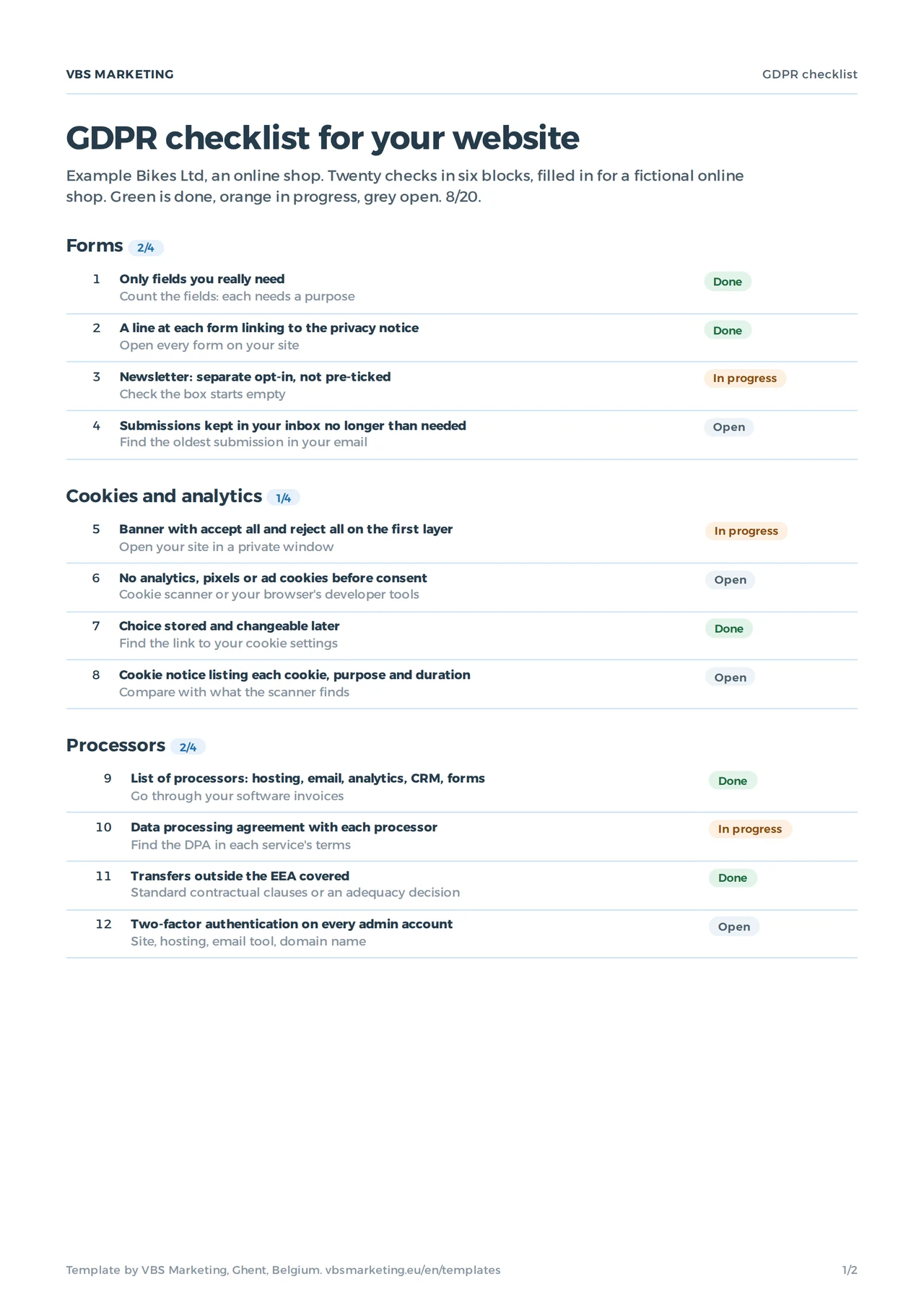
A GDPR checklist for a small business website covers six blocks: forms, cookies and analytics, processors, retention and records, data breaches, and the rights of the people whose data you collect. This template turns them into twenty checks, each with a way to verify it yourself. In the Excel file you pick a status per check and the sheet shows how far you are, per block and overall. You download it without leaving an email address.
It is written for a small business anywhere that sells to people in the EU, including companies in the UK and the US. The GDPR reaches beyond the EU: it applies to any company that offers goods or services to people in the EU, wherever the company sits. The checklist is about your website, not a full audit of your company and not legal advice; for questions such as which legal basis to use, ask a lawyer.
The six blocks and why they matter
| Block | Checks | The rule behind it | What getting it wrong costs |
|---|---|---|---|
| Forms | 4 | Collect only what you need, and say why (Articles 5 and 13) | A complaint from a visitor who did not know |
| Cookies and analytics | 4 | Consent for anything not strictly necessary (ePrivacy, Article 5(3)) | The most common fines from EU authorities |
| Processors | 4 | An agreement with every service that handles data for you (Article 28) | You stay liable for their mistake |
| Retention and records | 3 | Keep no longer than needed, record what you process (Article 30) | A breach hits more people than it had to |
| Data breaches | 2 | Notify within 72 hours where there is a risk, log everything (Article 33) | A late notification is a breach of its own |
| Data subject rights | 3 | A clear privacy notice, answers within one month (Articles 12 to 14) | A complaint to the authority |
Start with cookies. It is the block every visitor sees and every authority can check from a browser. Whether you need a banner at all is answered in do I need a cookie banner.
Where you are based changes the extra checks
- Law at home
- UK company with EU customersUK GDPR and PECR, enforced by the ICO
- US company with EU customersState privacy laws, no federal GDPR
- EU GDPR applies when
- UK company with EU customersYou offer goods or services to people in the EU
- US company with EU customersThe same
- EU representative
- UK company with EU customersUsually needed, unless processing is occasional and low risk
- US company with EU customersUsually needed, on the same test
- Data transfers
- UK company with EU customersCovered by the EU adequacy decision for the UK, check it is current
- US company with EU customersEU-US Data Privacy Framework or standard clauses
- Cookie banner for EU visitors
- UK company with EU customersEU rules, stricter than many UK banners
- US company with EU customersEU rules; an opt-out banner is not enough
The checks outside the EU companies miss
Two items catch companies based outside the EU. First, an EU representative: a company outside the EU that offers goods or services to people in the EU usually has to name a representative in one of the member states where those people live. The exception is narrow, for occasional processing that is unlikely to create a risk. Second, transfers: personal data from EU visitors that goes to servers outside the EU needs a legal basis for the transfer. For the UK, the EU adopted an adequacy decision, renewed over time, so check the current one; for the US, the EU-US Data Privacy Framework covers certified companies, and standard contractual clauses cover the rest.
Forms and cookies: the checks a visitor sees
A contact form often asks for more than it needs: a phone number and a company name for a question that can be answered by email. Every field needs a purpose you can explain in one line next to the form, with a link to your privacy notice; whether you need one is answered in do I need a privacy policy. The newsletter gets its own box that starts empty. Form submissions do not sit in a shared inbox for years. To keep spam out without a Google cookie, read how to stop contact form spam.
On cookies, many EU authorities are strict. The Belgian authority, for example, wants an accept all and a reject all button on the first layer, no pre-ticked boxes and no exemption for analytics cookies. The same rule covers pixels and local storage, not only cookies in the narrow sense. An opt-out banner, common on US sites, does not meet it.
| What loads | Before consent | After consent |
|---|---|---|
| Your own session and basket cookie | Yes | Yes |
| Google Analytics, even with IP masking | No | Yes |
| Meta Pixel or a Google Ads tag | No | Yes, if accepted |
| Analytics without cookies, device storage or personal data | Usually, have it checked | Yes |
How Google Ads and Analytics handle visitors who refuse is explained in the consent mode change. EU plans to loosen the cookie rules are still under negotiation; follow them in the Digital Omnibus and cookies.
Percent of checks done, per block
- Forms2 of 4
- Cookies and analytics1 of 4
- Processors2 of 4
- Retention and records1 of 3
- Data breaches0 of 2
- Data subject rights2 of 3
The example in the Excel file: 8 of 20 checks done. The sheet computes this as soon as you pick a status.
Processors, records and retention
Your site runs on other people's services: hosting, the newsletter tool, analytics, the CRM where enquiries land, the service behind your form. Each processes personal data for you, so each needs a data processing agreement. Large providers include one in their terms; check it and note where you found it. Put two-factor authentication on every admin account: site, hosting, email tool and domain registrar. A stolen admin password is the most common breach on small sites; if you run WordPress, also read is WordPress safe.
The record of processing is a list of what you process, why, from whom and for how long, with a retention period per type of data. An enquiry that went nowhere does not need to stay for three years; an invoice stays as long as accounting rules require.
Breaches and rights: the checks that count when it goes wrong
A breach is more than a hack: an email with client data sent to the wrong person, a lost laptop, a form that made submissions public. Where there is a risk to the people concerned, you notify the authority within 72 hours of finding out, and you log every breach internally, notified or not. Agree in advance who decides and who reports.
A person who asks what data you hold, or to have it erased, gets an answer within one month. Every marketing email has an unsubscribe link, and bulk senders meet the sender requirements of Gmail and Outlook; how to write a newsletter explains them. If your team uses AI tools with customer data, put that in your record too; the AI policy template has a block for it. The legal details your site shows next to the privacy notice are covered in company number on your website.