On this page
Shopify or Lightspeed? Choose Shopify if selling online is your main business and a shop, pop-up or market comes on top at most. Choose Lightspeed if your shop or restaurant is the heart of the business, you already use or want their point of sale, and your online store mainly needs to show the same stock. Both now sell till and online store together; the difference is where each is strong, and that is where each began.
Below: what each is, what they cost for a shop with an online store, a worked example, and when a custom site next to your till earns more. All prices before tax.
Shopify: it started as an online store
Shopify is a hosted store platform from a Canadian company. You pay a monthly plan, Shopify handles hosting and security, and you extend it with apps. If you also sell in a shop or at markets, Shopify POS comes with every plan: a till app on a tablet or phone with a card reader. For more till features, such as staff permissions and stock per location, you add POS Pro at 79 euros per location per month on Shopify's EU pricing. Selling online remains the starting point.
Lightspeed: it started at the counter
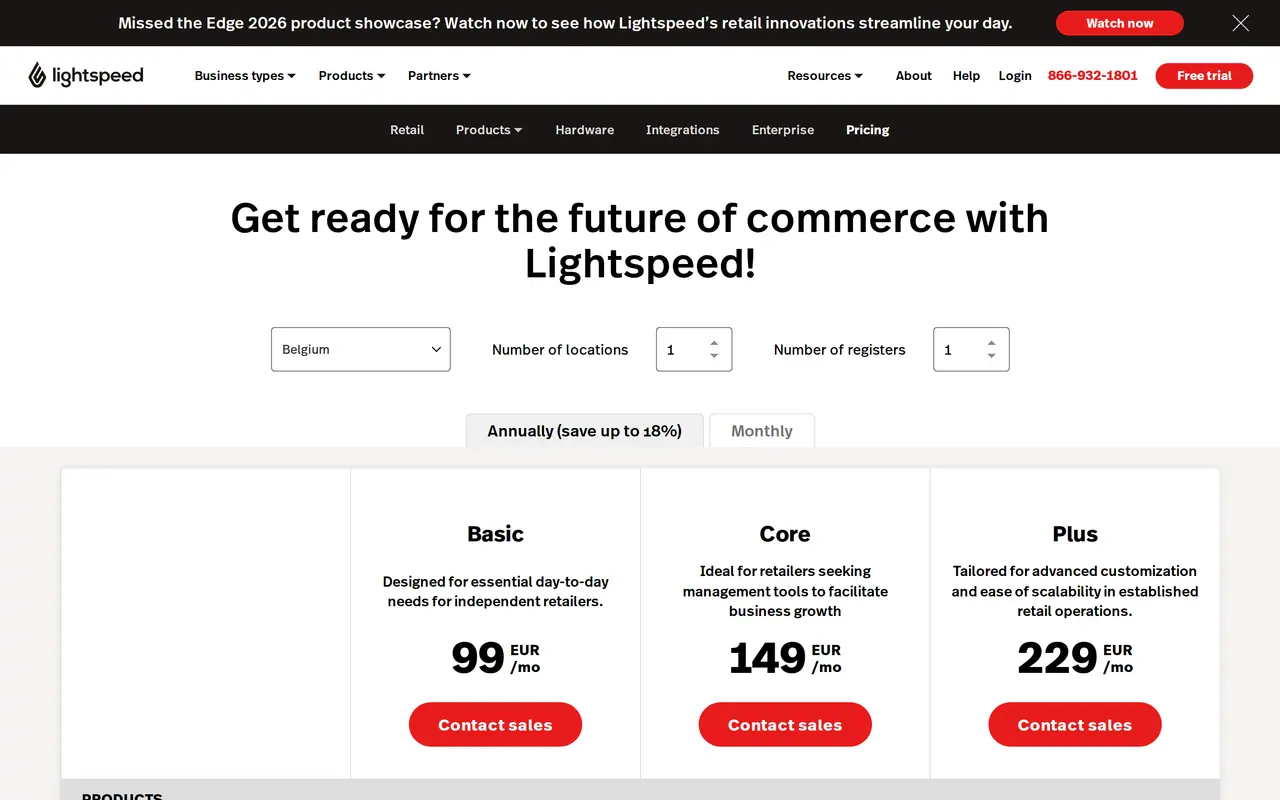
Lightspeed is known for its point-of-sale systems for retail and hospitality, with an online store that runs on the same stock: one product, one stock level, one view of what you sell in the shop and online. You also pay a plan and Lightspeed handles hosting. The starting point is the counter. In the eurozone, Lightspeed Retail costs 99 euros (Basic), 149 euros (Core) or 229 euros (Plus) a month billed yearly, for one location and one till, with an online store included; in dollars the plans run from 89 to 289. Extra tills, locations and payment terminals add to that, so ask for a quote for your setup.
Where they started, and what they added
Shopify
Added laterTill app for your shop or market stall
You sell mainly online.
Lightspeed
Added laterOnline store on the same stock
Your business revolves around a shop.
Pick the platform that started where your revenue is.
Shopify and Lightspeed side by side
| Criterion | Shopify | Lightspeed |
|---|---|---|
| Starting point | Selling online | Selling in a shop or restaurant |
| Till in the shop | Shopify POS on every plan, POS Pro 79 euros per location per month | The core of the package, with extensive till features |
| In-person card rate | 1.4% on Basic, 1.3% on Grow, 1.2% on Advanced (EU) | around 1.5% |
| Stock | Central, strong for online, per location with POS Pro | One stock for shop and online store, strong per location |
| Online store | Large choice of themes and apps | Fewer themes, aimed at the shop |
| Hospitality | Not the focus | Its own restaurant POS with tables and kitchen |
| Hosting and updates | Shopify handles it | Lightspeed handles it |
| Extending | A large app store | Fewer extensions, links with till and accounting software |
| Switching | Products and customers as CSV, rebuild the store | Export products and customers, replace till and store |
Worked example: a shop with an online store
A clothing shop with one location, 70 percent of revenue at the counter and 30 percent online. We compare fixed monthly costs before tax. Both in euros, billed yearly, for one location and one till. Treat this as a basis for comparison, not a quote.
| Fixed cost per month | Shopify Basic with POS Pro | Shopify Grow with POS Pro | Lightspeed Retail Core |
|---|---|---|---|
| Platform | 24 euros (billed yearly) | 69 euros (billed yearly) | 149 euros (billed yearly) |
| Till | 79 euros POS Pro | 79 euros POS Pro | included |
| Online store | included | included | included |
| Total per month | 103 euros | 148 euros | 149 euros |
| In-person cards, on 10,000 euros revenue | 140 euros (1.4%) | 130 euros (1.3%) | 150 euros (1.5%) |
The fixed costs sit close together. The difference is in daily use: does your staff work quickly with the till, does stock per location add up, and do you have the online features you need? Work out your own margin per sale with the margin calculator.
How to choose
Ask yourself three questions.
- Where do you sell most? In the shop or online? Pick the platform that started where your revenue is.
- Do you already have a till? Switching till costs time and staff training. If yours works well, an online store that connects to it is often the shortest route.
- What else must your site do? An online store shows products. If you also want to be found for what people in your area search for, publish guides or take bookings, a store platform alone soon hits its limits. How the move itself works, POS included, is in Shopify migration.
| Your business | Choose | Why |
|---|---|---|
| You sell mainly online, sometimes at a market | Shopify | Store first, POS on every plan |
| A shop with a growing online store | Shopify with POS Pro, or Lightspeed | Choose on what serves your staff and stock best |
| Several shops with stock per location | Lightspeed | Strong in till and stock across locations |
| A restaurant with takeaway or a web shop | Lightspeed | Its own restaurant POS with tables and kitchen |
| A shop that mainly wants to be found | Keep your till, add a custom site | Visibility comes from content, not from the till |
Involve your staff. Sellers use a till every day. Let them test before you sign, because a system that shines in a demo can feel slow at the counter.
What a shop with an online store needs
A shop that also sells online has other needs than a pure online store. Run through this list at every demo:
- Click and collectOrder online, pick up in the shop, with a notice when it is ready.
- Returns in the shopAn online purchase returned at the counter, with stock correct at once.
- One customer record across both channelsSomeone who buys in the shop and online is one customer with one history.
- Stock per locationShow online what is in which shop, or sell from the warehouse.
- A till that keeps working offlineIf the internet goes down, you still need to take payments.
- A link with your accountingDaily takings and online sales in one export, so your accountant does not work twice.
Both platforms do most of this, each in its own way and sometimes with an extra module. Ask explicitly about your three most important points.
A custom site next to your till
You can also keep your till or store platform for selling, and add a site built to be found: pages per product group, per service and per city, with the store as the destination. That combines the ease of a platform with the visibility of a custom build. How to be found locally is in create a Google Business Profile; what local SEO adds is on our service page.
Mistakes with tills and online stores
- Choosing on the demoTest with your own products and your own staff, on a busy Saturday.
- Forgetting hardwareCard readers, receipt printers and scanners cost extra. Ask what comes with your package.
- Two stock levelsAn online store not tied to your till sells products the shop just sold. Choose a setup with one stock.
- The online store as an afterthoughtA store without its own photos, copy and visibility sells little; see why is my online store not selling.
- AccessibilitySince 28 June 2025 the European Accessibility Act applies to EU stores selling to consumers, except micro-enterprises.
Switching
Both are hosted platforms. Products and customers can be moved, but your design, integrations and often your till hardware are replaced. Plan a switch outside your busiest season and redirect every old product URL with a 301; see moving a website to a new host. Comparing two store platforms instead? Read Shopify or WooCommerce; the full store bill is in ecommerce website cost.
Questions about Shopify and Lightspeed
What is the difference between Shopify and Lightspeed?
Shopify started as an online store platform and added a till. Lightspeed is mainly known as a point of sale for retail and hospitality and added an online store on the same stock. Pick the platform that started where your revenue is.
Is Lightspeed good for an online store?
For a shop that wants to sell the same stock online, yes. If you mainly want a strong store platform with many themes and extensions, Shopify offers more choice.
Can I take payments in my shop with Shopify?
Yes, with Shopify POS, which comes with every plan. In-person card payments cost 1.4 percent on Basic in the EU. For extended till features and stock per location, POS Pro costs 79 euros per location per month.
How much does Lightspeed cost per month?
In the eurozone 99, 149 or 229 euros a month billed yearly for one location and one till, with an online store included; in dollars 89 to 289. More tills, locations and terminals cost extra; ask for a quote and compare it with Shopify plus POS Pro.
Can I switch from Lightspeed to Shopify later, or the other way?
Yes. Products and customers move. Your design, integrations and often your till hardware are replaced. Plan the switch outside your busiest season and redirect old product URLs.
Which is better for a restaurant?
Lightspeed, because it has its own restaurant POS with tables, kitchen and payment per table. Shopify is not aimed at hospitality.