On this page
- 01Webflow: a visual builder with hosting included
- 02WordPress: open software on your own hosting
- 03Worked example: three years of Webflow or WordPress
- 04Moving and ownership: the difference you feel later
- 05SEO in Webflow and WordPress
- 06Who changes the site after launch?
- 07Webflow or WordPress for an online store?
- 08What about Framer?
- 09Choose Webflow when, choose WordPress when
- 10Where each goes wrong
- 11How to decide
Webflow or WordPress? Choose Webflow if you have a designer or marketing team who wants to build the site visually, down to the pixel, without dealing with hosting or updates. Choose WordPress if you publish a lot, need specific plugins or want to be able to take your site to any host. Webflow costs 15 to 25 dollars a month per site billed yearly, and your site lives on their platform; WordPress is free software with hosting, plugins and upkeep on top.
WordPress runs 39.6 percent of all websites, Webflow 0.8 percent. Webflow is small but strong among design agencies and scale-ups. Below: what each costs, where each is strong, and when a custom site fits better than both.
Webflow: a visual builder with hosting included
Webflow is a visual website builder for people who want to design without writing code but with a developer's control: you work with the same building blocks as HTML and CSS, only visually. Webflow hosts your site, handles updates and security, and has a built-in CMS for blogs, case studies and lists.
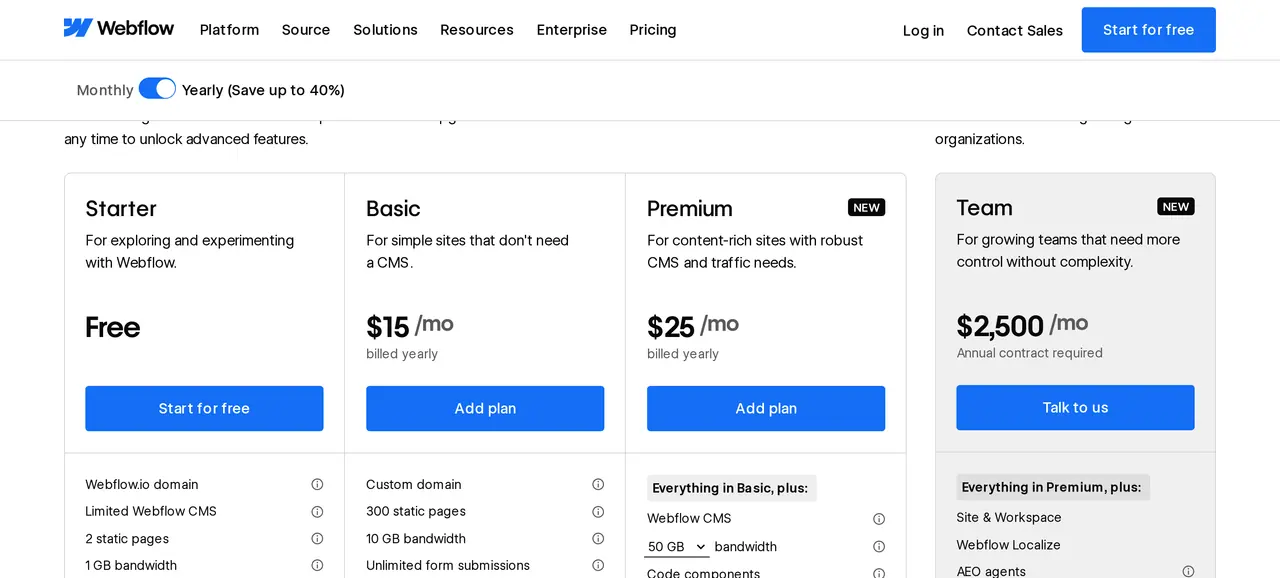
Site plans, in dollars and before VAT:
| Site plan | Per month, billed yearly | What you get |
|---|---|---|
| Starter | free | A webflow.io address, 2 pages, limited CMS |
| Basic | 15 dollars | Custom domain, 300 static pages, 10 GB bandwidth, no CMS |
| Premium | 25 dollars | Everything in Basic plus the CMS, from 50 GB bandwidth |
| Localization | from 29 dollars extra | Languages beyond the primary one |
On top comes a workspace plan if several people work on the site, plus VAT where it applies. A multilingual site with CMS quickly runs to 54 dollars a month or more.
WordPress: open software on your own hosting
WordPress is open-source software you install on your own hosting. You pick a theme and add features with plugins. You can do anything, and you are responsible for updates. In 2024 the WordPress ecosystem logged 7,966 new vulnerabilities, 96 percent of them in plugins. If you use WordPress, plan the upkeep in. More in is WordPress safe.
Webflow and WordPress side by side
- Building
- WebflowVisual, with a lot of control over design. There is a learning curve.
- WordPressWith a theme and blocks. Fast, but within the theme's limits.
- Hosting
- WebflowAt Webflow, on a CDN.
- WordPressAt any host you choose.
- Maintenance
- WebflowWebflow handles updates and security.
- WordPressYou or your builder keep WordPress, theme and plugins updated.
- Publishing
- WebflowA built-in CMS, clear for blogs and lists.
- WordPressStrong: it is what WordPress was made for.
- Adding features
- WebflowMore limited. Special features mean connecting outside services.
- WordPressThousands of plugins, or your own code.
- Multiple languages
- WebflowWith the paid Localization add-on.
- WordPressWith a plugin.
- Moving away
- WebflowCode export is possible, but CMS content, forms and search do not work outside Webflow.
- WordPressTo any host.
Webflow wins on design and peace of mind, WordPress on freedom and ownership. If you want both, choose a custom site.
Worked example: three years of Webflow or WordPress
A company with a twenty-page site, a blog and a second language. Before VAT. Webflow bills in dollars; we convert at 1.12 dollars to the euro.
| Item over three years | Webflow Premium with Localization | WordPress with a translation plugin |
|---|---|---|
| Build by a designer or agency (example) | 4,000 euros | 4,000 euros |
| Site plan or hosting | 36 x 54 dollars = 1,944 dollars, about 1,735 euros | 539.64 euros on shared business hosting |
| Domain .com | 36.57 euros at OVHcloud | 36.57 euros at OVHcloud |
| Plugins | none | translation and SEO plugins, around 200 euros a year, 600 euros (example) |
| Maintenance | Webflow handles it | 1,800 euros (600 a year, example) |
| Total | about 5,770 euros | about 6,980 euros |
The difference is in what you get back. With Webflow you pay more platform and less upkeep, with WordPress the other way around. And on Webflow your site stays tied to the subscription. What each yearly item covers: website maintenance cost per year. In the UK or Germany the build and the upkeep hours cost more; see web developer hourly rate.
What happens to your site when you want to move
Your site lives on their platform
Subscription stops- WebflowYour siteYour site
- FramerYour siteYour site
- WixYour siteYour site
When the subscription stops, so does your site. Moving usually means rebuilding.
Your site comes with you
- WordPressCurrent hostAnother hostWordPress
- Custom siteCurrent hostAnother hostCustom site
You can change hosts and take everything along.
Moving and ownership: the difference you feel later
Webflow lets you export your site's code, but only on a workspace plan, and without what keeps the site alive. CMS content, forms, site search and password protection do not work on an exported site, and only the primary language exports. CMS content can be exported as CSV, but you have to give it a new home yourself.
With WordPress you take everything: files and database move to another host. With a static custom site too: the pages are plain files that run on any server. Also read moving a website to a new host.
SEO in Webflow and WordPress
Both give you the control you need: titles, descriptions, redirects, a sitemap and clean URLs. Webflow delivers clean code and a fast CDN without setup. WordPress depends on theme, plugins and hosting: fast is possible, slow too. A heavy page builder in WordPress often costs speed; see how to improve website speed.
Most of the gain is not in the platform but in the content: a page per service and per language, on the terms your buyers use. What goes underneath is in what is technical SEO. For sites in several languages, see our approach to a multilingual website.
Who changes the site after launch?
The question most often forgotten. In Webflow an editor changes text and CMS items in the Editor without being able to break the design; new page types are built by the designer. In WordPress anyone with an account can change anything, which gives freedom and risk: a page someone accidentally rebuilds. Agree who may do what, and what a new page costs when your builder makes it.
Webflow or WordPress for an online store?
Webflow has its own ecommerce plans, but they are limited in payment methods, VAT handling and integrations for European stores. WordPress with WooCommerce is more flexible, with more upkeep. If you sell seriously online, compare Shopify and WooCommerce instead: see Shopify or WooCommerce and ecommerce website cost.
What about Framer?
Framer is a younger website builder that, like Webflow, starts from design and is popular for landing pages and start-up sites. There too your site lives on their platform. For a site of a few pages with a lot of motion it is a strong choice, for one with hundreds of pages and an extensive CMS less so. A custom landing page is also an option: see landing page design.
Choose Webflow when, choose WordPress when
| Choose | When | Not when |
|---|---|---|
| Webflow | You have a designer or team who wants to build visually, and you want no upkeep | You need custom features, many plugins or full ownership |
| WordPress | You publish a lot, need a specific plugin or want to take the site anywhere | Nobody does the upkeep |
| A custom site | You want your own design, speed and ownership, without plugins, with calculators or a portal | You want to rearrange the site daily yourself without a developer |
More likely torn between WordPress and a template builder? Read Wix or WordPress. Or between WordPress and custom: custom website or WordPress.
Where each goes wrong
- Choosing Webflow without someone who knows itThe learning curve is real. Without a designer you build slower than on a template.
- Forgetting bandwidthA site with many visitors or video goes over the plan's limit, and extra bandwidth costs monthly.
- WordPress without a maintenance planA site that got no updates for two years is a risk.
- Treating languages as an afterthoughtOn Webflow each extra language is a monthly cost, on WordPress a plugin with its own updates.
How to decide
- Decide who will build the site and who will update it weekly afterwards.
- Count your languages and the pages you expect in two years.
- Work out both options over three years with the table above, in your currency.
- Ask every builder how you leave if you ever want to move.

Questions about Webflow and WordPress
Is Webflow better than WordPress?
For a designer who wants to build visually without upkeep, often yes. For anyone who needs many features, plugins or ownership, no. Webflow is stronger in design and peace of mind, WordPress in freedom. Choose by who builds and maintains your site.
How much does Webflow cost per month?
A site plan costs 15 dollars a month for Basic and 25 for Premium with CMS, billed yearly. An extra language starts at 29 dollars a month. VAT and any workspace plan come on top.
Can I move from Webflow to WordPress?
Code export is possible on a workspace plan, but CMS content, forms and search no longer work afterwards. In practice you rebuild the site and bring the CMS content along as CSV. Redirect every old address with a 301.
Is Webflow good for SEO?
Yes, Webflow delivers clean code, a fast CDN and full control over titles, descriptions and redirects. As on any platform, your rankings depend on content: a page per service and per language on the terms your buyers use.
Do I need a developer for Webflow?
Not for a template. For your own design you need someone who understands how web pages are built: Webflow is visual but thinks like HTML and CSS. Many companies have the site built and then edit content themselves in the CMS.
Is Webflow more expensive than WordPress?
Per month usually yes, especially with CMS and several languages. Over three years it depends on what WordPress upkeep costs you. If you outsource it, WordPress often costs more than Webflow; if you do it yourself, less.