Industries: nurseries
Nursery software that lives in the toddler room, not the office
Your management system or learning journal stays where it is. We build what it leaves to paper: a register the practitioner taps at the door, a ratio board that counts every room by session, a website that shows parents which months have space, and a jobs page for your next level 3 practitioner.
Eleven toddlers, two practitioners and a register that has to be right
Nursery software in the UK has to work at the front door at ten to eight, with a child on one hip and a parent who wants to mention a bad night. By ten someone needs to know whether a bottle went down, at half twelve nine children are asleep, and at five four parents arrive at once. In between, a mum rings to ask whether her son can switch his Wednesday for a Thursday from January.
Most settings already have something for invoicing and the learning journal. What sits around it is still a paper register on a clipboard, a sleep chart on the wall, a spreadsheet for staffing and the manager's memory of who is on leave. This page shows what we build beside your existing system, which parts of the EYFS framework and UK GDPR it has to respect, and how much of it a childminder or a group of four nurseries actually needs.
A nursery day, and where the paperwork lands
The care is rarely the problem. Time goes on what happens around it: copying the paper register into the system, chasing parents for funded hours codes, ringing round when a practitioner calls in sick, and finding out at the end of the month why a child shows up twice in one session.
| Moment | How it often runs | With a tool beside your system |
|---|---|---|
| Drop-off and collection | A paper register at the door, filled in later | A tap on the room phone at the moment it happens |
| The child's day | A sleep chart, a food sheet and a note in the bag | One day note the parent sees at collection |
| Ratios | A spreadsheet and a headcount when someone is off | A board per room and session that counts staff against children |
| Changes to sessions | An email someone copies into three places | A draft booking change for the manager to approve |
| Funded hours | A list of codes checked by hand each term | A reminder when a code is due for reconfirmation |
| A new practitioner | An advert on a job board that runs for weeks | A jobs page on your own site, filled in on a phone |
We do not build a second management system. Invoicing, the learning journal and your local authority return stay where they are. Where your system has an API or an export, we read from it or write to it; how that works is on API integration services.
The toddler room's day on one shared phone
- The daily register writes itselfSigning a child in and out on the phone builds the record of names, hours and key person that the EYFS asks for.
- Consent sits with the childIf a parent has not agreed to photos, the app will not take one for that child.
- One phone per roomThe device stays in the room, with a code per practitioner. No children's data on personal phones.
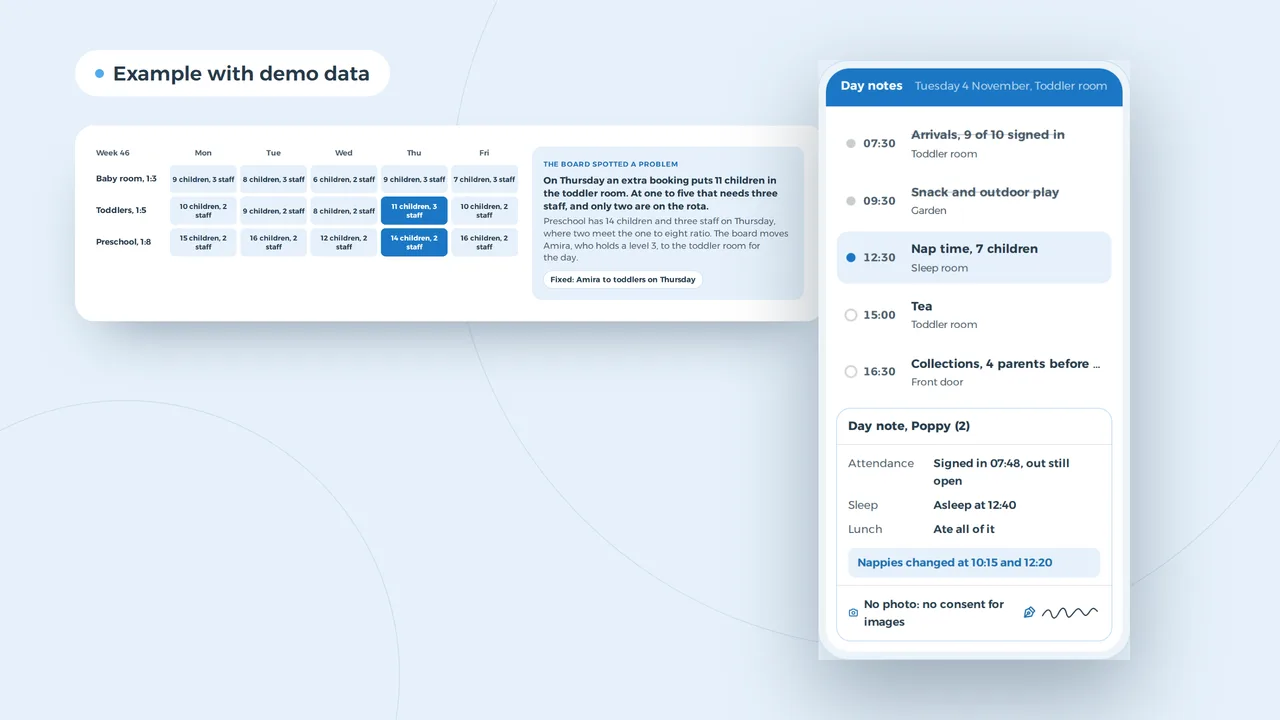
An example of what we can build, with a made-up child and times. You choose what goes in a day note.
Nursery software on the room phone, not on staff mobiles
A practitioner rarely has two free hands, so the room app asks for very little: who is here, who is asleep, what this child ate, and one button for arrival and departure. The EYFS framework asks for a daily record of the names of the children on the premises, their hours of attendance and each child's key person. A clipboard at the door struggles with that on a busy morning; a phone already in the room does not.
The phone belongs to the room, not to the practitioner. Each member of staff signs in with their own code and sees only the children in that room, so no child's data sits on a personal mobile. It does not have to be an app from a store: a web app saved to the home screen, a PWA, keeps working in a sleep room with no wifi and syncs as soon as it is back online.
The day note replaces the sleep chart and the food sheet. Parents read it at collection or that evening. Allergies and medical needs sit in the child's record, visible to those who need them, not in a note three colleagues can scroll past. Photos are a separate decision per child: without consent for images, the app will not take one. If parents need more than a note, such as a booking form to sign, that belongs in a client portal with two-factor authentication, not in a parents' WhatsApp group.
A Thursday where the toddler room is one practitioner short
The board spotted a problem
On Thursday an extra booking puts 11 children in the toddler room. At one to five that needs three staff, and only two are on the rota.
Preschool has 14 children and three staff on Thursday, where two meet the one to eight ratio. The board moves Amira, who holds a level 3, to the toddler room for the day.
Fixed: Amira to toddlers on Thursday
An example of what we can build, with made-up names and numbers. You set the rooms and the ratios they use.
Ratios per room and per session
In a day nursery everything hangs on two numbers: how many children are in a room right now, and how many qualified staff. For group settings the framework sets one adult to three children under two, one to five at age two, and one to eight from age three, or one to thirteen when a teacher with QTS, EYTS or EYPS works directly with the children. Your own staff qualifications decide who counts.
A ratio board knows your rooms, your session patterns and your team. It counts per room and per session and flags a problem before it happens: annual leave on a full Thursday, a child moving up to preschool in January, a practitioner who rings in sick. Then it looks at who is free and holds the right qualification. You set the ratios, so the board changes when the rules do.
The same board shows your spaces per start month, which is what parents ask about first. If you are still deciding between a spreadsheet and a board, read Excel scheduling or planning software. How we build rotas in general is on staff scheduling software.
Funded hours stay with your system and the council
Working parents reconfirm their 30 hours code every three months, and your local authority collects your funded children through its own headcount, usually each term. That claim stays in your management system or the council's portal. We make sure the codes and hours that go into it are already right, and remind the manager when a parent's code is due.
A parent in Nailsworth looks for a September start
New enquiry
Baby, starting September 2027, three days a week, funded hours
Laura, Nailsworth, yesterday 21:05
- A page with spaces by start month and what funded hours cover
- A Google profile with opening hours, the age range and the area
- A visit booking that only shows the slots you open
Example with made-up nurseries and reviews.
Parents search on a phone, often a year ahead
Parents start looking for a nursery long before a child is born. They do it in the evening, on a phone, with the name of the town: nursery Stroud, day nursery near Minchinhampton. What they want to know is always the same: is there a space the month I go back to work, what does a day cost after funded hours, what are the opening times, and how do I ask.
A site that answers those four things in the first minute brings in more enquiries than one that opens with a slogan. Put your spaces by start month on a page, without promising a waiting list. Explain how funded hours and your own fees fit together, including what parents pay for meals and consumables. Keep your Google Business Profile in the right category with your hours, because parents search by town, as set out under local SEO. We design and build that website from 1,500 euros.
Finding a level 3 practitioner for a new baby room
An example of what we can build, with made-up names. You choose what you ask.
A job page a practitioner fills in on the sofa
A nursery grows only as fast as it can recruit, and ratios leave no room to run a room one person down. A practitioner thinking about a move looks in the evening, on a phone. A form that wants a CV as an attachment loses most of them. We build the job on your own site with three questions: name and mobile number, whether they hold a full and relevant level 3, are working towards it or neither, and whether they want fixed days or bank shifts.
The page says plainly what the job is: which room, how many hours, how far ahead the rota is set. Bank staff matter as much as permanent ones, so anyone who prefers cover work goes straight onto your bank list. Showing people who might work for you what it is really like is called employer branding.
A parent's email becomes a draft booking change
An example of what we can build, with a made-up parent and child. The AI drafts from the email and your own bookings, you decide.
Emails from parents as drafts, the decision with the manager
The manager of a nursery with forty children gets dozens of messages a week: swap a day, a holiday, a sickness, a question about the invoice after funded hours. Each one has to land in two or three places. AI can read such an email next to your occupancy and draft the change: which session drops, whether the requested day is free in that room, whether the funded hours still add up. The manager approves or edits it. The AI decides nothing about places and sends nothing to parents on its own.
With children's data we build that on a model hosted in the EU or the UK, under a data processing agreement, with no training on your data. Why a consumer chatbot is not the place for it is covered in is ChatGPT safe for business.
A childminder needs less than a group of four nurseries
A childminder working alone needs no ratio board and no ERP. A group with four settings across two counties needs more than a shared calendar. This is what we would build at each size.
| Size | What you need | What you can leave out |
|---|---|---|
| Childminder | A website with your spaces and a Google profile; your current app for the register | A ratio board, staff roles, an ERP, an app of your own |
| A single-room setting or pre-school with five staff | A register and day notes on one phone per room, a jobs page | An intranet, an integration with every system |
| A day nursery with 20 to 50 places or staff | A ratio board with bank staff, roles per room, a link to your management system, a parent portal | A large platform where you use half the modules |
| A group of settings | One platform across sites, reporting per setting, a parent portal with two-factor authentication | A second management system next to the one you have |
What drives the price of such a project is explained in custom software development cost. Try your own figures in the software development cost calculator.
The EYFS, Ofsted and UK GDPR rules that end up in the system
Group settings in England register with Ofsted on the Early Years Register and follow the EYFS statutory framework, in the version for group and school-based providers that applies from 1 September 2026. These are the rules that most often shape the software, checked at the source on 31 October 2026.
| Situation | What the rule asks | What the software does |
|---|---|---|
| Daily register | A daily record of the children cared for, their hours of attendance and each child's key person | A tap at the door, with the key person on the child's record |
| Child records | Full name, date of birth, parents and carers, who has parental responsibility, who the child lives with, emergency contacts | One record per child, with access by role |
| Ratios | 1:3 under two, 1:5 at two, 1:8 from three (1:13 with a qualified teacher); staff count only with the right qualification | Counts per room and session with the ratios you set |
| Medicines | Written permission from a parent for each medicine; a written record each time, with parents told the same day | A medicine log on the room phone that tells the parent that day |
| Accidents and first aid | A written record of any accident, injury or first aid, with parents told the same day | An incident form on the phone, with the parent's acknowledgement |
| Complaints | A written record, and the outcome to the parent within 28 days | Logs the date and reminds the manager before day 28 |
| Funded hours | Working parents reconfirm their code every three months; the local authority runs its own headcount, usually per term | Shows which codes are due and which children are funded |
| UK GDPR and the ICO | Records kept securely; health details are special category data; most nurseries pay the ICO data protection fee | Roles per room, photo consent per child, data hosted in the UK or EU |
| Keeping records | The framework leaves it to the provider how long to keep child records after a child leaves | Archives and deletes on the schedule you choose |
The software decides nothing about a child's care or development and gives no advice on it. It puts the rule in front of you at the moment it matters.
Three rooms and a week of copying out
| Task per week | Paper and spreadsheet | With room phones and a ratio board |
|---|---|---|
| Day notes, 7 practitioners | 525 minutes | 280 minutes |
| Copying the register | 90 minutes | 15 minutes |
| Parent messages | 160 minutes | 80 minutes |
| Ratios and cover | 120 minutes | 45 minutes |
| Funded hours and corrections | 60 minutes | 20 minutes |
| Total | 955 minutes | 440 minutes |
That is 515 minutes a week, nearly eight and a half hours. Over 51 open weeks it comes to about 438 hours a year. Whether those hours go to the children, to a manager who leaves on time or to opening another room is your call.
One room tries it first
- A conversation about your roomsHow many places, how many staff, which management system, who does the rota and where the hours go. We look at an ordinary week, not a feature list.
- A fixed price before we buildWe pick the part that costs you the most time and give a fixed price for it. A website starts from 1,500 euros; software is priced after the conversation.
- The toddler room goes firstOne room works with the first version for a few weeks. What does not fit gets changed before the rest of the team follows. The code and the data belong to your nursery.
We have no nursery client yet, but for DA Logistics we built a weekly planning board that resolves its own conflicts and an app where drivers send leave requests and reports in three languages.
If you provide care in people's homes, see domiciliary care software; for organisations run on volunteers, see software for charities.
Nursery managers usually ask
Does your nursery software replace our management system?
No. Invoicing, the learning journal and your funded hours claim stay in the system you use. We build what sits beside it: the register at the door, day notes, the ratio board, the website and the jobs page. Where your system has an API or an export, attendance goes in without copying.
Can the daily register be kept on a phone?
Yes. The EYFS framework asks for a daily record of the children on the premises, their hours and their key person; it does not ask for paper. A shared room phone makes it easier to record arrivals and departures as they happen. The record must stay accessible and secure.
How do you handle photos of children?
A photo is only possible when a parent has given consent for images, and that consent is stored per child. Without it, the app will not take one. Images are hosted in the UK or EU and only the child's own parents can see them.
Do we need to tell the ICO about a new system?
Most nurseries already pay the ICO data protection fee because they hold personal data; a new system does not change that. What does change is your privacy notice and your records of processing. We sign a data processing agreement with you and say where the data is hosted.
Can parents read day notes without installing an app?
Yes. A parent gets a secure link or signs in to a portal with two-factor authentication. They see their own child's note and nothing about other children.
What does nursery software from VBS cost?
You pay a fixed price per project, agreed after a first conversation. The only fixed amount is a website, from 1,500 euros. A ratio board or a room app depends on the number of rooms, your rules and whether your management system allows an integration.
Custom software
How VBS helps you with this
We build the platform your business runs on every day: your spreadsheets, emails and paperwork in one system that does what you do.
- Your workflow mapped first, then a fixed price
- Screens for the office, the client and the road
- Hosting, backups and security managed by us on AWS
How we approach it is on our page about Custom software.
A register that is right without copying out?
Tell us how a week runs in your nursery and which system you use. We will show you which part we would build first.
Rather get in touch right away?