Industries: payroll bureaus
Payroll bureau software for the UK, around the payroll engine you already run
Your payroll software works out gross to net and sends the FPS to HMRC. We build what sits in front of it and around it: client changes that arrive in one shape, a board for every payday, starters and leavers that are never late, and a portal where clients send their own information.
A bureau runs on what its clients send in
Payroll bureau software in the UK usually means a payroll engine with a bureau licence: many employers in one system, payslips, RTI submissions, pension files. Most bureaus already have one, and it does that job well. The hours go elsewhere. A café owner who emails overtime as three lines on the last day, a care home that forgets its sickness, a joinery firm whose timesheets arrive as photos from the site, a starter checklist that sits in someone's inbox while payday comes closer.
This page sets out what we would build for a payroll bureau, or for an accountancy practice that runs client payrolls, need by need and size by size, with the HMRC and pension rules it has to respect. It is always custom software next to the engine you run, never a new gross to net calculation.
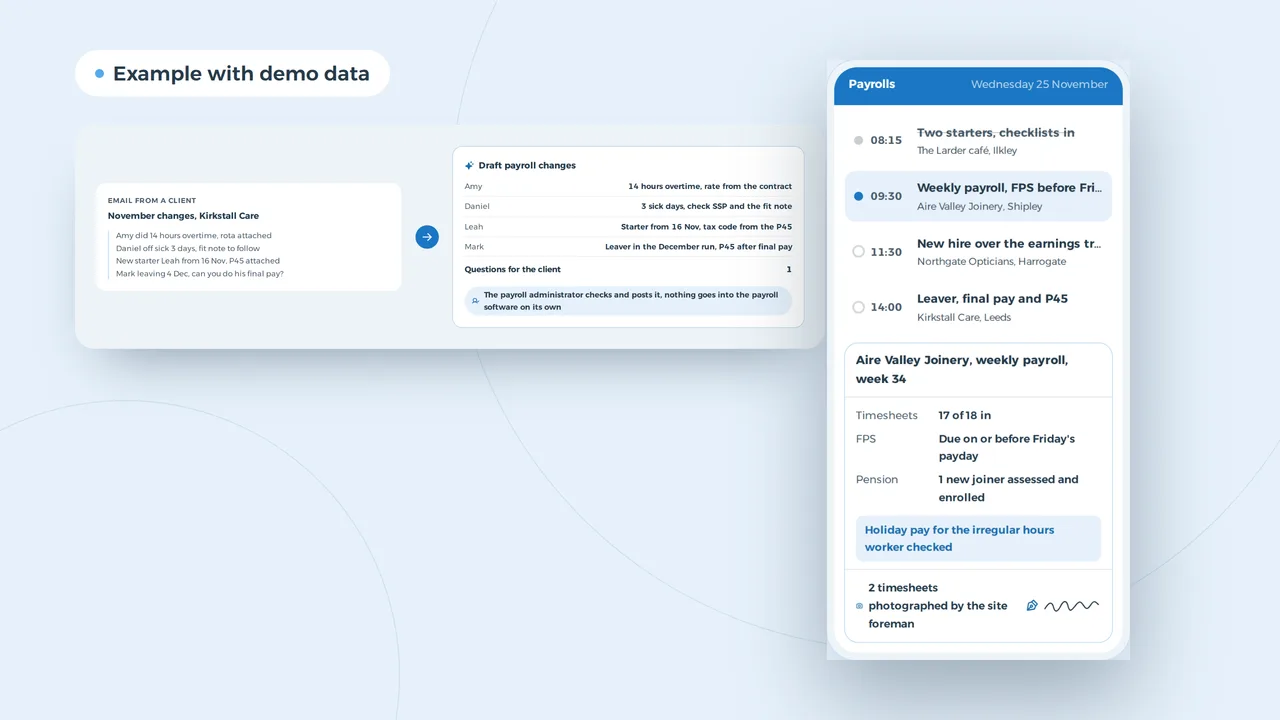
A payroll manager's day and one client payroll, on the phone
- The payroll engine stays yoursThe app shows what has come in from each client and what is missing. Your payroll software calculates and sends the FPS to HMRC, we connect to it where it allows.
- Starters sorted before the first paydayStarter checklists and P45s arrive through the client portal, not as attachments in someone's inbox.
- NI numbers stay lockedThe phone shows names and status. National Insurance numbers and bank details only after two-step sign-in, encrypted in the database.
An example of what we can build, with made-up clients and names. You choose what the payroll record shows.
Payday week at a bureau, hour by hour
A payroll administrator with thirty clients rarely loses time inside the payroll software. It leaks in the collecting, the chasing and the searching. In a week with weekly, fortnightly and monthly paydays, it tends to look like this.
| Moment | How it often goes | With your own platform next to the engine |
|---|---|---|
| Monday, weekly timesheets due | Emails, photos and spreadsheets in five different layouts | A fixed form per client, and what still comes by email is turned into a draft by AI |
| A new starter on Wednesday | The starter checklist arrives after the payroll has run | The client adds the starter in the portal, the checklist and P45 come with it |
| Two days before a monthly payday | A list of who has not sent anything yet, and phone calls | The board shows per client what is missing and sends the reminder itself |
| A new hire earns over the trigger | Someone spots it when the pension file fails | The joiner is flagged for assessment in the same run |
| A client asks for last year's P60 | Searching an old shared drive | Every document in the client record, with a date and who uploaded it |
| Re-enrolment comes round | The date sits in someone's diary, or nowhere | Every client's three-year date on the board, with a reminder months ahead |
Each step is small. Across 150 client payrolls and four paydays a month, together they add up to a day a week per administrator.
Client changes that arrive in one shape
The biggest drain on a bureau is how pay changes arrive. One client fills in a spreadsheet, another sends a photo of the rota, a third emails three lines the morning payroll runs. Someone keys it in and phones about what does not add up.
A portal per client removes most of that. The client sees their own staff and enters hours, overtime, sickness and holiday per person for the period. Anything far from last period is queried there and then. A client with a clocking system sends a file or connects a time tracking app. What still arrives by email, AI reads: it turns loose text and an attached rota into a draft list of changes with the open questions, and the administrator checks it. How that works with employee data is set out in AI for HR; the principle matches invoice automation: read and suggest, a person decides.
A client email with November's changes becomes a draft for the payroll
An example of what we can build, with a made-up client. The AI reads and drafts, a person decides. Personal data stays inside the bureau's own environment.
A board for every payday, per administrator
Every administrator keeps a rhythm in their head: weekly payrolls on Monday, care homes on Thursday, the monthly batch before the last Friday. While everyone is in, it works. When someone is off, nobody knows which payrolls are still open this week or which FPS has to go first.
A planning board puts the paydays on one screen: per administrator the client payrolls per day, what has been run, what has been filed and who still owes their changes. The board knows the bureau's own rules. A client without inputs moves a day, with a reminder through the portal, and the rest of the batch carries on. It is the same idea as staff scheduling software, for payrolls rather than shifts, with a dashboard that shows the directors each month how many clients sent their changes on time.
The board sees that a care home is holding up Thursday's batch
The board spotted a problem
On Thursday Hannah runs the monthly payroll for Kirkstall Care, but the care home has not sent its November overtime and sickness. Payday is Monday 30 November, and the FPS has to reach HMRC on or before that day.
The board moves Kirkstall to Friday morning, sends the care home manager a reminder through the portal and runs the other eight on Thursday.
Sorted: Kirkstall to Friday
An example of what we can build, with made-up names. You choose which deadlines the board watches.
The payroll engine stays yours
We do not build gross to net, tax code handling or RTI filing. That belongs in your payroll software, which is recognised by HMRC for the job. What we build feeds it clean data through an API integration or an import file in the layout your software reads.
One record per client, with a portal on top
A client moving to the bureau brings a pile with them: year to date figures from the previous provider, P45s, the pension scheme and its rates, a list of company cars, holiday entitlements, contracts. At many bureaus that ends up spread over email, a shared drive and a spreadsheet with a tab per client.
One record per client puts it all in one place: employees, documents, deadlines, the re-enrolment date and a log of who changed what. The client's director follows along through a client portal with a secure sign-in link, sees what is missing and uploads it. National Insurance numbers and bank details are encrypted and only shown after two-factor authentication. If that spreadsheet with a tab per client is where you are today, the guide on replacing Excel with software shows how to move in steps.
A plumbing firm with fourteen staff moves to the bureau
The client's director sees what is missing and uploads it through a secure link. NI numbers and bank details stay hidden.
An example of what we can build, with a made-up client.
Hiring payroll administrators
A good bureau payroll administrator is hard to find, and a bureau that has one does not want to lose them to rekeying. A vacancy on your own site with a three question form brings more replies than a CV upload, and a view of who applied stops a candidate waiting a week for an answer. That belongs on a website that gives employers and candidates each their own route. The platform helps keep people too: an administrator who no longer chases and rekeys has time for the advice clients pay for.
Payroll administrator wanted, and who applied this week
An example of what we can build, with made-up names. You choose which questions the form asks.
Payroll bureau software by size of bureau
A bookkeeper running twenty payrolls on the side needs no ERP and no platform of their own. A bureau with five administrators and 200 clients needs more than a shared folder. This is what we would build at each size, always next to your payroll engine.
| Size | What you need | What you do not need (yet) |
|---|---|---|
| Sole trader, a bookkeeper or an accountant who also runs payrolls | A fixed changes form per client, email reminders, a folder per client. A tidier spreadsheet often does the job | A platform, a board, an app |
| Team of five, 100 to 250 client payrolls | A record per client, a portal for changes and documents, the payday board, a connection to the payroll software | An ERP, an app in the stores, your own payroll engine |
| 20 to 50 staff, more than one office | Roles and rights per office, AI that reads emails and documents, a dashboard per administrator, vacancies on the site | Your own gross to net: that stays in the recognised engine |
| Larger, a national bureau or a group of practices | A portal and a web application at scale, an API layer to the engine, a first part with clear edges | Replacing everything at once. A custom ERP only comes up once the rest is in place |
Practices that also keep the books for the same clients will find the related work in software for accounting firms. The same pattern of records, deadlines and a client portal runs through insurance brokers with their policies and property management with tenants and landlords.
RTI, auto-enrolment and benefits in kind in your systems
These are the rules that most often have to live in a bureau's systems, checked against GOV.UK, The Pensions Regulator and the CIPP on 31 October 2026.
| Situation | What the rule asks | What the software does |
|---|---|---|
| Every payday | A Full Payment Submission to HMRC on or before the day employees are paid | The board shows per client, days before payday, whether the changes are complete |
| Adjustments to what is owed | An Employer Payment Summary by the 19th of the following tax month | A reminder per client in the week before the 19th |
| Year end | A P60 to every employee on the payroll on 5 April, by 31 May. Expenses and benefits not payrolled on a P11D, with the P11D(b), by 6 July | A year end checklist per client with the dates and the lists still to collect |
| Benefits in kind | Payrolling becomes mandatory from 6 April 2027 for company cars, car fuel, vans, van fuel and medical benefits, and from 6 April 2028 for most other benefits | Car and benefit lists collected per client now, so the first payrolled year starts clean |
| Workplace pensions | Assess staff every pay period. For 2026/27 the earnings trigger is £10,000 a year, qualifying earnings run from £6,240 to £50,270, and the minimum is 8% in total with at least 3% from the employer. Re-enrolment every three years, with a re-declaration within five months of the anniversary | New joiners flagged for assessment, the re-enrolment date per client on the board with a reminder months ahead |
| Payroll agents and money laundering rules | HMRC treats payroll agents that also give accountancy services or tax advice as accountancy service providers that need AML supervision. According to the CIPP, payroll-only providers must register for an HMRC agent services account from 18 November 2026, with 18 February 2027 as the final date | Onboarding with identity and AML checks, the evidence kept in the client record |
| Employee data | UK GDPR: keep only what you need, limit access, a data processing agreement with every client | Encrypted NI numbers and bank details, roles per administrator, an audit log and a daily backup |
Payroll software knows these rules for the calculation. What it rarely knows is the deadlines per client and the paperwork around them. That is where the platform sits. The differences with EU rules are in UK GDPR vs EU GDPR.
A bureau with 150 client payrolls, in hours a month
| Task | Time back per month |
|---|---|
| Changes: 300 runs x 10 minutes | 50 hours |
| Chasing: 60 x 6 minutes | 6 hours |
| Starters and leavers: 80 x 6 minutes | 8 hours |
| Total | 64 hours |
Over a year that is some 770 hours, or about £17,000 of administrator time. Not in the table: a change keyed in wrongly this month that costs a correction and an awkward phone call the next. What a platform like this costs depends on what you build first; custom software development cost explains what drives the price, and build vs buy software when custom pays back.
A conversation first, then a fixed price per project
- A day at the bureauWe sit in during a payday week: how changes come in, where documents live, which deadlines sit in people's heads and what your payroll software can export or import.
- A proposal with a fixed priceWhat we build, in which order, and a fixed price per project. Websites start from 1,500 euro; software is priced after the conversation.
- The biggest time drain firstUsually the client portal for changes, then the client record, then the board and the AI intake. Each part works on its own and feeds your payroll engine.
- Your data comes along, your engine staysWe import your current spreadsheets, with a report of what did not add up. The payroll software and your HMRC set up stay as they are.
For Business Centrum, a payroll and HR office in Ghent, Belgium, we built a management platform that replaces their spreadsheet, with employers, employees, work permits, meal vouchers, documents and a client portal, tested locally on their own file of 309 employers and 971 employees.
Bureau owners often ask us about payroll bureau software
- Does this replace our payroll software?
- No. Gross to net, tax codes, statutory pay and RTI filing stay in your payroll software. We build what sits in front of it: collecting changes, client records, deadlines, documents and a portal, and we hand the data over in a form your software reads.
- Can clients enter their own hours and changes?
- Yes, in a portal with their own staff and a form per pay period. Anything far from last period is queried straight away. A client who prefers email can keep emailing: AI turns it into a draft and the administrator checks it.
- Will it connect to the payroll software we use?
- That depends on what your software allows. With an API we connect directly. If it reads an import file, we produce that file in the right layout. We look at what yours can do in the first conversation.
- Does a payroll-only bureau need to register with HMRC?
- According to the CIPP, payroll-only providers must register for an HMRC agent services account from 18 November 2026, with 18 February 2027 as the final date, and that account needs AML supervision. Check your own position with HMRC or your supervisory body. The platform keeps the onboarding and AML evidence per client.
- How safe are National Insurance numbers in a platform like this?
- Encrypted in the database, visible only to the people who need them and only after two-factor sign-in. Every change goes into an audit log, there is a daily backup, and every client gets a data processing agreement.
Custom software
How VBS helps you with this
We build the platform your business runs on every day: your spreadsheets, emails and paperwork in one system that does what you do.
- Your workflow mapped first, then a fixed price
- Screens for the office, the client and the road
- Hosting, backups and security managed by us on AWS
How we approach it is on our page about Custom software.
A payday week without the chasing?
Tell us how changes, documents and deadlines reach your bureau today. We will look at it with you and say what we would build next to your payroll engine.
Rather get in touch right away?