Industries: architects
Architect practice management software for UK studios, beside the CAD you already run
2023
Revit or ArchiCAD draws the scheme. We build what sits around it: the site report after the meeting, one record per job with planning, Building Regulations and fees by stage, a client who can see where things stand, and a website that shows your finished work.
An architecture practice runs on stages, reports and fees
Architect practice management software usually means one of two things: a CAD package, or an off-the-shelf tool for timesheets and invoices. Most studios already have the first and have tried the second. What still leaks time is the work in between: the site report typed up at night, the client who emails to ask what happens next, the Stage 4 fee invoice nobody raised, the planning decision date that slipped past.
This page sets out what we would build for a UK practice, need by need and size by size, with the rules that belong in it: ARB registration, written terms of engagement, Part 2A dutyholders, planning timescales and UK GDPR. Everything you see uses made-up names.
A project architect's Thursday, with the site report still open
- Fees follow the stagesThe Stage 5 fee invoice is ready now the shell is weathertight. The app prompts, your accounts package sends it.
- Building control on the same listFull plans approved. The drainage inspection is in the diary before anyone backfills.
- Photos belong to the reportWhat the architect shoots on site lands in the project record, not in the camera roll.
An example of what we can build, with made-up names and sites. You choose what the report asks for.
Where the studio week leaks hours
An architect rarely loses time on design itself. It goes on everything around it.
| Moment | How it often goes | With your own app beside CAD |
|---|---|---|
| Site meeting at 8.30 | Notes on paper, photos on a phone, the report written up that evening | The report builds during the meeting, with photos and actions per party, and goes out after a read-through |
| A drawing is revised | An email with attachments to contractor, engineer and client, and a question about which revision is current | Every revision in the job record, with who received and opened it |
| Stage 4 is signed off | Nobody remembers to raise the next fee invoice | The stage closes and the fee invoice is ready to check |
| The client asks where things stand | Calls, emails, three folders searched | The client follows stages and reports through a secure link |
| Planning is validated | The eight-week date sits in someone's head | The decision date is in the record, with a reminder before it lapses |
A generic task list does not know these rhythms. That is why we build custom software that follows your own stages, with integrations to your accounts package or document store where they allow it. A contractor looks at the same site differently, with gangs and materials: that sits under software for construction companies.
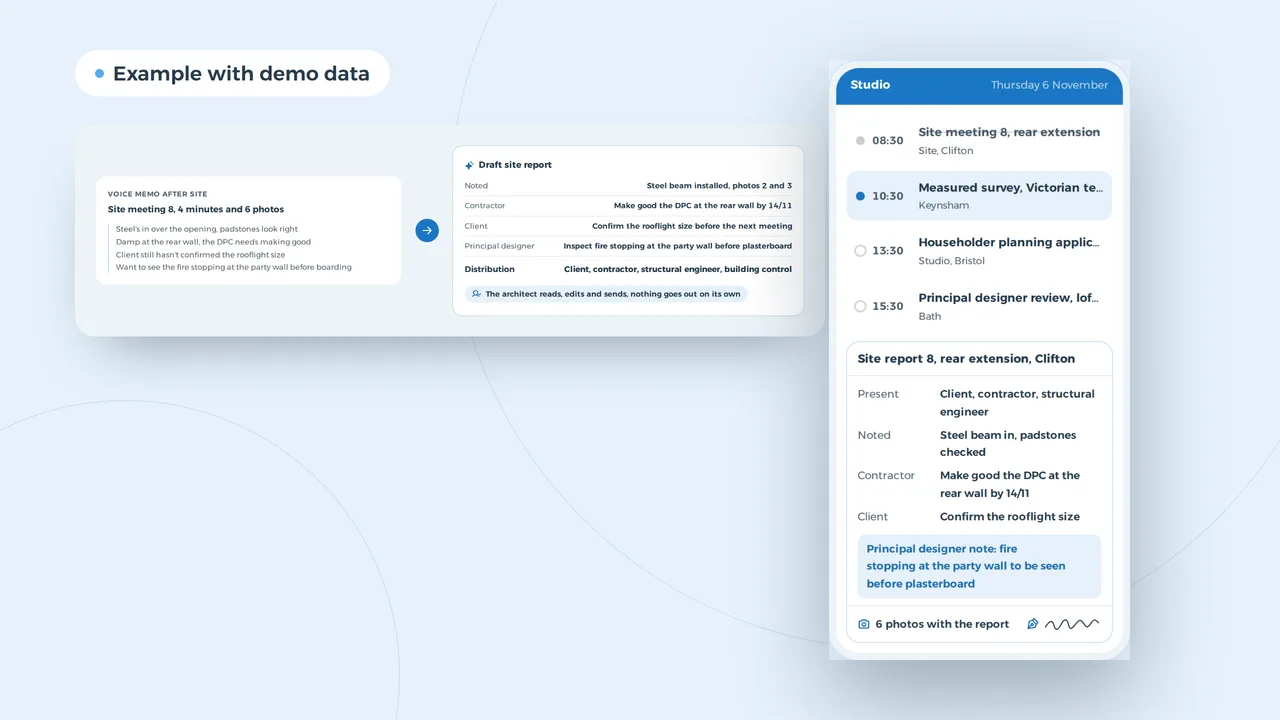
A four-minute voice memo becomes a draft site report with actions per party
An example of what we can build, with a made-up site. The AI drafts, the architect decides what the report says.
Site reports drafted before the drive back
The site report is the record of what was agreed, who does what and by when. It is also the document most likely to wait until Friday. AI helps without deciding anything. You record a memo after the meeting, take your photos, and the model turns them into a draft in your own template, with actions by name and the photos next to the observation they belong to.
The architect reads, edits and sends. Nothing goes out on its own, and the model does not learn from your projects. The same approach drafts a first pass of a specification clause or a reply to a client query. How such an assistant is built is covered under AI agent development; fixed steps that run without a conversation sit under AI automation.
A rear extension through RIBA stages, with the fee against what has been invoiced
The client sees the stages, the site reports and what has been invoiced through a secure link. Drawings are shared per revision.
An example of what we can build, with a made-up client and figures.
One record per client, from brief to completion certificate
A house extension easily runs eighteen months, from the first visit to the completion certificate. In that time a job collects a fee proposal, signed terms of engagement, a planning application, a Building Regulations submission, the principal designer appointment, dozens of site reports and a run of fee invoices. A shared drive keeps the files. It does not know which stage is live, which date is coming up or which fee instalment you can invoice.
A bespoke record does. It knows your stages, adds dates as documents arrive and shows the fee against what has been invoiced. Variations get their own line, with who approved them and when. For a householder application the Planning Portal sets a decision within eight weeks of validation; the record holds that date and the appeal route if it passes without one. The client sees it all in a client portal without anyone sending an email. If you want enquiries, clients and follow-ups in the same place, that is custom CRM development.
Clients who search before they call
A homeowner looking for an architect rarely types your name. They search 'architect extension' with their town, look at three practices on the map and open the one whose finished work looks like their own house. Three things count then. A page per project with drawings, photos and the brief. A Google profile with photos of completed jobs; how to set one up is in create a Google Business Profile. And an enquiry form that asks for the address, budget band and timing straight away, so your first meeting is about design.
That is what we build under website design. The local side sits under local SEO, and asking clients for a review at handover is covered in get more Google reviews.
An extension enquiry in Bristol that arrives with the address and old drawings
New enquiry
Victorian terrace, side return extension, conservation area, survey attached
Priya, Bishopston, yesterday 21:15
- A page per project, with drawings, photos and what the client asked for
- A Google Business Profile with photos of finished work
- An enquiry form that asks for the address, budget and timing
Example with made-up practices and reviews.
Part 2 and Part 3 people who want to join
A growing practice hires architectural assistants, technologists and qualified architects. A Part 2 assistant working towards Part 3 needs a supervisor and wants to know which projects they will work on, because their experience record depends on it. A careers page on your own site, with your projects beside it and an application in three taps, says that better than a job board. The studio sees who applied, who sent a portfolio and who is coming in. How you spread people across live jobs as the team grows is covered in staff scheduling software.
A Part 2 role and the people who applied this week
An example of what we can build, with made-up names. You choose which questions the form asks.
Architect practice management software by size of studio
A sole practitioner needs no ERP and usually no app of their own. A practice of thirty across two offices needs more than a shared drive. This is what we would build at each size, beside your CAD.
| Size | What you need | What you do not need (yet) |
|---|---|---|
| Sole practitioner | A website with finished projects, a Google profile, fixed templates for site reports and fee invoices | A resource planner, roles and permissions, an app of your own |
| Studio of five | One record per job with stages and fees, site reports from a phone, a link for the client | An ERP, a document management system of your own |
| Practice of 20 to 50 | People spread across jobs, hours per stage against the fee, a portal for clients and consultants, AI for the first draft of a report | A second record beside the document store you already run |
| Larger, several offices or public sector work | Figures per office and per client, integrations with accounts and document control, access by role | A package that forces your stages into its own model |
A sole practitioner should start small: a good website and fixed templates return more than an app. What shapes the cost of bespoke work is set out in custom software development cost, and whether to build or buy at all in build vs buy software. If your fee tracker is a spreadsheet that has grown too far, read replace Excel with software.
Other consultants on a project work with the same building blocks. A land surveyor plans measured and topographic surveys and delivers drawings to the design team: see software for land surveyors. Surveyors and civil engineers who want more of that work from practices like yours have their own pages: marketing for land surveyors and marketing for civil engineering firms. A managing agent who looks after buildings an architect once handed over tracks maintenance and works per block: see property management software.
ARB, Part 2A and planning in the project record
These are the rules that most often need to live in a practice's systems, checked with ARB, the government guidance on Part 2A and the Planning Portal in October 2026. They follow England; Wales, Scotland and Northern Ireland differ on Building Regulations and planning.
| Situation | What the rule asks | What the software does |
|---|---|---|
| The title architect | The Architects Act 1997 restricts the title to people on the ARB register. Registration is renewed each year with a retention fee and a declaration on continuing professional development | Each architect's profile shows their registration and renewal date |
| Terms of engagement | The ARB Code asks for written terms before work starts, and adequate professional indemnity insurance. Unclear terms are a frequent source of complaints | No job moves past the brief without signed terms in the record, and the PII policy shows its renewal date |
| Dutyholders under Part 2A | Since 1 October 2023 the Building Regulations name client, designer, principal designer, contractor and principal contractor. With more than one designer or contractor, the client appoints a principal designer and principal contractor in writing, domestic work included | The record asks who holds each role and keeps the written appointment |
| Planning | Householder applications are decided within eight weeks of validation, major applications within thirteen. Without a decision, an appeal for non-determination is possible | The decision date is set when the application is validated |
| Fee invoices | Most clients pay by stage. A homeowner is not a business, so invoices stay simple PDFs | Per client the right format, with the stage and the fee instalment on the invoice |
| Client data | UK GDPR: only what the job needs, kept secure and no longer than necessary | Data held in the UK or EU, access by role, a log of who opened what |
Whether a specific job needs a principal designer, you decide with the regulations in front of you. The software asks the question, the answer stays with the architect. What UK GDPR asks of your website is covered in UK GDPR vs EU GDPR.
A studio of five, in hours
| Task | Time per week the studio gets back |
|---|---|
| Site reports: 8 x 30 minutes | 4.0 hours |
| Client queries: 5 x 10 minutes | 0.8 hours |
| Fee invoices: 1 x 20 minutes | 0.3 hours |
| Together | 5.1 hours |
Over 46 weeks that is about 235 hours. At £45: 235 x £45 = £10,575 a year of architects' time, in this example. What the studio does with those hours is its own call: more time on design, one more site visit, an earlier finish. The example says nothing about new work or turnover. Time a month of site reports and client queries in your own studio, and run the numbers.
A conversation in your studio, then a fixed price per project
- A morning in your studioWe join a site meeting and sit in the office: how a report is made, where the job record lives, what your CAD and accounts package already do and where they allow integrations.
- A proposal with a fixed priceWhat we would build, in what order, and a fixed price per project, agreed after that first conversation.
- What costs most time goes firstUsually site reports from a phone and one record per job, then the client link, then AI for the first draft. Each part works on its own.
- Drawings and data where they belongA data processing agreement, data held in the UK or EU, access by role. Your drawing files stay in your own document store.
We do not have an architecture practice as a client yet. For SN Group, a construction company in Ghent, Belgium, we built a two-language site with project pages, a cost calculator and an energy performance calculator.
Architects often ask
Does this replace my CAD or BIM software?
No. Drawing stays in Revit, ArchiCAD, Vectorworks or whatever you use. We build what is missing beside it: site reports from a phone, one record per job with stages and fees, a link for the client, and integrations with your accounts package or document store where they allow it.
Can we follow RIBA stages, or our own?
Either. Many practices use the RIBA Plan of Work stages 0 to 7, others merge or split them per type of job. The record follows the stages you already use, and the fee schedule follows those stages too.
Can the client follow their own job?
Yes, through a secure link or a portal. They see the stages, the site reports and what has been invoiced. You choose what stays internal, such as drawings in progress or studio notes.
Does it help with principal designer duties?
It keeps the record: who holds each dutyholder role, the written appointment, and the reviews done at each stage. Whether a job needs a principal designer, and how you meet the competence requirements, stays your professional judgement.
What does software for an architecture practice cost?
That depends on what you need. After a first conversation you get a fixed price per project, so you know the cost before any work starts.
Custom software
How VBS helps you with this
We build the platform your business runs on every day: your spreadsheets, emails and paperwork in one system that does what you do.
- Your workflow mapped first, then a fixed price
- Screens for the office, the client and the road
- Hosting, backups and security managed by us on AWS
How we approach it is on our page about Custom software.
Site reports out before you are back at your desk?
Tell us how your studio handles site reports, job records and fee invoices today. We will look at it with you and say what we would build, beside your CAD.
Rather get in touch right away?