Websites for dance schools
Dance school website design that turns a timetable into taster bookings
1,500
A site where a parent finds the right class for their child's age, books a taster for Saturday and enrols for the term without ringing you during a lesson.
Two schools, one Sunday evening, one parent choosing
Good dance school website design starts with a parent on a sofa comparing two schools on their phone. Their daughter is six and wants to do ballet, or their son saw a street dance video and will not stop talking about it. The school that answers age, day, time and fees first usually gets the taster. The other one gets a phone call on Monday, if it is lucky.
This page is about the site itself: the pages, the timetable, taster bookings, enrolment, privacy and being found. What runs behind it, such as termly fees, the studio board, costumes and show tickets, is on our page about dance school software.
Five questions every parent brings to your site
Parents rarely read a dance school site from top to bottom. They come with a short list of questions and leave as soon as one goes unanswered. Plan the site around those questions, not around the history of the school.
| The question | Where the answer belongs | What goes wrong when it is missing |
|---|---|---|
| Is there a class for my child's age? | A page per style with age groups on the first screen | The parent scrolls through a general welcome and gives up |
| Which day and what time? | A timetable that filters by age and style | A PDF from last year that nobody updated |
| What does it cost per term? | Fees on the class page, with sibling discount | An email asking about prices that you answer at 11pm |
| Can we try a class first? | A taster button on every class | The parent rings during a lesson and nobody picks up |
| Is it a safe, friendly place? | Teachers with photos, a safeguarding page and reviews | Doubt, and a click on the next school |
Every page you add should answer one of these better. If you want to compare what a site like this costs across the UK, read our guide to website costs in the UK.
One enrolment: taster, term fees, costume size and the show
The parents follow it through a link
An example of what we can build, with made-up names and amounts. You choose the stages and the documents.
Booking a taster straight from the timetable
The taster is where a visitor becomes a pupil. Make it a button on every class, not a contact form at the bottom of the home page. A parent taps the class, sees the next free dates, fills in the child's name and age, and gets a confirmation with what to wear and where to park.
Behind the button the site knows how many places a class has. A full class offers the waiting list or a class at another time, so you never say no to a parent who was ready to come. The teacher sees the taster pupil in their register before the lesson starts. The day after, the parent gets a short message with a link to enrol. That one message often decides whether the taster turns into a term. How we build bookings like this is on our page on a booking system for your website.
Seven pages a dance school site carries
- A home page that sorts by ageToddlers, children, teens and adults each get a clear route from the first screen.
- A page per styleBallet, tap, jazz, street and contemporary, each with the ages, the grades and a short video.
- The timetableFiltered by age, style and day, with a taster button on every class.
- Fees and termsPer class per term, sibling discounts and what the costume and exam fees cover.
- TeachersA photo, the styles they teach, their training and a line in their own words.
- Safeguarding and policiesYour safeguarding approach, the named lead, photo consent and how you handle medical notes.
- Where to find youEach studio or hall with a map, parking, drop-off and the classes held there.
The taster pupil lands in the teacher's register
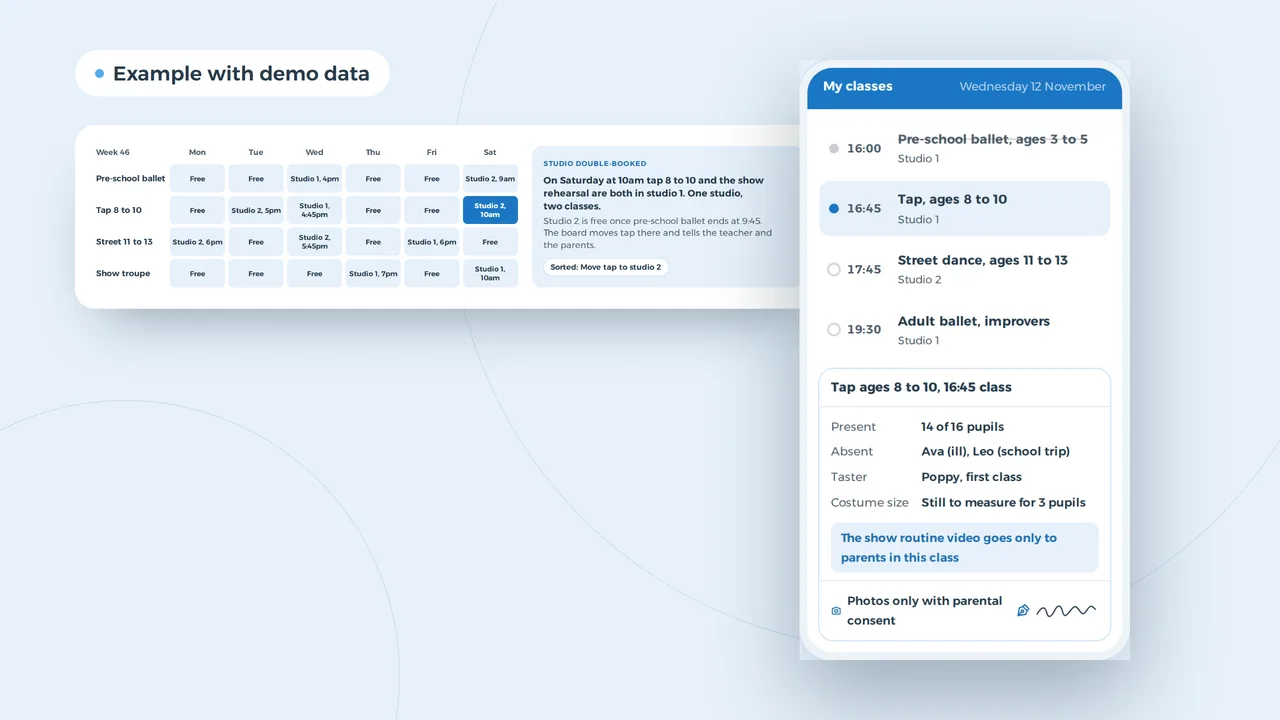
- Parents report absencesA parent marks their child as away in the app. The teacher sees it before class and rings nobody between groups.
- The taster is already listedWhoever booked a taster appears with name and age. After class the invitation to enrol goes out on its own.
- Sizes taken in classThe teacher types the size against the pupil. The costume order adds itself up.
An example of what we can build, with made-up names. You choose what a teacher sees.
Enrolling for the term in one sitting
After the taster comes enrolment. The parent should do it in one go on a phone: the child's details, the class, emergency contacts, medical notes the teacher needs, photo consent per use, and the first term's fees. A form that asks for all of that on paper at the door gets lost in a dance bag.
Ask only what the school needs. A teacher needs to know about an allergy or asthma; they do not need a full medical history. Photo consent works best when the parent can tick separately for the website, social media and the show programme. Payment can be a link per term, so the parent pays when they enrol and you do not chase bank transfers in October. If you want parents to come back to a page with everything about their child, a small client portal does that; often a landing page per term is enough to start.
Twelve months on a dance school site
- June and JulyRe-enrolment and the new timetableThe timetable for September goes live, current pupils re-enrol and new families book tasters for the first week.
- SeptemberTasters and full classesClasses fill up, full ones switch to a waiting list and the site points new parents to a class at another time.
- October to DecemberChristmas show or open classA page for the event, photos from rehearsals with consent, and a reminder about next term's fees.
- JanuaryNew year, new startersAdult beginners' classes and a second taster wave, with their own page and posts.
- SpringExams and the summer showExam dates, show information, ticket sales and the list of what each class needs for costumes.
- After the showPhotos, reviews and the summerA gallery for parents, a request for a Google review and the summer school or holiday workshops.
A timetable you change in one place
A timetable is the page parents open most, and the one schools forget to update. When it is a PDF or an image, every change means a new file, and the old one keeps turning up in Google. Build it from data instead: you change a class once and the timetable, the style page, the taster button and the studio page all follow.
| What changes | Without a timetable built from data | With one |
|---|---|---|
| A class moves studio | New PDF, new post, three pages to fix | One change, every page shows the new studio |
| A class is full | Parents book a taster for a class with no room | The button switches to the waiting list |
| A new teacher starts | Their name missing on half the pages | The teacher page and the classes update together |
| Half term | A banner someone forgets to take down | The dates are in the timetable, the classes disappear for that week |
The same data can feed your Google Business Profile opening hours and the structured data search engines read, through schema markup for your classes and events.
A parent searches for dance classes in Bristol after tea
New taster request
Daughter aged 7, ballet or tap, Wednesdays if possible
Hannah, Horfield, today 21:02
- A page per style and age with day and time
- A Google profile with reviews from parents
- A form to book a taster
Example with made-up dance schools and reviews.
Getting found in the towns your pupils come from
Most pupils live within a short drive of the studio, and parents search for the town, not for you. That makes a dance school a local search business. Three things carry most of the weight: a complete Google Business Profile with photos and recent reviews, a page per style with the town in it, and a site that loads fast on a phone in a car park.
If you teach in more than one hall, give each place its own page with its classes, parking and drop-off. Ask parents for a review after the show, when they are proudest; our guide on getting more Google reviews shows how to do it without nagging, and our local SEO tips cover the rest. Want to see how Google shows your pages first? Try the SERP preview. Check how quickly your current site loads with the website speed test. We also do this as a service: local SEO.
Privacy, photos and music on the site
A dance school site handles children's details, photos and sometimes health notes, so privacy is part of the build, not a page you add at the end. Most organisations that keep personal details pay the ICO a yearly fee of £52 or £78, and some are exempt; check which applies to you. Health information is special category data under UK GDPR: collect only what a teacher needs and keep it out of email. How UK GDPR differs from the EU version is in our guide on UK GDPR and EU GDPR, and the rules for the banner are in our guide to UK cookie law; the cookie scanner shows what your current site sets.
Photos of pupils only go on the site with the consent the parent gave for that use, and you take them down when a parent asks. Videos with music raise a separate question: playing music in class usually needs TheMusicLicence from PPL PRS, but putting a song online can need other permissions, so check before you upload. Show pages that sell tickets should also mention that children in a paid performance may need a performance licence from their council. Make the site usable for every parent too; our guide on UK website accessibility law explains what that means.
Before your dance school site goes live
- Every class shows age group, day, time, studio and fees per term
- Every class has a taster button that knows when the class is full
- The enrolment form works on a phone in under five minutes
- Photo consent is asked per use: website, social media, show programme
- Medical notes go to the teacher of that class only
- Each studio or hall has its own page with a map and parking
- The Google Business Profile matches the address and hours on the site
- Videos use music you have the rights to put online
- The cookie banner has a reject button as easy as accept
- The site loads quickly on a phone over 4G
A new site ready for re-enrolment
- A conversationYou tell us about your school: styles, ages, studios, the show, and what parents ask you every week. We look at your current site and your Google profile with you.
- A fixed price per projectYou get a proposal with a fixed price. Websites start from 1,500 euro; a booking system or a parent portal is priced after the conversation.
- Your timetable as the baseWe build the timetable from your current classes, so the site is right from the first day. You check every class before launch.
- Live before the summerWe aim to launch before re-enrolment opens, so tasters for September already come in through the new site.
A dance school is not on our client list yet, but for Villa Lidia we built a site with an enquiry form, an availability calendar and a small admin panel, the same pieces a taster class needs when it should only be bookable while there is room. How we build sites is on our page on website design. If your school runs more like a club, look at sports club website design; if you also teach yoga or pilates for adults, yoga studio website design sits close by. Still deciding whether to do it yourself? Read build your website yourself or hire someone.
Website design
How VBS helps you with this
We build your site from design to copy, imagery and code, in one team, so that Google and your buyers find it and get in touch.
- Design and copy built on your buyers' questions
- Fast, multilingual when you need it, at a fixed price
- Forms, cookieless analytics and hosting on AWS
How we approach it is on our page about Website design.
A site where parents book the taster themselves?
Tell us about your school, your classes and the questions parents keep asking. We will show you how the site could answer them.
Rather get in touch right away?