Industries: dance schools
Dance school software for UK schools: classes, fees, costumes and the show
A register teachers tick on their phone, termly fees that arrive without anyone chasing parents at the door, classes that never land in the same studio, and a show where costumes and tickets come from the same list. Built around how your school actually teaches.
A dance school runs on three terms, weekday evenings and one big show
Dance school software has to fit a year with its own rhythm. Pupils enrol before September, every class fills up or doesn't in the first weeks of term, fees go out each half term or term, and by spring everything turns on the show: costumes, extra rehearsals and tickets. In between you teach, mostly after school and on Saturdays, and do the admin on Sunday night.
We build custom software for dance schools in the UK: enrolment by style, age and grade, termly fees with payment links, an app for teachers and parents, a board for your studios and a file per pupil with costume size, exam entries and tickets. A yoga or pilates studio runs on drop-ins and class passes; that sits on our page on software for yoga studios. This page is about a school with classes, terms and a show.
A dance teacher's Wednesday, with the register and a taster pupil
- Parents report absencesA parent marks their child as away in the app. The teacher sees it before class and rings nobody between groups.
- The taster is already listedWhoever booked a taster appears with name and age. After class the invitation to enrol goes out on its own.
- Sizes taken in classThe teacher types the size against the pupil. The costume order adds itself up.
An example of what we can build, with made-up names. You choose what a teacher sees.
Where the school year pinches
A dance school does not have an ordinary week. The work follows the school calendar, and every part of the year brings its own paperwork. If you run it on spreadsheets, email and a few WhatsApp groups, you feel it most at enrolment, the first fees run and show season.
| When | What happens | Where it pinches without a system |
|---|---|---|
| Summer holidays | Re-enrolment and new pupils | Forms by email, on paper at reception and in your inbox |
| September | Tasters and class lists | Classes too full or too empty, a waiting list on a sticky note |
| Each term | Fees go out | Bank transfers without a reference, reminders written by hand |
| Exam season | Entries, fees and timetables | Who is ready for which grade, kept in a teacher's head |
| Spring | Costumes and extra rehearsals | Sizes in a notebook, an order that does not add up |
| End of the year | The show | Tickets, seats per family, chaperones and helpers backstage |
A system does not fix those moments by adding screens. It works because everything comes from one list of pupils: whoever enrols lands in the right class, with the right fees and the right parents. If you want to know when a spreadsheet stops being enough, read our guide on Excel scheduling or planning software.
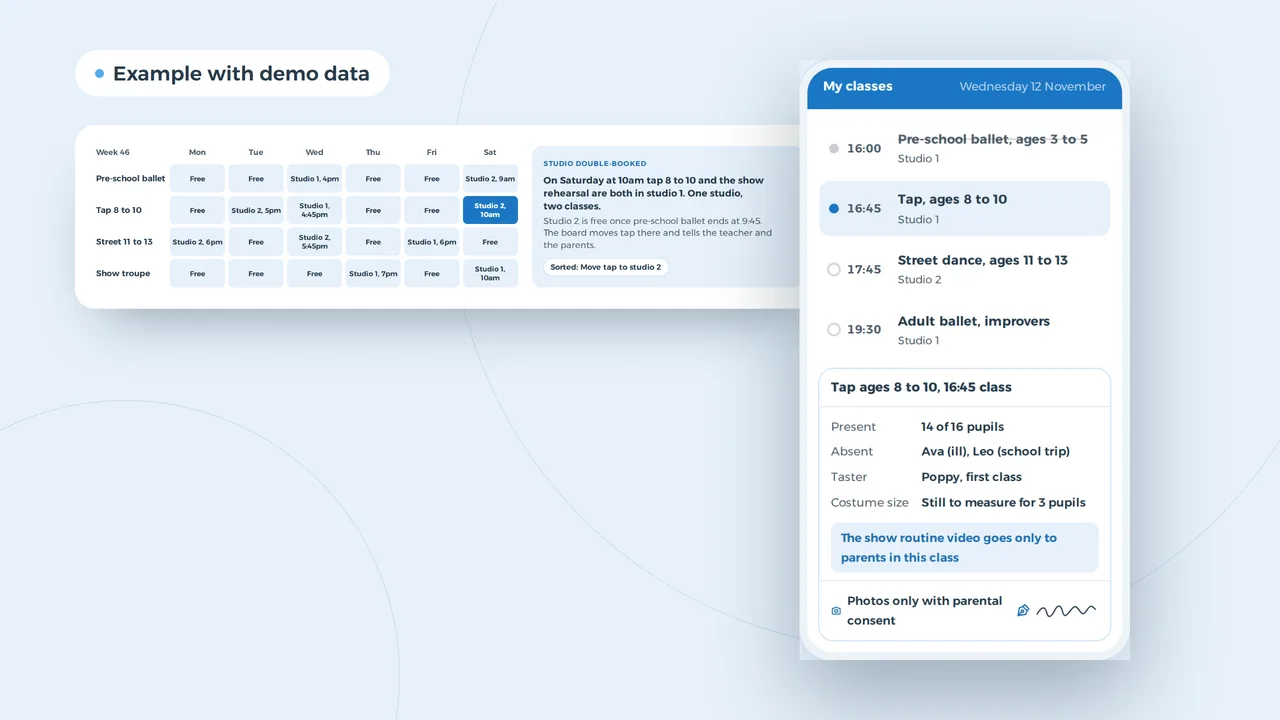
Tap and the show rehearsal in the same studio, Saturday at 10am
Studio double-booked
On Saturday at 10am tap 8 to 10 and the show rehearsal are both in studio 1. One studio, two classes.
Studio 2 is free once pre-school ballet ends at 9:45. The board moves tap there and tells the teacher and the parents.
Sorted: Move tap to studio 2
An example of what we can build, with made-up classes. You decide which rules the board watches.
Classes by age and grade, studios by the hour
A dance school plans with classes, teachers and studios at once. A tap class for ages 8 to 10 has a fixed day, a fixed teacher and a cap on numbers, because a studio only has so much floor. When something moves, such as an extra show rehearsal or a teacher off sick, three lists change at the same time.
The board keeps them together. It sees two classes booked into one studio, suggests a free one and tells the parents of the class that moves. It knows when a class is full: a new enrolment goes onto the waiting list, and when someone leaves, the first name on that list gets the place. A pupil who moves up a grade changes class without the fees being redone by hand. If you hire a church hall or a school gym for some classes, it goes on the board as its own room, with the hours you have it. For teachers' hours and cover, it works alongside staff scheduling software.
A parent searches for dance classes nearby one evening
New taster request
Daughter aged 7, ballet or tap, Wednesdays if possible
Hannah, Horfield, today 21:02
- A page per style and age with day and time
- A Google profile with reviews from parents
- A form to book a taster
Example with made-up dance schools and reviews.
Parents who search after tea
Parents usually pick a dance school close to home, and they search on their phone. They want three answers: which style suits their child's age, which day and time the class runs, and what the fees are. If your site does not say, they do not ring; they tap the next school on the map.
That is why dance school software also has a front end: a page per style and age group, a Google Business Profile with recent reviews from parents, and a taster form that drops straight into your list of pupils. How to get those reviews without nagging is in our guide to getting more Google reviews, and you can make the link for your newsletter with our Google review link generator. What else a good dance school site needs is on our page about dance school website design. Being found in your own town is a craft of its own; we do it as local SEO.
A pupil with enrolment, termly fees, costume and tickets
The parents follow it through a link
An example of what we can build, with made-up names and amounts. You choose the stages and the documents.
Termly fees without chasing parents at the door
Collecting fees is harder for a dance school than for a shop. A family often has two children in three classes, with a sibling discount, and pays per term. Then come costume fees, show tickets and exam entries. Keep that in bank statements and a spreadsheet, and every term starts with working out which payment belongs to whom.
In a file per pupil, it all sits together. The fees follow from the classes, the discount works itself out, and each term a payment link goes out with its own reference. Whoever has not paid gets a reminder you did not have to write. Parents follow along through a link or their own client portal, where they also find the medical notes, the photo consent and the costume order. How we build a portal like that is on our page on client portal development.
Two children, three classes, one account
Give a family one overview instead of an invoice per child. The sibling discount and the second-class discount work themselves out, and a parent sees in one place what is paid, what is due and which costume is on order.
AI turns the sizes on the enrolment forms into a costume order
An example of what we can build, with made-up names and sizes. AI counts and suggests; a person decides.
Costumes, tickets and the night itself
The show is the night many parents enrol for, and the part of the year with the most work in it. Every class gets a costume, every pupil a size, and every family wants seats together. With AI built into your software the counting goes faster: AI reads the sizes from the enrolment forms, drafts an order per size and lists who still needs measuring. The teacher checks it and decides; the AI only suggests.
Tickets sell from the same system. A parent picks seats for the performance their child is in, pays online and gets the ticket on their phone. A helper scans at the door. If you hold the show in a theatre with its own box office, we only connect the list; if you sell your own, you get a booking system on your website that books tasters as well. If you run more than one show a year, also look at what we build for event companies.
Safeguarding, licences and data: the rules
A dance school works with children, puts them on stage, plays music and keeps their details. These are the rules that most often end up in the software. Check the current position with the DBS, your local council, the ICO and your accountant before you rely on them; the safeguarding code below is for England.
| Topic | What the rule says | What the software does |
|---|---|---|
| DBS checks for teachers | An enhanced check covers roles that regularly train, supervise or are solely in charge of children. Basic and standard checks cost £20, enhanced £41; standard and enhanced checks are free for volunteers who qualify | The level, the date and a renewal reminder per teacher and helper |
| Safeguarding | The Department for Education code of practice for out-of-school settings covers health and safety, safeguarding and child protection, safe and suitable people, and governance. Dance is not named, but it is written for clubs, tuition and activities like yours | Emergency contacts, collection permissions and incident notes in the pupil file, seen by those who need them |
| Children in the show | A child under school leaving age in a performance the audience pays to see, or on licensed premises, may need a licence. The person in charge applies to the child's local council at least 21 days before. A child away from their parent, teacher or tutor needs a council-approved chaperone | A list per performance of who is on stage, their council and the chaperones |
| Music in class and on stage | If you play music in your business in the UK, you usually need TheMusicLicence from PPL PRS; events can be covered by a temporary permit | The licence as a document with its renewal date |
| Data protection fee | Most organisations pay the ICO £52 or £78 a year; some are exempt | Pupils' data kept to what the school needs, with access by role |
Photos of pupils, medical notes and emergency contacts are all personal data, and health information is special category data. Ask only what a teacher needs to keep a child safe, ask parents for photo consent per use, and let only the teacher of that class see it. How UK GDPR differs from the EU version is in our guide on UK GDPR and EU GDPR; what your site itself needs is in our guide to a GDPR-compliant website. If a supplier handles your pupils' data, you also need a data processing agreement.
What fits a school of your size
A teacher with two classes in a hired hall needs something different from a school with twelve teachers. You do not need a heavy package or an ERP to run properly; start with whatever costs you the most hours today.
| Size | Typical set-up | What is enough |
|---|---|---|
| Sole teacher | Two to five classes in a hired hall | A good website, an enrolment form and payment links |
| A team of five | Own studio, five teachers, one show a year | A pupil list with classes, termly fees and an app for teachers |
| A school of 20 to 50 people | Two sites, exams, more than one show | A platform with a file per pupil, a studio board, tickets and a parent portal |
| Larger | A vocational academy or a group of schools | Custom software linked to your accounts and the systems you already use |
For a rough idea of what custom work costs, try our software development cost calculator or read about custom software for small businesses. If your school is a charity with trustees, our page on software for charities covers that side. If it runs more like a club, our page on sports clubs may sit closer to your week.
A year of fees for 180 pupils, in hours
An example, not a measurement. The assumptions: a dance school with 180 pupils, fees in three terms, one pupil in five pays late and gets two reminders of 5 minutes each, matching a payment by hand takes 2 minutes, and before the show you count the sizes for 12 classes at a quarter of an hour each.
| Task | Sum | Minutes a year |
|---|---|---|
| Reminders | 36 pupils x 2 reminders x 5 minutes x 3 terms | 1,080 |
| Matching payments | 180 pupils x 3 terms x 2 minutes | 1,080 |
| Counting costume sizes | 12 classes x 15 minutes | 180 |
| Together | 2,340, or 39 hours |
With payment links that match themselves, reminders that go out on their own and an order that AI drafts, mostly checking is left. Your own figures will differ; work it out with your own numbers and your own time per task.
A first version before re-enrolment opens
- A conversation about your yearYou tell us how a year runs at your school, from the first taster to the show. Together we find where the hours go and what has to come first.
- A fixed price per projectYou get a proposal at a fixed price. Websites start from 1,500 euro; software is priced after the conversation, based on what goes in.
- Your own lists as the starting pointWe start from your current spreadsheet or export, so your pupils are in from day one. How that works is in our guide on how to replace Excel with software.
- Live for the new school yearWe plan the launch before re-enrolment, so you do not switch systems in the middle of a term. After that we build on what the first term teaches us.
We have not built for a dance school yet, but for Business Centrum we replaced a spreadsheet with a platform of client files, documents, tasks and a portal where their clients follow along, the same building blocks as a pupil file with a link for parents. If you want an app parents keep on their home screen, read how we approach app development; often a PWA is enough.
What dance school owners ask us
Is there free dance school software in the UK?
Yes, there are packages for enrolment and fees, some free for small schools. For a teacher with a few classes they are often enough. Custom software pays off when your package makes you do things twice, for example because costumes, tickets and fees live in three systems. If you want a list you control for families and pupils, read about custom CRM development.
Do our dance teachers need a DBS check?
A role that regularly trains, supervises or is solely in charge of children can get an enhanced check, and most schools ask for one. Check the right level for each role with the DBS eligibility guidance. The software keeps the level, the date and a renewal reminder per teacher and helper.
Do the children in our show need a performance licence?
It depends on the show. A child under school leaving age in a performance the audience pays to see, or on licensed premises, may need one, applied for by the person in charge at the child's local council at least 21 days before. Ask the council whether your show is covered by an exemption.
Can parents enrol and pay without an account?
Yes. A parent gets a link by email or text, fills in the enrolment, gives photo consent and pays the first term. Nobody has to remember a password.
When is the best time to switch?
A few months before re-enrolment, so the new school year starts in the new system. Switching mid-term works too, but then running payments and classes move across. Plan it in a conversation with us.
What does dance school software cost?
That depends on what goes in. Websites start from 1,500 euro. For software you get a fixed price per project after a conversation.
Custom software
How VBS helps you with this
We build the platform your business runs on every day: your spreadsheets, emails and paperwork in one system that does what you do.
- Your workflow mapped first, then a fixed price
- Screens for the office, the client and the road
- Hosting, backups and security managed by us on AWS
How we approach it is on our page about Custom software.
Enrolments, fees and the show in one system?
Tell us how a year runs at your school, from the first taster to the final bow. We will show you where we would start.
Rather get in touch right away?