Industries: care homes
Care home software UK: the work beside your care records
Care plans, medication and daily notes stay in the digital social care record you already use. We build the work around it that still runs on spreadsheets and phone calls: the rota per unit, the family app, enquiries and admissions, recruitment and a website that shows your fees and your rating.
Sixty residents, three shifts and a phone on reception
Care home software has to keep up with a building that never closes. The early shift on Oak starts at a quarter to seven, the singing group meets in the lounge at ten, a daughter and two grandchildren arrive at two, and the night staff take over at a quarter past nine. In between, a son rings about the extras on the invoice, a new enquiry comes in through the website and a carer texts to say she is off sick tomorrow.
Most homes already keep care plans, medication records and daily notes in a digital social care record, and that is where they belong. The same goes for partners around the home: the pharmacy that supplies medication and the optician who visits for glasses keep their own records, and we do not pull those into yours. What surrounds it often lives in a spreadsheet with colour codes, a notice board and the reception phone. Gaps on the rota surface at handover. Enquiries sit in an inbox. The fees page says 'please call us'.
This page sets out what we build beside your care record, the rules it has to respect in England and how much of it a small residential home or a group with several homes actually needs. If you provide care in people's own homes rather than in a home, see domiciliary care software instead.
What stays in the care record, and what we build next to it
We do not build care planning, eMAR or daily care notes. That is the job of the digital social care record. A second record beside the first would only mean two places to check.
What we build is the work no care record was designed for, and that still costs your managers hours every week. A rota that knows the staffing each unit and shift needs. An app that keeps families informed without any care content in it. A list that follows every enquiry to a visit, an assessment and a move-in. A recruitment page carers actually finish. And a website that shows your fees and your CQC rating where families look. Where your care record or payroll offers an export or an API, we read from it rather than ask anyone to type things twice; see API integration services.
A resident's day, on her daughter's phone
- The week's menu is in the appWhat is served at each meal, and how to book a place if you want to stay for lunch.
- Photos only with consentPhotos of an activity only show residents who agreed to be in them.
- Questions reach the right personLaundry goes to reception, an outing to the activities team. Care questions you talk through with the staff.
An example of what we can build, with made-up names. You choose what families see.
Families who live an hour away
A daughter who cannot visit on a Monday wants to know whether her mother went to the singing group, what was for lunch and whether Saturday at two still suits. Those questions now reach reception, or a carer in the corridor who has something else to do.
A family app answers them without the phone: the week's menu, activities, booking a visit or a place at lunch, photos from an outing and the monthly newsletter. What it leaves out is care content. Health data is special category data under UK GDPR, so care notes stay in the care record and in conversations with the team. The app does not have to be in an app store: a web app with an icon on the home screen is often enough, as in app development. If families should see invoices or signed documents, those sit behind a login in a client portal with two-factor authentication.
A gap on the late shift, filled before the day starts
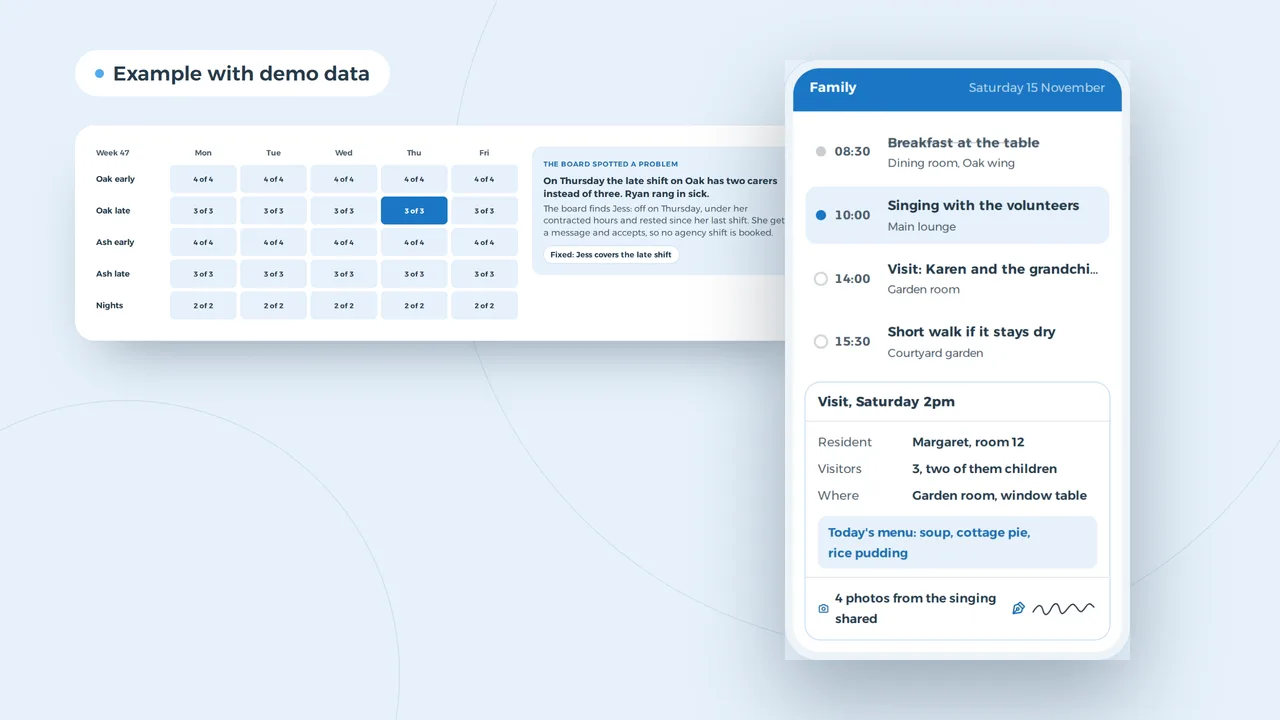
The board spotted a problem
On Thursday the late shift on Oak has two carers instead of three. Ryan rang in sick.
The board finds Jess: off on Thursday, under her contracted hours and rested since her last shift. She gets a message and accepts, so no agency shift is booked.
Fixed: Jess covers the late shift
An example of what we can build, with made-up names. You choose how many staff a shift needs.
A rota built around units and shifts
A care home rota has more layers than a calendar. Early, late and night shifts on each unit, a minimum number of carers and a nurse where you provide nursing care, part-timers, bank staff, annual leave and sickness. It often lives in a spreadsheet the deputy manager maintains, and tomorrow's gap shows up when someone calls.
We build a rota that knows your own rules: how many staff each shift needs on each unit, who is trained for which unit, and how many hours someone is contracted for. When a carer drops out, it suggests who can cover and sends that person a message. Swaps happen in the app, with the manager's approval. Fewer last-minute agency shifts is usually where the money is. When a rota tool beats a spreadsheet is the subject of Excel scheduling or planning software; what one can do is on staff scheduling software. The rota holds no care data about residents.
An admission without care content, with the fees
The family see invoices, extras and appointments. Care notes stay in the care record.
An example of what we can build, with made-up names and fees.
Enquiries that do not go cold
An empty room costs a care home every week it stays empty, and most enquiries come from families under pressure: a hospital discharge, a fall, a carer who can no longer cope. A message left in a shared inbox on Friday evening can be answered by another home on Saturday morning.
We build a list that follows every enquiry: who it is for, what type of care, self-funded or council-funded, when they hope to move. It shows who to call back, books the visit and the pre-admission assessment, and keeps the contract, the deposit terms and the first invoice in one place the whole management team can read. For a home that wants more than a list, that becomes a small custom CRM for admissions, with no clinical content in it.
Nantwich, a son searching, and a visit on Saturday
Visit request
For his father, residential care, Saturday morning if possible
Paul, Crewe, today 20:42
- A fees page per room and type of care, with what is included
- The current CQC rating on every page
- A visit request that asks nothing about health
An example of what we can build, with made-up names and reviews.
Fees and your rating, where families look first
People rarely search for a care home for themselves. It is a son or daughter typing 'care home' and a town after work, with three questions: what is it like, what does it cost and what did CQC say. Many care home websites answer the first and hide the other two.
Two rules make hiding them a risk. Regulation 20A requires a provider in England to show its most recent CQC rating on its website, legibly and conspicuously, with its date, the address of CQC's website and where the latest report can be found there. The Competition and Markets Authority's advice on consumer law expects homes to show an accurate and representative indication of the weekly fees they typically charge self-funders for each type of care, what those fees include, which extras cost more and how deposits work. On a website that also means the standard contract terms and the complaints procedure are easy to find. What that looks like page by page is in care home website design. Add a Google profile with the right category, photos and visiting hours; create a Google Business Profile explains the steps and local SEO how we work. A website starts from 1,500 euros.
Finding a senior carer for the Oak wing
An example of what we can build, with made-up names. You choose what you ask.
A vacancy a carer can answer on the bus home
Without carers there is no rota, and without a rota the next admission waits. Carers look for work on their phones after a shift, close to home. An application that asks for a CV and a cover letter loses most of them before they start. So we build the vacancy on your own site with the questions that matter: name and number, care experience or new to care, days or nights. Applications land in a list the manager and deputy can both see, with where each conversation stands.
Once someone is offered a job, the same list tracks the checks before a first shift, such as references, right to work and a DBS check, so nobody starts with one missing. What a candidate wants to know first is how the rota works: how far ahead it is set, how often weekends come round, whether swaps are possible. Showing that is employer branding, and a real rota in an app says more than a promise in an advert.
Five notes from the activities team become the newsletter
An example of what we can build, with made-up names. The AI drafts from your own notes, you decide what goes out.
Writing the newsletter, not the care notes
AI makes no care decisions here and reads no care record. Where it saves time is the writing around the home: the monthly family newsletter from the activities coordinator's notes, the week's menu in plain language from the kitchen's list, a message about changed visiting times. Someone in the home reads the draft and decides what goes out.
Even without care data, these drafts carry the names of residents and families. The model therefore runs in the UK or EU, with a supplier who signs a data processing agreement and keeps nothing to train on. How we set up a private assistant is on custom ChatGPT for business.
How much a home of your size needs
A small residential home with twenty residents does not need a rota engine for five units. A group with four homes needs more than a family app. This is what we would build beside the care record at each size.
| Size | What you need | What you can skip |
|---|---|---|
| Small home, up to 20 residents | A website with fees and rating, a newsletter, an enquiry list | A rota engine, family logins |
| Home of 40 to 80 residents | A rota per unit and shift, a family app, admissions tracking, a careers page | Reporting per site, a board dashboard |
| Nursing home or several units | A rota with nurse cover per shift, a family portal with invoices, a link to the care record | A second care record |
| Group with several homes | One platform across homes, shared enquiries and bank staff, reports per home | A large suite you half use |
What drives the cost of building that is set out in custom software development cost.
CQC, the CMA and UK GDPR in your systems
These are the rules that most often reach what we build for a care home in England. Scotland, Wales and Northern Ireland have their own regulators: the Care Inspectorate, Care Inspectorate Wales and the RQIA.
| Topic | What it asks | What the software does |
|---|---|---|
| Fundamental standards | CQC registration and the regulations every provider must meet, including enough suitably qualified staff | A rota that shows staffing per unit and shift, at any time |
| Fit and proper staff | Checks before someone starts, such as references and a DBS check | A recruitment list that shows which checks are done |
| Ratings on display | Regulation 20A: the latest rating on your website and at each home, with its date | Puts the rating on every page from one place |
| Fees and contracts | CMA advice: indicative weekly fees per type of care, what is included, extras, deposits, contract terms and complaints easy to find | A fees page per room and type of care |
| Unfair practices | Consumer law under the DMCC Act 2024, in force since April 2025 | No pressure selling, no fees revealed only on the phone |
| Personal data | Health data is special category data under UK GDPR | No care content in the family app or the rota |
How UK GDPR differs from the EU version, for a supplier like us in Belgium, is in UK GDPR vs EU GDPR.
Sixty residents and a week of phone calls
| Task per week | Phone, spreadsheet and paper | With rota, family app and enquiry list |
|---|---|---|
| Questions from families | 160 minutes | 80 minutes |
| Filling rota gaps | 120 minutes | 30 minutes |
| Following up enquiries | 150 minutes | 60 minutes |
| Newsletter and menu | 90 minutes | 30 minutes |
| Sorting applications | 60 minutes | 20 minutes |
| Total | 580 minutes | 220 minutes |
That is six hours a week, spread across reception, the deputy manager and the activities team. A care home does not close for the summer, so over 52 weeks it comes to 312 hours. One agency shift avoided a week often weighs more than the time. Whether those hours go to residents or to work that has waited for months is your call.
Starting with one unit
- A conversation about your weekHow families get in touch, who builds the rota, which care record you use and where the hours go. We look at an ordinary week, not a feature list.
- A fixed price per projectTogether we pick the part that costs the most time and put a fixed price on it. A website starts from 1,500 euros; software is priced after the conversation.
- One unit uses it firstOne unit works with the first version for a few weeks. What does not fit is changed before the rest of the home follows. You own the code and the data.
We have no care home among our clients yet; protecting sensitive data is what we did in the platform for Business Centrum, which replaced spreadsheets, with two-factor authentication, sessions you can revoke and encrypted storage.
Custom software
How VBS helps you with this
We build the platform your business runs on every day: your spreadsheets, emails and paperwork in one system that does what you do.
- Your workflow mapped first, then a fixed price
- Screens for the office, the client and the road
- Hosting, backups and security managed by us on AWS
How we approach it is on our page about Custom software.
Fewer phone calls about the rota and the fees?
Tell us how a week runs at your home and which care record you use. We will show you where we would start.
Rather get in touch right away?