Websites for insurance brokers
Insurance broker website design that turns local searches into quote requests
A site that answers what homeowners, landlords and small firms check before they get in touch, and a quote form that asks what the insurers will ask.
People compare brokers on their phone first
Insurance broker website design has one job: turn a local search into a quote request you can work with. A landlord with a renewal on 1 January, a family that has just completed on a house and a joiner whose insurer has pulled out of the trade all search, open a few sites and contact the broker that clearly handles their kind of cover.
Many broker sites miss that. Every product sits in one long list, the quote form asks for a name and a message, and the first call goes on asking for the rebuild cost, the claims history and the renewal date. Who regulates the firm and how it is paid is tucked into the footer, while that is exactly what a careful buyer checks.
Our starting point is your book of business: which clients you want more of, which towns you cover and what those clients ask. The enquiry reaches you ready to market, and the pages load fast on a phone.
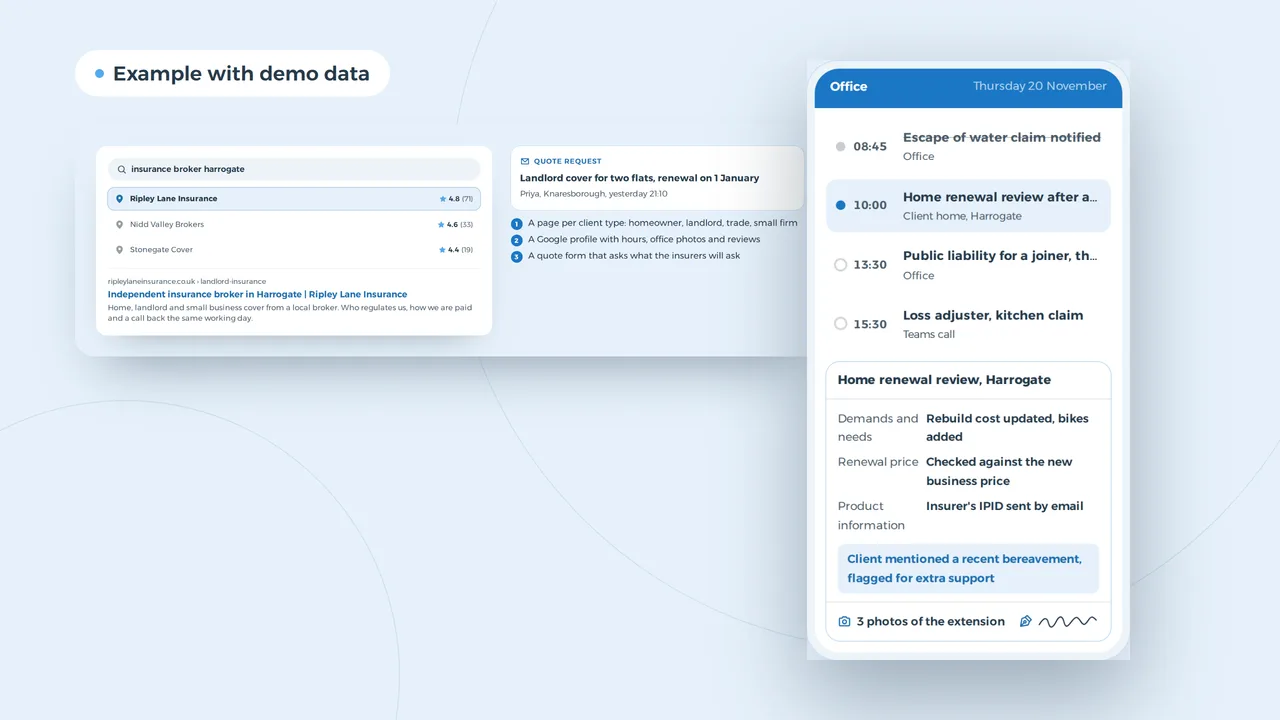
A search in Harrogate that turns into a quote request
Quote request
Landlord cover for two flats, renewal on 1 January
Priya, Knaresborough, yesterday 21:10
- A page per client type: homeowner, landlord, trade, small firm
- A Google profile with hours, office photos and reviews
- A quote form that asks what the insurers will ask
Example with made-up brokers and reviews.
One page per client type, not one page of products
A broker site works best with a page per client type rather than a page per product. A homeowner, a landlord with three flats, a tradesperson and a small firm with ten staff all ask different questions, and each page answers them in their words: what cover they usually need, what the insurers will ask, and what you do when they claim.
Each of those pages can rank on its own for searches in your area, which is what local SEO is about. The Google Business Profile brings people to the map, reviews from clients decide who gets the click, and the page itself has to convert. That is the part our website design work focuses on.
A typical broker site against one built for quote requests
The difference rarely sits in the design. It sits in what the site asks and answers.
- Homepage
- Typical broker siteA slogan and a list of products
- Built for quote requestsWho you insure, where, and a quote button per client type
- Product pages
- Typical broker siteOne page with every type of cover
- Built for quote requestsA page per client type, with what the insurers will ask
- Quote form
- Typical broker siteName, email, message
- Built for quote requestsRenewal date, claims history, last year's schedule as an upload
- FCA status
- Typical broker siteA line in the footer
- Built for quote requestsStatus, firm reference number and how you are paid, in plain words
- Complaints
- Typical broker siteMissing or a PDF
- Built for quote requestsA short page with your process and the Ombudsman route
- After the form
- Typical broker siteAn email in a shared inbox
- Built for quote requestsA task in your CRM with the renewal date attached
Your FCA status, fees and complaints route, said plainly
Before a client buys, you have to tell them who you are, whether you give advice and how you are paid. Saying it plainly on the website saves that conversation and builds trust before the first call: authorised and regulated by the FCA, your firm reference number with a link to the Financial Services Register, whether you charge a fee as well as commission, and how to complain, including the route to the Financial Ombudsman Service.
Everything on the site counts as a communication with clients, so the FCA's rule applies: clear, fair and not misleading. No 'cheapest quote guaranteed', no cover described without its main exclusions. The same goes for the basics every UK site needs, from cookie consent to accessibility. Brokers are a favourite target for email spoofing, so check your domain with our DMARC checker as well.
The quote request lands in the handler's day
- Demands and needs are on fileWhat the client asked for, what you recommended and why: stored with the client record, ready when a claim comes in.
- This morning's claim keeps movingThe notification went to the insurer. The app shows what the adjuster still needs and when the visit is booked.
- Client data stays in the office systemThe phone shows the appointment and the record. Photos and documents go straight to the file, not the camera roll.
An example of what we can build, with made-up names and appointments. You choose what the record shows.
A quote form that asks what the insurer will ask
A good quote form asks what the insurer will ask, and nothing more. For a home: the rebuild cost, the year of construction, the claims history and the renewal date. For a landlord: the number of units and the type of tenants. For a trade: turnover, staff and the work they do. The client can upload last year's schedule, so you see the current cover straight away.
The enquiry then lands where your team works. In an insurance broker CRM it becomes a task with the renewal date attached, in a CRM built to your process it starts a follow-up, and through an integration it can reach your broking system. Clients who already hold a policy can log in to a client portal to follow a claim.
Pages most broker sites need
Home insurance
Buildings and contents, high value items, listed and non-standard homes.
Landlords
One flat or a portfolio, with the tenant types and the questions insurers ask.
Trades
Public liability, tools and vans, for the trades you already insure.
Small firms
Office, liability and cyber cover, with a call back from a named handler.
About and regulation
Your FCA status, how you are paid, and the people behind the firm.
Claims and complaints
How to make a claim, what happens next, and how to complain.
Found by search engines and AI assistants
People increasingly ask AI assistants which broker to use, and those assistants read the same pages search engines do. Clear pages per client type, real answers to real questions and a consistent business profile help in both places; the guide on getting found in ChatGPT explains what else matters. For broader rankings beyond your town, see our SEO work.
Website design for a broker, priced per project
From1,500 euro
A broker website starts from 1,500 euro. After a first conversation you get a fixed price for the whole project.
- Number of client typesEach page per client type is written for that client, not copied.
- Quote formsA simple enquiry form costs less than forms per client type with uploads.
- Links to your systemsSending enquiries to your CRM or broking system adds work, depending on what the system allows.
The guide to UK website costs sets out what drives the price of a site in general. Other regulated professions face the same mix of trust and rules; compare our approach to a website for accountants or a website for law firms.
Website design
How VBS helps you with this
We build your site from design to copy, imagery and code, in one team, so that Google and your buyers find it and get in touch.
- Design and copy built on your buyers' questions
- Fast, multilingual when you need it, at a fixed price
- Forms, cookieless analytics and hosting on AWS
How we approach it is on our page about Website design.
More quote requests from your own town?
Tell us which clients you want more of and where. We will say what the site needs, with a fixed price per project.
Rather get in touch right away?