Industries: engineering firms
Engineering firm software built around the job, the fee stage and the drawing
Your analysis and CAD packages do the engineering. We build what is missing around them in a structural or civil consultancy: time that lands on the right job and RIBA stage, fees tracked stage by stage, a drawing register everyone trusts, and site records that leave from site.
A consultancy sells hours and bills by stage
Engineering firm software rarely needs to do the engineering. You already have analysis software, a CAD or Revit seat per engineer and a spreadsheet for everything else. What slips is the spreadsheet part: timesheets filled in from memory on Friday, a Stage 5 fee nobody checks until the invoice is due, a contractor pouring to C01 while the office has issued C03, a site visit record typed up at nine at night.
This page sets out what we would build for a structural or civil engineering consultancy in the UK, by need and by size of practice, with the duties that shape the job: CDM 2015 designer duties, the dutyholder and competence rules under Part 2A of the Building Regulations, the Building Safety Act and the protected titles of the Engineering Council. Everything shown is an example with made-up names and jobs.
Today's site visit, design team meeting and calc deadline on the engineer's phone
- Hours land on the job and the stageTime logged on site counts against the Stage 5 fee. The office sees how much of each stage is already used.
- The drawing on site is the current revisionThe phone opens the drawing that is current. Superseded revisions stay in the register, clearly marked.
- The record goes out from sitePhotos, observations and the contractor's question go to the right people at once, with a copy in the project file.
An example of what we can build, with made-up names and jobs. You choose what the site visit record asks.
A week in a structural practice, and where it leaks
Engineers rarely lose time on the calcs themselves. It leaks at the edges: the site manager on the phone about a missing opening, the architect's email with fourteen comments, a colleague asking which revision the contractor has, and the hours nobody allocates to a stage until the fee runs out.
| Moment | How it often goes | With a system of your own beside your design software |
|---|---|---|
| Site visit | Photos on the phone, notes on paper, a Word record in the evening | The record leaves from site, photos pinned to the drawing, time on the job and stage |
| Timesheets | Filled in on Friday from memory, often on the wrong job | Time per day, per job and per RIBA stage, with a nudge when a day is empty |
| Fee tracking | The invoice shows Stage 5 is already well over | Each stage shows its fee against the time spent, weekly or monthly |
| Drawing issue | A folder per job, file names like final_v3, the contractor builds off an old one | A drawing register with the current revision, who received it and when |
| Architect's comments | One long email, points lost between revisions | Each comment against the right drawing, with an owner and the revision that closes it |
| CDM information | Risk notes in a calc file or in one engineer's head | A designer risk register per job, passed to the principal designer with the drawings |
Your analysis and CAD packages stay. We build alongside and connect where they allow it. If most of your practice still runs on spreadsheets, start with replacing Excel with software.
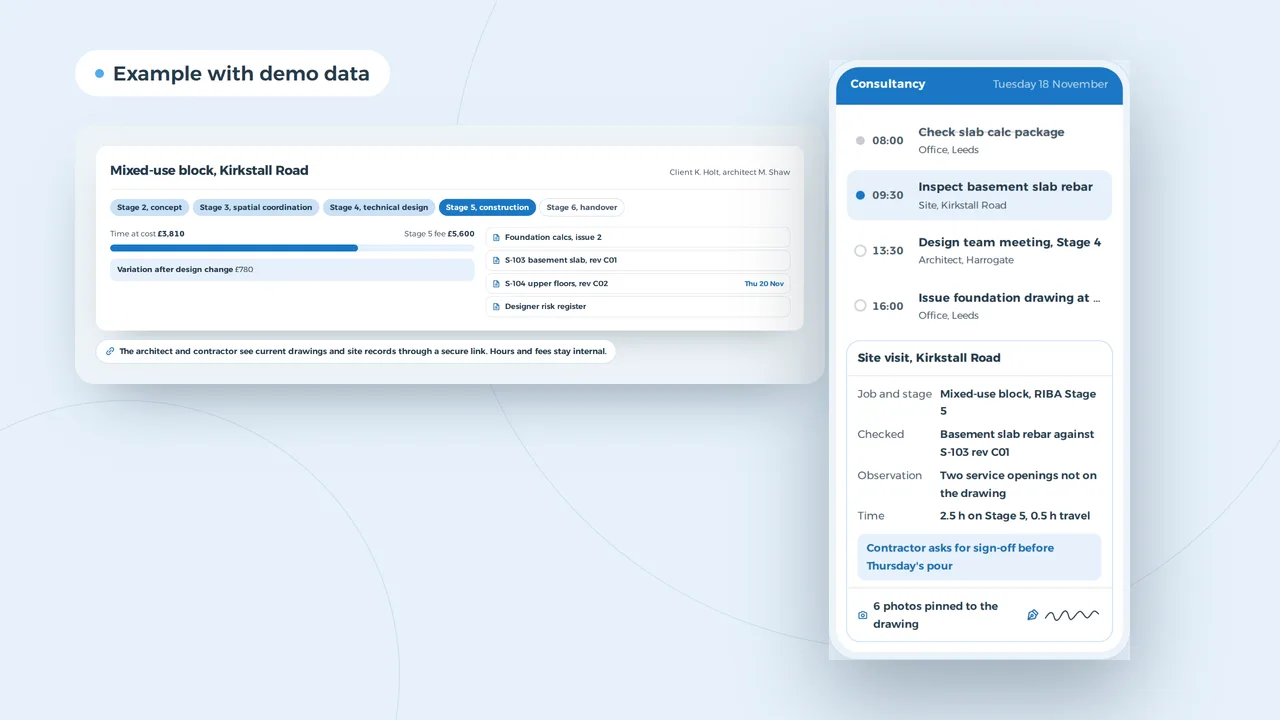
A mixed-use block in five RIBA stages, with the fee against the time
The architect and contractor see current drawings and site records through a secure link. Hours and fees stay internal.
An example of what we can build, with a made-up job and amounts.
Fee stages measured against the time booked
Most consultancies agree a fee as a lump sum or a percentage, split across RIBA stages: concept, spatial coordination, technical design, construction, handover. Engineers book time by the hour. Where the two meet, the practice knows whether a job is healthy. In many firms that moment comes at the end, when it is too late to do anything.
In the job file each stage carries its fee, and time lands on it as soon as it is booked. You see how much of each stage is used, and a variation after a design change sits apart so it can be agreed before it disappears into the job. When a stage closes, the file drafts the invoice. A time tracking app that knows jobs and stages is the first piece; a custom dashboard shows the whole practice by director, team or client.
The architect and contractor get a secure link to what concerns them: current drawings, site records and documents still to come. A client portal like that saves the calls and emails asking which revision is current. For invoicing, the rules that apply in the UK today are in our guide to e-invoicing in the UK.
The weekly board spots a site visit clashing with a deadline
The board spotted a problem
On Thursday Tom is due on site in Ilkley at 9am, and the calc package for the same job goes to building control at noon. With the drive and the check, that does not work.
The board moves the site visit to Friday at 9am, as the pour is not until Monday, and lets the site manager know.
Fixed: Site visit moved to Friday
An example of what we can build, with made-up names. You choose what the board checks.
Five engineers, thirty live jobs and a calc package due at noon
A five-person practice can easily have thirty live jobs at different stages. One waits on the architect, one is about to pour, a third has calcs due with building control tomorrow. A shared calendar knows the meetings but not the rules of your practice: that a calc package needs a day of checking, that a site visit in Ilkley costs half a day with the drive, that the drainage engineer is needed at the S104 meeting.
A planning board knows those rules. It shows each engineer's week with jobs, site visits and deadlines, and when a visit lands on the morning a package for the same job is due, it flags it and suggests another slot. You decide what the board checks. How such a board works is on our pages about construction scheduling software and staff scheduling software; whether a spreadsheet still does the job for you is weighed up in Excel scheduling or planning software.
Fourteen comments from the architect, each against the right drawing
An example of what we can build, with made-up comments. The AI sorts and drafts, the engineer calculates and decides.
Revision C02 with every comment closed
AI does not design foundations or sign off calcs. It does what every engineer does first after an email with fourteen comments: work out which comment belongs to which drawing, what is already closed and what is new. A terrace added on the third floor means new loads, updated calcs and an entry in the designer risk register. A moved lift core touches two drawings. The AI drafts that list with an estimate of the hours for the new revision, and the engineer decides.
That estimate is also worth a conversation with the client: a change after Stage 4 sign-off is a variation. Seen early, it can be agreed before the hours are spent. More on what AI can and cannot do on a building project is in AI for construction, and how it drafts a fee proposal is covered in AI quote generator.
Hiring a graduate engineer through your own site
An example of what we can build, with made-up names. You choose which questions the form asks.
Duties a UK engineering consultancy has to track
These are the rules that most often need a place in a UK consultancy's systems, checked against the Health and Safety Executive, GOV.UK and the Engineering Council on 31 October 2026. This is not legal advice; check your own position with your institution or your insurer. The summary below covers England; Scotland and Wales have their own building standards.
| Situation | What the rule asks | What the software does |
|---|---|---|
| Designing under CDM 2015 | A designer, consulting engineers included, makes sure the client knows its duties before design starts, eliminates foreseeable risks and controls the rest, and gives information to the principal designer, the client and the principal contractor | A designer risk register per job, linked to the drawings, sent with each issue to the principal designer |
| Domestic jobs under CDM | On a domestic project with no principal designer appointed, the designer in control of the pre-construction phase takes on the role | A flag on domestic jobs, with the extra duties as tasks when your practice holds the role |
| Building Regulations Part 2A | Since 1 October 2023 every designer must be competent for the work it accepts, and on a job with more than one designer, they agree in writing who is principal designer. The principal designer signs the completion statement | Appointments and competence evidence per job, and the written agreement in the job file |
| Higher-risk buildings | Under the Building Safety Act 2022, buildings of 18 metres or seven storeys with at least two homes go through gateways with the Building Safety Regulator | A job type with its own stages and documents, so nothing reaches a gateway incomplete |
| Longer liability | The Act extends the time homeowners have to claim for sub-standard work from 6 to 15 years for new work, with a longer window for work finished before June 2022 | Drawings, calcs and site records kept per job for as long as you decide, and easy to find |
| Professional titles | CEng and IEng are legally protected titles, awarded through licensed institutions such as ICE and IStructE. The word engineer on its own is not protected | Each engineer's registration and institution, with their CPD record kept alongside |
| Personal data | UK GDPR: plans of private homes, addresses and client names are personal data | Access by role, a secure link per job, data hosted in the UK or EU. See UK GDPR vs EU GDPR |
Engineering firm software by size of practice
A sole practitioner does not need an ERP or a planning board. A forty-person practice across two offices needs more than a timesheet spreadsheet.
| Size | What usually does the job | What we would build on top |
|---|---|---|
| Sole practitioner | Accounting software and your design packages | A simple app for time per job, a list of deadlines, a site that says what you do and where |
| Team of five | Spreadsheets for timesheets and planning, a shared drive of drawings | A weekly board, time per job and stage, a job file with a drawing register |
| 20 to 50 staff | A timesheet and invoicing package that does not know RIBA stages | Fees by stage against time, a portal for architects and contractors, dashboards by director and team |
| Larger, several offices | An ERP or a practice management package for the basics | Integrations with that package, plus a site app and comment register alongside, rather than replacing it |
For a small practice, off-the-shelf project management software for engineering firms, or a little custom software for a small business, is often enough. A custom ERP only makes sense when several teams, offices and ledgers need to work as one. What a build costs and what drives the price is in custom software development cost, and connecting to the packages you already pay for is on API integration services.
A five-engineer practice, counted in hours
| Task | Today | With a system of your own (assumed) | Hours a year saved |
|---|---|---|---|
| Timesheets and searching | 5 x 20 min a day | 5 x 5 min a day | about 290 |
| Site visit records | 6 x 30 min a week in the office | 6 x 5 min, the record leaves from site | about 115 |
| Checking which revision went out | 2 h a month | a glance at the register | about 20 |
| Total | about 425 hours |
That is roughly a quarter of a full-time engineer a year, time that can go on jobs instead of admin. For many practices the bigger gain is seeing during the job whether a stage fee will hold, not at the final invoice.
A conversation first, then a fixed price per project
- A day in your officeWe sit in for a day: how time is booked, how a drawing moves from P01 to C02, how a site record is written and what your accounting and design software already do.
- A proposal at a fixed priceWhat we build, in which order, and a fixed price per project, agreed after that day.
- The biggest time sink firstUsually time by job and stage plus the site app, then the job file with the drawing register, then fee tracking. Each part works on its own.
- Data in its placeA data processing agreement, hosting in the UK or EU, access by role. Drawings and calcs stay the practice's own.
We have not built for an engineering consultancy yet, but the management platform for Business Centrum also replaces spreadsheets with files, tasks, documents and a log, with a portal where clients follow along.
Along the chain: land surveyors supply the topographical survey your design starts from, architects send the comments, and insurance brokers place the professional indemnity cover your appointments ask for. Each has its own page with what we would build. If winning work is the bigger question, read marketing for civil engineering firms; a website that shows your projects also helps you hire. Or get in touch and tell us how your practice works today.
Questions engineering practices ask about software
Does this replace our analysis or CAD software?
No. Design and drawing stay in the packages you know. We build what is missing around them: time by job and RIBA stage, a weekly board, a job file with a drawing register, site records from a phone and fee tracking by stage.
Can timesheets feed our accounts package?
Yes, if the package has an API. Time and stages stay in the practice's system, invoices per stage go to your accounts software.
Does it work for civils and drainage as well as structures?
Yes. The stages and documents differ, such as S104 and S38 agreements or flood risk notes on civils jobs, and the system follows the steps you set.
Will the architect and contractor see our fees and hours?
No. They get a secure link to what concerns them: current drawings, site records and documents still to come. Time, fees and internal notes stay with the practice.
Is a system of our own too much for a three-person practice?
Often it is. Then a timesheet tool with jobs and stages and a list of deadlines is enough. We say so in the first conversation and only build more as the practice grows.
Custom software
How VBS helps you with this
We build the platform your business runs on every day: your spreadsheets, emails and paperwork in one system that does what you do.
- Your workflow mapped first, then a fixed price
- Screens for the office, the client and the road
- Hosting, backups and security managed by us on AWS
How we approach it is on our page about Custom software.
Every stage fee visible while the job runs?
Tell us how your practice tracks time, drawings and site visits today. We look at it with you and say what we would build alongside your design software.
Rather get in touch right away?