Industries: land surveyors
Software for land surveyors, built around site, office and client
Your survey and CAD software handles the points and the drawings. We build what it leaves to the office: a job sheet on the phone for every site visit, a board for crews and kit, a job file the client's solicitor can follow, and a website that brings in enquiries with the title number attached.
A survey practice runs between site and office
Search for software for land surveyors and you mostly find CAD, point cloud tools and the software that comes with the GNSS receiver. They do their job well. What they rarely do is run the rest of the practice: which job is on site when, who has the scanner, whether the neighbour knows about Thursday's visit, which title plans are still missing and when the solicitor gets the report.
That work lives in a diary, an inbox, a spreadsheet and the head of the senior surveyor. This page shows what we build around it for a sole practitioner or a practice with several crews, beside the survey package you already use. If you work on projects with others in the design team, see what we do for architects and for engineering firms. Engineers who want those same design teams to find them have a page of their own on marketing for civil engineering firms.
Four jobs in a day, on the surveyor's phone
- The title plan sits beside the measured lineHM Land Registry plans show general boundaries. The app keeps the title plan, the old deeds and your survey together on one job.
- Terms are on the job before anyone drives outSigned terms of engagement, the fee basis and the conflict check are attached before the site visit is booked.
- Survey data stays in your own softwarePoint clouds and drawings live in your CAD package. The phone shows the job and what is still missing.
An example of what we can build, with made-up names, addresses and jobs. You choose what the job sheet shows.
Lost time sits between the survey jobs
Surveyors rarely lose time measuring. Time leaks between jobs: an enquiry that arrives without a title number, a neighbour who did not know about the site visit, a solicitor asking whether the report is ready, site photos still sitting in a phone's camera roll.
| Moment | How it often goes | With an app of your own beside your survey software |
|---|---|---|
| An enquiry comes in | An email with an address, then a call back for the title number and access | A form asks for the address, title number, survey type and access; the enquiry lands as a job |
| Booking the site visit | Calls to the client, the neighbour, the building manager | The board picks a slot when surveyor and kit are free and emails everyone involved |
| On site | Notes on paper, photos on the phone, typed up later | A job sheet per visit on the phone, with photos and sign-off, even without signal |
| The boundary question | Title plans, old conveyances and your survey in three folders | One job file with the title plans, the deeds and the measured line side by side |
| The report | Drafted in Word, emailed back and forth | The solicitor or client downloads the final report through a secure link |
| Fees and extras | A second site visit agreed by phone, forgotten at invoice time | Every agreed extra sits on the job, against the fee |
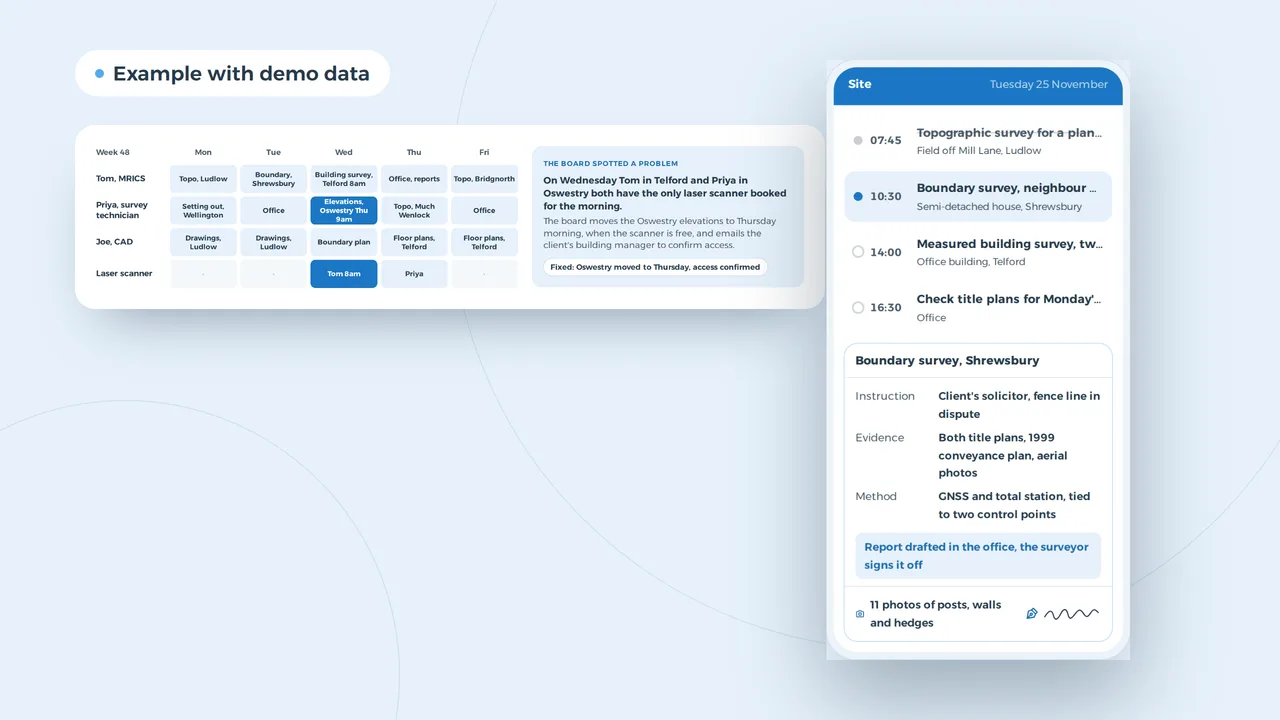
One laser scanner, two jobs: the board spots it before Wednesday
The board spotted a problem
On Wednesday Tom in Telford and Priya in Oswestry both have the only laser scanner booked for the morning.
The board moves the Oswestry elevations to Thursday morning, when the scanner is free, and emails the client's building manager to confirm access.
Fixed: Oswestry moved to Thursday, access confirmed
An example of what we can build, with made-up names and jobs. You choose what the board checks.
Crews, kit and a drawing office in one week
In a practice with more than one surveyor, the diary rarely clashes on people. It clashes on kit: the only laser scanner, the total station in for calibration, the drone with one qualified pilot. And it clashes on access: a measured building survey needs the building manager, a boundary survey often needs the neighbour.
A board built for your practice puts people, kit and sites on one week. It spots double bookings, allows for the drive between Ludlow and Telford, and proposes a slot that works. The drawing office sits on it too: when the floor plans for Telford are due, and when the boundary plan goes to the solicitor. Who works which day and who is on leave belongs on the same screen; that part is staff scheduling software. If the week still lives in a spreadsheet, Excel or planning software sets out when it is time to move.
A boundary report in five stages, with the fee against what is invoiced
The solicitor sees the stages and downloads the report through a secure link. Raw survey data stays in the office.
An example of what we can build, with a made-up client, site and amounts.
Boundary jobs where the evidence stays together
A boundary job is a file of evidence: both title plans and registers, older conveyance plans, aerial photos, your survey and your report. HM Land Registry title plans usually show general boundaries only, so the measured line, the deeds and the title plan need to sit side by side, not in three folders. A job file per instruction keeps them together with the stages: terms of engagement, evidence gathered, site survey, draft report, report issued.
The client or their solicitor follows it through a secure link that shows only what you share. At its core that is a client portal, with raw survey data and internal notes kept out of view. Drawings, as PDF and DWG, come from your CAD package; an API integration fetches them so nobody files them twice. The same job file works for topographic surveys for architects, measured building surveys for developers and lease plans for conveyancers. If clients and referrers already live in a spreadsheet, a custom CRM can hold who sends you work and how often.
RICS regulation shapes the office as much as the site
A firm regulated by RICS has to publish a complaints handling procedure with an approved ADR provider, keep a complaints log and hold professional indemnity insurance that meets the RICS minimum terms, declared at registration and at each annual renewal. What we build keeps the log, the policy dates and the signed terms on file. The surveyor still signs every report.
Someone in Shropshire searches for a land surveyor and sends a boundary enquiry
New enquiry
Boundary survey before a new fence goes up, title plan attached
Helen, Church Stretton, yesterday 21:05
- A page per survey type: topographic, measured building, boundary
- A Google profile with the towns you cover and photos from site
- An enquiry form that asks for the title number and a sketch
Example with made-up practices and reviews.
Found for the survey, the town and the problem
A homeowner rarely searches for a chartered land surveyor. They search for a land surveyor in their town, or straight for the job: a boundary survey before a fence goes up, a topographic survey the architect asked for, a measured survey of a house before an extension. A page per survey type, with what it involves, what it is used for and what the client should send, answers those searches.
Three things make the difference. A Google Business Profile with the towns you cover and photos from site. Reviews from clients whose job went smoothly; how to get more Google reviews covers asking without pushing. And an enquiry form that asks for the title number and a sketch, so the office does not have to call back. How this plays out in search is on marketing for land surveyors and on our local SEO service; the site itself we build like any website design project.
An enquiry with three attachments, read and turned into a draft quote
An example of what we can build, with a made-up enquiry. The AI reads and drafts, the surveyor decides and signs.
Enquiries with attachments, read before the first coffee
A boundary enquiry rarely arrives as one sentence. It comes with a title plan, photos from years ago, a sketch and a worried paragraph about the neighbour. AI reads the attachments, picks out the address, the parties and the question, opens a job and lists what is still missing, such as the title number of the neighbouring property. It drafts a quote from your own past quotes. The surveyor prices, checks and signs.
The model runs in an environment the practice controls, with data kept in the UK or EU and not used to train anyone's model. AI quote generator shows how a draft comes out of an enquiry or a site visit; AI automation covers the rest of the office.
Software for land surveyors by size of practice
A sole practitioner does not need an ERP, and usually not a board either. A practice with three crews and a drawing office needs more than a diary. This is what we would build at each size, beside your survey software.
| Size | What you need | What you do not need (yet) |
|---|---|---|
| Sole practitioner | A website with a page per survey type, a Google profile, an enquiry form that asks for the title number, invoices from your accounting package | A board, an app of your own, an ERP |
| Practice of five: two surveyors, a technician, CAD, an office manager | A job file with a site sheet, a board for people and kit, a link for clients and solicitors | An ERP or a bespoke accounts system |
| 20 to 50 staff, several crews or offices | A board across crews, a dashboard per team, links to accounts and drawing storage, roles per department | A second package beside your survey software |
| Larger, or a survey team inside a consultancy | Integration with the ERP or project system already in place | Another separate system |
What a build like this costs depends on what comes first; custom software development cost puts the ranges side by side.
UK rules a survey practice's systems have to follow
Checked against HM Land Registry guidance on GOV.UK and RICS guidance on 31 October 2026.
| Situation | What the rule asks | What the software does |
|---|---|---|
| A firm regulated by RICS | Rules of Conduct in force since 2 February 2022: a published complaints handling procedure with an approved ADR provider, and a complaints log | The log lives in the office system, with dates per complaint and the outcome |
| Professional indemnity insurance | Cover that meets the RICS minimum terms, declared at registration and at each annual renewal | Policy and renewal date on the dashboard, with a reminder |
| Title plans on registered land | Most title plans show general boundaries only (section 60 of the Land Registration Act 2002). If the exact position is disputed, only a court can decide it (HM Land Registry practice guide 40, supplement 3) | The title plan sits beside the measured survey in the job file; the report draft carries that caveat |
| Scale of title plans | Usually 1:1250 in towns and 1:2500 in the country (practice guide 40, supplement 5) | The job sheet notes the scale, so nobody measures a fence line off the title plan |
| Determined boundaries | An application to HM Land Registry with a precise plan, generally with the agreement of the adjoining owners (practice guide 40, supplement 4) | The job tracks each neighbour's agreement and which plan version they saw |
| Client, neighbour and tenant details | UK GDPR: only what the job needs, kept no longer than needed; see UK GDPR vs EU GDPR | Access per role, photos in the job file and not in a camera roll |
Where invoicing is heading, including e-invoicing, is in e-invoicing in the UK.
A practice with two surveyors, in hours
| Task | Office time back each week |
|---|---|
| Enquiries: 15 x 8 minutes | 2.0 hours |
| Site sheets: 10 x 15 minutes | 2.5 hours |
| Report status calls: 8 x 5 minutes | 0.7 hours |
| Kit clashes: 1 x 30 minutes | 0.5 hours |
| Total | 5.7 hours |
Over 46 weeks that is about 262 hours. At £30, 262 x £30 = £7,860 a year in office time. It is not a promise, it is a way to see where a build pays back first: here the site sheet and the enquiry form together. Hours per job for your fee review can go on the same sheet, as in a time tracking app.
A day with your practice, then a fixed price per project
- A day in the office and on siteWe see how an enquiry arrives, how the week is planned and what gets lost between site, drawing office and client. And what your survey software already does.
- A proposal with a fixed priceWhat we build, in which order, and a fixed price per project. A website starts from EUR 1,500; everything else we price after the conversation.
- The biggest time sink firstOften the enquiry form and the site sheet, then the board, then the job file with the client link. Each part works on its own.
- Your data stays yoursJobs and drawings sit in an environment you own. If you ever stop, you take everything with you in an open format.
We have no survey practice as a client yet, but the planning board we built for DaTrans76 spreads around thirty drivers across some twenty routes every day, the same kind of board that can share out crews and kit.
Surveyors usually ask us
- Does this replace my CAD or survey software?
- No. Points, calculations and drawings stay in the package you know. What we build sits around it: enquiries, planning, the site sheet, the job file and the client link. Where your software allows it, we fetch drawings and exports automatically.
- Can a solicitor download the report themselves?
- Yes, through a secure link per job. They see the stages, the final report and what is still open, not your internal notes or raw survey data.
- Does the job sheet work on a site with no signal?
- It can. We build the sheet so it fills in offline, keeps the photos, and sends everything once there is signal again.
- Can it keep the RICS complaints log and PII dates?
- Yes. The complaints log, the ADR provider, your policy and its renewal date can sit in the office system with reminders. What RICS asks of your firm stays your responsibility; the software keeps the record.
- Should a sole practitioner start with a full system?
- No. For a sole practitioner a good website with a proper enquiry form is usually the first step. A board or a job file with a client portal comes when more people or more jobs run at the same time.
Custom software
How VBS helps you with this
We build the platform your business runs on every day: your spreadsheets, emails and paperwork in one system that does what you do.
- Your workflow mapped first, then a fixed price
- Screens for the office, the client and the road
- Hosting, backups and security managed by us on AWS
How we approach it is on our page about Custom software.
Your next boundary job already in one file?
Tell us how your practice handles enquiries, site work and reports today. We look at it with you and say what we would build, beside your survey software.
Rather get in touch right away?