Exact Online and your other software
Exact Online API integration: your books fed without retyping
1,000
Customers, quotes, invoices, stock and payments moving between Exact Online and the rest of your software, through an App Store app or a custom integration on the REST API.
Where the bookkeeping waits
An Exact Online integration lets Exact exchange data with the software you sell, plan and deliver in. A customer from your CRM appears as an account in Exact straight away, an invoice from your planning tool lands as a sales invoice in the right journal, and a bank payment closes it.
For many small and mid-sized businesses in Belgium and the Netherlands, Exact Online is the accountant's package, while the actual work runs somewhere else: a web shop, a CRM, a planning board or a spreadsheet. Without an integration someone retypes it all at the end of the month, or sends a pile of PDFs to the accountant. That costs hours, and a typo in a VAT code only shows up when the accountant calls.
There are three ways to fix that: an app from the Exact Online App Store, a workflow in a tool like Zapier, or a custom integration on the Exact Online API. This page puts them side by side, with what the official Exact documentation says today and where such integrations break in practice.
A package for the accountant, an API for the rest
Exact Online runs in the cloud, which makes it easier to connect than accounting software on a server of your own. Most of the data you see on screen can also be reached through the REST API: accounts, quotes, sales orders, items, invoices, bank entries and VAT codes.
It does work differently from many other packages. Every set of books in Exact is called a division, and an accounting firm often manages many at once. An integration therefore always has to know which division it writes to, and whoever builds one for your business asks for that number first.
- One division per set of books, in every API address
- Sign-in through OAuth 2.0 with your own app registration
- Webhooks for accounts, items, invoices and more
The Exact Online REST API
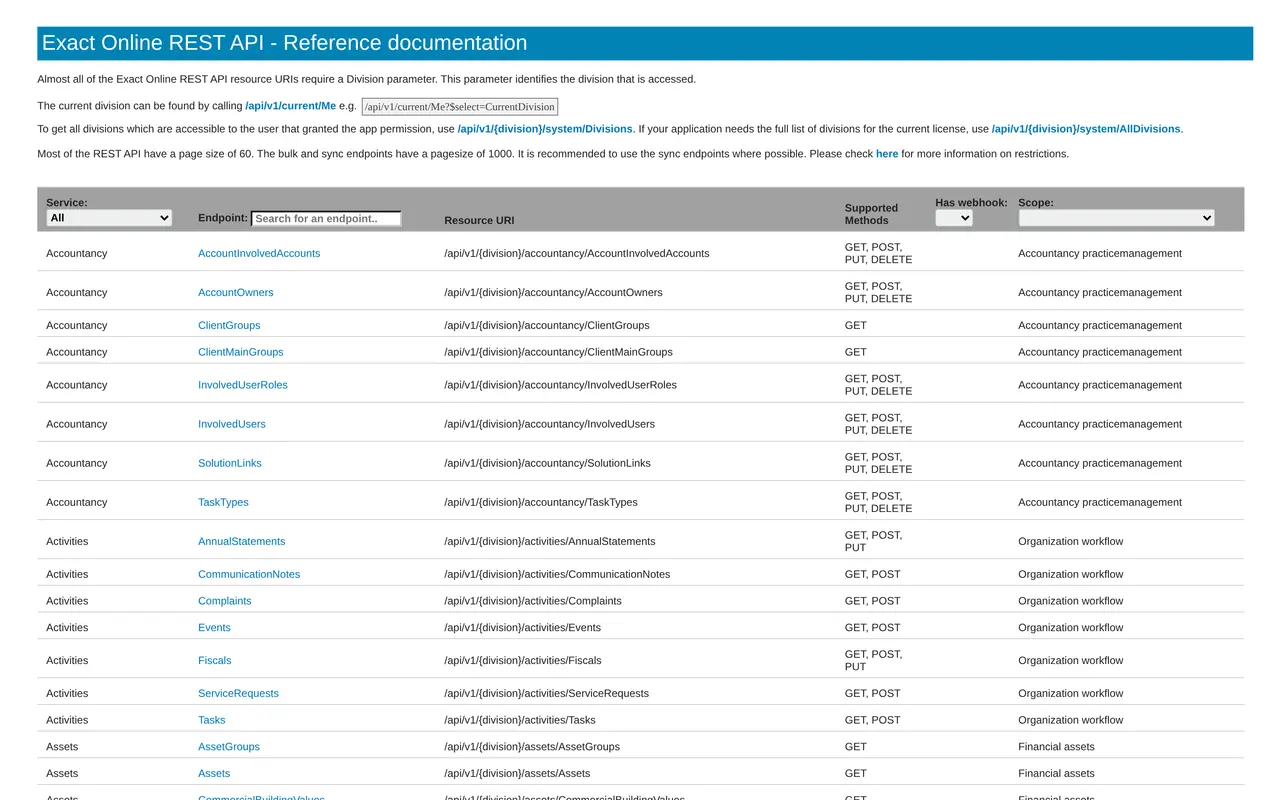
The Exact Online API works with plain web addresses. Almost every address starts with `/api/v1/{division}/`, followed by a service and a resource. Accounts live under `crm/Accounts`, quotes under `crm/Quotations`, sales invoices under `salesinvoice/SalesInvoices`, items under `logistics/Items`, and the VAT codes of the division under `vat/VATCodes`. The division the signed-in user has open comes from `current/Me`; every division the app may access is listed under `system/Divisions`.
Three things from the documentation shape how you build:
- Pages of 60 or 1,000Most endpoints return 60 records at a time. The bulk and sync endpoints return 1,000, and Exact recommends using the sync endpoints wherever possible. An integration that fetches every account one page at a time each night hits the limits far sooner than one that only reads the changes.
- Webhooks instead of pollingThrough `webhooks/WebhookSubscriptions` you register your own callback address for a topic, such as accounts, items or stock positions. Exact then tells you that something changed. That saves calls and makes the integration faster. See what a webhook does.
- Limits on the number of callsThe documentation points to restrictions on how many calls an app may make. An integration that ignores them gets an error instead of an invoice on a busy day.
Sign-in runs through OAuth 2.0. You register a custom integration as an app in the Exact App Center, which gives you a client ID that the user grants access to inside Exact. The integration then receives an access token and a refresh token, and uses the refresh token to fetch a new access token when the old one runs out.
Exact Online at the end of your flows
/api/v1//crm/Accounts
Every call names the division. First the integration asks /api/v1/current/Me which division is active.
Lawson Services Ltd
Source: Scheduling and quote tool
- Customers
crm/Accountswebhook - Quotes
crm/Quotations - Sales invoices
salesinvoice/SalesInvoices - Items
logistics/Itemsfrom Exactwebhook - Stock
read/logistics/StockPositionfrom Exactwebhook
Lawson Hire Ltd
Source: Hire calendar
- Customers
crm/Accountswebhook - Sales invoices
salesinvoice/SalesInvoices
Invoice H-0412 from the hire calendar, with 101 in the URL
The door
- OAuth 2.0 with an app registered in Exact Online. The administrator grants access once.
- Every endpoint asks for its own scope, such as Crm accounts for customers.
- You subscribe to webhooks per topic, such as Accounts, Items and StockPositions. Exact then reports a change itself.
- Reading stock through the API needs an Exact package for wholesale or manufacturing.
- Exact limits the number of calls per minute and per day. The integration batches and waits where needed.
Stopped before it reached the books
An invoice from the hire side arrives with division 101 in the URL, the trade one.
Every source belongs to one division. When the division in the URL does not match the source, the call stops, goes into the log and the bookkeeper gets a message.
Example with made-up companies and numbers, based on Exact Online's public REST documentation. We are not an Exact partner.
Three routes into Exact
Between an app and a custom integration sits a third option: a workflow in a tool. This is how they compare.
| Route | Fits when | What you need | Where it pinches |
|---|---|---|---|
| App from the Exact Online App Store | An app exists for your web shop, bank or CRM | A subscription with the app's maker | You work the way the app expects, not the other way round |
| Workflow in Zapier, Make or n8n | A simple flow, such as a Stripe payment that becomes an invoice | An account with the tool and access to your Exact | Little room for exceptions and VAT rules |
| Custom integration on the REST API | Your own software, several flows or your own rules | An app registration in the App Center and a builder you can call | Upfront build, and upkeep when Exact changes something |
| File export and import | A flow that may run once a month | A fixed export and the Exact import | Someone has to remember it, and errors show up afterwards |
Zapier has an app for Exact Online, with ready-made flows such as a Stripe payment that ends up in Exact. In Make and n8n you build the same thing on the API. Which tool fits is covered in Make, Zapier or n8n.
Still choosing between packages? Exact Online vs Odoo sets them side by side. If you already run Odoo, its integration has its own page at Odoo integration, and the choice between Odoo and Microsoft is in Odoo vs Business Central. A full Odoo rollout, with Exact kept on as the books beside it, is in Odoo implementation.
App Store app against a custom build
The Exact Online App Store has categories for integration platforms, web shops and CRM. Sometimes what you need already exists.
- Who builds it
- App from the App StoreThe app's maker, for many customers at once
- Custom integration on the APIA builder, for your flows and your rules
- What it does
- App from the App StoreWhat the app offers, within the settings it allows
- Custom integration on the APIExactly the fields, directions and exceptions you agree on
- Cost
- App from the App StoreOften a subscription with the app's maker
- Custom integration on the APIA fixed price for the build, with upkeep separate
- When Exact changes
- App from the App StoreThe maker updates the app for all its customers
- Custom integration on the APIThe builder updates your integration
- Fits when
- App from the App StoreYour package and way of working are common
- Custom integration on the APIYou run your own software or a process no app covers
Search the App Store first. If an app exists for your package and it does what you need, that is almost always the fastest route. A custom integration only pays off when you run your own software, or have rules no app provides.
Six failures we rule out first
- Duplicate accountsPick a fixed key per flow, such as the VAT number, and search before you create. Otherwise the same customer appears twice, once with and once without a VAT number.
- VAT codesFetch the list from Exact itself and record which code belongs to which case, including reverse charge and intra-EU supplies. A code that has a different name in your own package is the classic cause of a correction.
- The wrong divisionFix the division number in the integration, especially when your accountant manages several sets of books under one login.
- Call limitsUse sync endpoints and webhooks instead of fetching everything again. An integration that reads only the changes stays well within the restrictions.
- A token that no longer refreshesSend an alert when the integration loses access, to someone who knows what to do, so a withdrawn consent does not go unnoticed for a week.
- Journals and payment termsAgree beforehand which journal an invoice lands in and with which payment condition, so the accountant does not have to move bookings afterwards.
Who writes which record into Exact
The question is not whether something can be connected, but which system is in charge of each record. With Exact that is often simple: the books are the end point, and almost everything flows towards them.
| Record | Source of truth | Direction | Endpoint | Where it goes wrong |
|---|---|---|---|---|
| Accounts | Your CRM or web shop | Into Exact | crm/Accounts | The same customer twice, with and without a VAT number |
| Quotes and orders | Your CRM, configurator or web shop | Into Exact, or only in your own system | crm/Quotations, salesorder/SalesOrders | An order changed in Exact but not in your CRM |
| Sales invoices | The system that invoices | Into Exact, never both ways | salesinvoice/SalesInvoices | An invoice numbered in two systems |
| VAT codes | Exact | From Exact to the integration, as a list | vat/VATCodes | A code named differently in your own system |
| Items and stock | Exact or your stock system, never both | One way, agreed upfront | logistics/Items, sync/Inventory/StockPositions | Two channels selling the same last item |
| Payments | The bank, through Exact | From Exact back to your CRM or web shop | financialtransaction/BankEntries | A reminder sent for an invoice that was paid |
The last row is the flow people forget. Your sales team wants to see in the CRM whether a customer has paid, and only Exact knows. An integration that sends payments back saves calls to the accountant.
Invoices between Belgian businesses go out as e-invoices over Peppol since 2026. Check what your accounting package already does for that before you put it in an integration. More on the choice is in which software for Peppol, and the incoming side is covered in invoice automation.
Building it, one step at a time
- A call, with your accountant tooWe go through the flows, the division and how your accountant has set up the books: journals, VAT codes and payment conditions. Then you get a fixed price, with upkeep quoted separately.
- An app registration in your nameThe integration gets its own registration in the Exact App Center, and you grant the consent in Exact. Withdraw it, and the integration stops at once.
- Built against test booksWe build in a separate division or with test data first, not in your real books. Every flow gets a key for spotting duplicates.
- A log and a way backEvery call goes into a log, with what came in and what Exact answered. If an invoice fails, you see which one and send it again. A new version of the integration can roll back to the previous one.
- Alerts when it goes quietIf the access refresh fails, or nothing arrives for a day while there are invoices, someone gets an alert.
Not an Exact partner
We are not an Exact partner and we have no app in the Exact Online App Store. We build integrations on the public REST API that Exact documents, with an app registration in your name and a consent you grant and withdraw yourself.
Proof from our own platforms
What we can show is software that talks to other software. The transport platform for DA Logistics builds a bundle for the accountant, is used daily by 31 users, and goes live in 2 to 6 seconds per release, with a backup and a way back. The platform for Business Centrum imports their existing spreadsheet with a report of what it took over, tested on their real file with 309 employers and 971 employees.
The other packages each have their own page: Odoo integration, Teamleader integration, the Robaws API and Business Central integration. The general story is on API integration services. If you invoice from your own software, read Peppol invoicing software as well. We build integrations inside AI automation; when it becomes a platform of its own, that is custom software.
AI automation
How VBS helps you with this
We make emails, quotes, documents and follow-up run by themselves, built into the way you already work.
- One flow per task, from form to confirmation
- A person approves what matters
- Runs on AWS, with a log and an alert when something fails
How we approach it is on our page about AI automation.
What should land in Exact on its own?
Tell us which systems run next to Exact, who does your books and what gets retyped today. After a call you know whether an App Store app is enough or a custom integration pays off, with a fixed price.
Rather get in touch right away?