Glamping and campsites
Glamping website design that sells every pod by itself
A couple scrolls past your bell tent on Instagram at eleven at night, taps through, sees the hot tub, picks two nights in May and pays the deposit before they put the phone down.
Guests book the view, then the dates
Glamping is bought on pictures. A guest compares a shepherd hut in the Cotswolds with a safari tent in Northumberland on a phone, long before they compare prices. They want to see the bed, the wood burner, the shower and the view from the deck, and they want to know whether the dates they have in mind are free.
A glamping website has one job: get that guest from the photo to a paid booking without sending them to a platform. That means a page per unit, availability on the page, a clear total with add-ons, and a deposit taken there and then.
Found near Keswick, booked on the park's own site
New booking
Hardstanding pitch with hook-up, 4 nights, 6-metre caravan, 2 adults and 2 children
Hannah, Manchester, today 20:41
- A page per pitch type and per pod, with photos, sizes and price
- A Google profile with recent photos of the field and the shower block
- A booking module that reads the same calendar as Pitchup
An example of what we can build, with made-up campsites and reviews.
A page for every pod, tent and hut
The most common mistake on a glamping site is one gallery for the whole field and one booking button. Every unit sells on its own details, so each one gets its own page:
- photos of that unit, inside and out, taken in the season the guest will stay;
- beds, bedding, heating, the kitchen or the cooking kit, and where the shower and toilet are;
- what is included and what is extra, such as firewood, a breakfast hamper or the hot tub;
- the minimum stay and the changeover day for that unit;
- the house rules that matter for booking, such as dogs, fire pits and the number of guests;
- the calendar and the price for the chosen dates, right on the page.
A guest who lands on the shepherd hut from a Google search should be able to book the shepherd hut without going back to the home page. That is also what makes each unit page rank for its own search, such as a shepherd hut with a hot tub near a town. More on how this works for holiday lets in general on our page about a direct booking website.
What each kind of unit has to show
Every type of unit raises its own questions. Answer them on the page and the guest does not need to message you before booking.
| Unit | The question guests ask first | What the page leads with |
|---|---|---|
| Bell tent | Will we be warm and dry? | The bed, the heating, the groundsheet and photos taken on a grey day |
| Pod | Is there a toilet and shower inside? | The floor plan, the bathroom or the walk to the shower block |
| Shepherd hut | Is it cosy enough for winter? | The wood burner, the bed size and the view from the steps |
| Safari tent or lodge | Does it work for a family? | Bedrooms, the kitchen, the deck and how many guests may stay |
| Treehouse | Is it safe for children and dogs? | The stairs, the railings and the house rules |
Where the honest answer is a shared shower block or a cold first night in April, say so on the page. A guest who knew beforehand writes a better review than one who found out on arrival.
Listing on a platform or a site of your own
- Commission
- Only on Airbnb or Booking.comOn every night booked
- Your own glamping websiteNone on direct bookings
- Guest details
- Only on Airbnb or Booking.comPartly shielded by the platform
- Your own glamping websiteYours, for repeat stays and a winter mailing
- Photos and story
- Only on Airbnb or Booking.comIn the platform's template
- Your own glamping websiteAs you want them, with the area and the farm around you
- Add-ons
- Only on Airbnb or Booking.comHard to sell before arrival
- Your own glamping websiteHampers, firewood and hot tub sold with the booking
- Your own rules
- Only on Airbnb or Booking.comFitted into the platform's options
- Your own glamping websiteDeposit, cancellation and changeover days set by you
Availability that the platforms read too
Most glamping sites stay on the platforms in their first years, and that is fine. The site has to read the same calendar, so a pod sold on Airbnb closes on your site at once, and a booking on your site closes on Airbnb. Whether you list on one platform or both is set out in Airbnb vs Booking for hosts.
Behind the booking button sits a booking system for a website that knows units, changeover days and minimum stays. For a park that also has touring pitches, the same calendar runs the pitch plan. That side is covered on our page about campsite booking software.
A deposit at booking and the balance taken automatically before arrival saves most of the chasing. Offer the payment methods your guests expect, including those of visitors from abroad; see payment methods in Europe.
Search, maps and the area around you
Guests search for glamping near a place: a lake, a national park, a coast path, a town. Your site needs pages that answer those searches with real detail about the area, such as walks from the field, the nearest pub and how far the beach is. Combine that with a Google Business Profile that is complete and current.
| Search | What earns the click | Where it lives |
|---|---|---|
| Glamping near a town or park | A page about the area with distances, walks and photos | Area pages on your site |
| Shepherd hut with hot tub | A unit page that leads with the hot tub | The unit page |
| Dog friendly glamping | The dog rules, the fenced area and the walks | Unit pages and a dogs page |
| Glamping for a group | Group prices and the whole field for a weekend | A group page with an enquiry form |
| The name of your site | The map pack with reviews and photos | Your Google Business Profile |
Set up the profile as in create a Google Business Profile and choose the category from Google Business Profile categories. Ask for a review after each stay with the Google review link generator; why that matters is in get more Google reviews. For a site that wants to rank across its whole region, see local SEO.
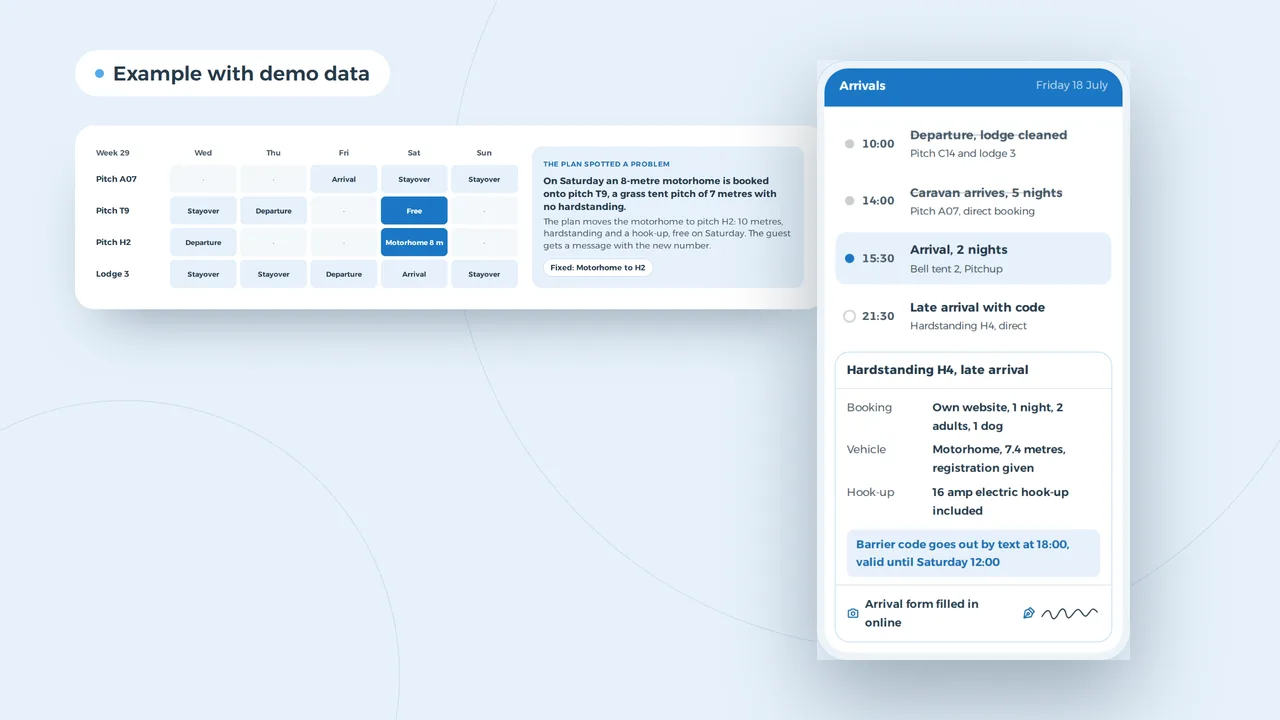
Bell tent 2 arrives through Pitchup, the rest direct
- One pitch plan for every channelA Pitchup booking for bell tent 2 closes it on your own website straight away. A pitch, a pod or a lodge only sells once.
- The late motorhome does not ringThe barrier code goes out at the time you choose and only works for that night.
- Length and hook-up known in advanceGuests give the length of their motorhome or caravan and say if they want a hook-up. The system only offers pitches that fit.
An example of what we can build, with made-up guests and pitches. You choose which fields a booking has.
Instagram, photos and the season ahead
Glamping is found on Instagram and Pinterest and booked later on Google or a platform. A post of the view from your deck brings guests who already know what they want. Three choices make that work.
- Photos per season. Shoot every unit in spring and in summer, inside and out, with the bed made and the wood burner lit. Old or borrowed photos cost you reviews. Image sizes per channel are in social media image sizes.
- A link to the unit, not the home page. Someone who taps on the bell tent wants the bell tent's calendar. Following up messages and posts is part of social media management.
- Ads before the season. A targeted campaign in February and March fills spring weekends; see Facebook and Instagram ads.
Collect email addresses for a newsletter or an early booking offer only with consent, and say what you do with them. What your site needs for that is in a GDPR compliant website and UK cookie law.
Before a glamping site goes live
- Every unit has its own page with photos, beds, heating and what is included
- The calendar on each page reads the platform bookings
- The total for the chosen dates shows add-ons before payment
- A deposit is taken at booking and the balance before arrival
- House rules for dogs, fires and guest numbers sit on the page and in the confirmation
- The confirmation includes the address, the gate code time and directions
- Pages load fast on a phone with a weak signal in the countryside
- The Google Business Profile links to the site, not to a platform
Speed and languages for guests on the road
Many guests look at your site again on the way, in a car park or a lay-by with one bar of signal. Photos have to be sized for a phone and the page with the address and directions has to load in seconds. Test it with the website speed test and see improve website speed for what to fix first.
If your guests come from the Netherlands, Germany or France, a version in their language helps them book with confidence, especially for the rules and the cancellation terms. See multilingual website development.
Building the site, week by week
- Week 1A walk through your unitsWe go through each unit, the add-ons, your rules and how bookings come in now, and agree what the site needs.
- Weeks 2 to 4Design and unit pagesThe design, a page per unit and the area pages, with your photos or a shoot we plan with you.
- Weeks 5 and 6Booking and paymentsThe calendar linked to the platforms, deposits, add-ons and the confirmation email.
- Weeks 7 and 8Testing and launchTest bookings on every unit, the Google profile linked to the site, and launch before your booking season opens.
Budget, and what sits on top
Websites from 1,500 euro. A glamping site with unit pages and online booking sits above that, and the price depends on the number of units, the booking rules and the languages. We give a fixed price after the first call. What a site costs in the UK in general is in website cost in the UK, and what it costs to keep running in website cost per year. How we build sites in general is on website design.
Still planning the site itself? Read start a glamping business in the UK first, for planning permission, licences and rates. If you want to talk about your units, get in touch.
Website design
How VBS helps you with this
We build your site from design to copy, imagery and code, in one team, so that Google and your buyers find it and get in touch.
- Design and copy built on your buyers' questions
- Fast, multilingual when you need it, at a fixed price
- Forms, cookieless analytics and hosting on AWS
How we approach it is on our page about Website design.
Your pods booked direct?
Tell us how many units you have and how bookings come in now. We show you what a site with live availability would look like for your field.
Rather get in touch right away?