On this page
A call link for people without WhatsApp
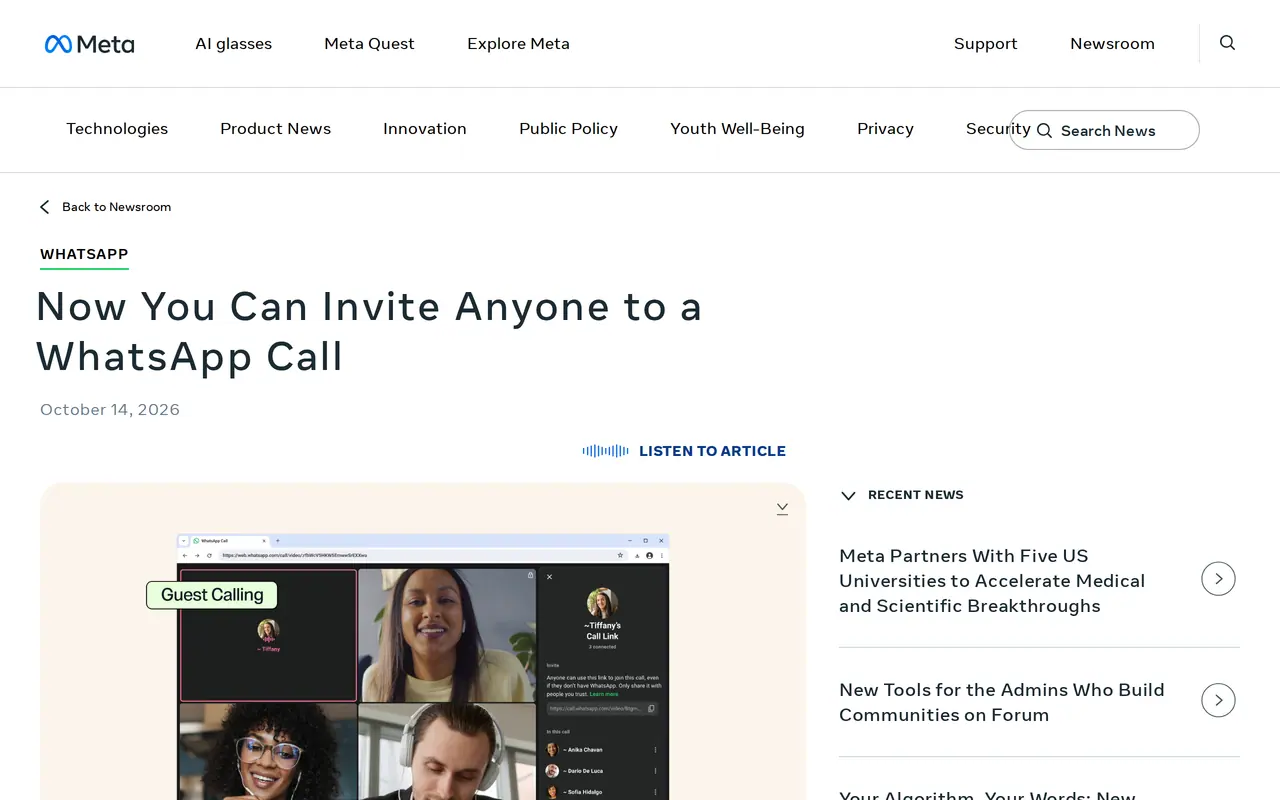
The WhatsApp guest calls feature has existed since 14 October 2026. Meta announced that you can now call people through WhatsApp who do not have a WhatsApp account themselves. In the Calls tab you create a call link with the plus icon and send it on. Your guest opens the link in a browser on their computer, enters a name and waits in a waiting room until you let them in.
The call is free, end-to-end encrypted and has no time limit. It can be one-on-one or a group call of up to 32 people. Guests can share their screen, react with a thumbs-up or a heart and raise their hand. Later this year, according to Meta, a plugin will let you plan such a call straight from Google Calendar or Outlook.
From link to call, four steps on each side
A call through a link
- Your guest, without WhatsAppThey open the link in a browser
- 1open the link on a computer
- 2enter a name
- 3wait in the waiting room
- 4share screen, react, raise a hand
As Meta announced it on 14 October 2026: free, end-to-end encrypted, no time limit, up to 32 people.
What the host can do and what the guest can do
The roles are unequal, on purpose. Only someone with a WhatsApp account creates a link and decides who gets in.
| Host with WhatsApp | Guest without WhatsApp | |
|---|---|---|
| Create a call link | Yes, in the Calls tab | No |
| Getting in | Admits guests from the waiting room | Waits until the host admits them |
| Remove participants | Yes, at any time | No |
| See phone numbers | Not stated | No |
| Send messages | Not stated | No |
| Add people | Not stated | No |
| Share screen, react, raise hand | Not stated | Yes |
| Where | The WhatsApp app or WhatsApp Web | A browser on a computer |
For a business, the key detail is that guests cannot see phone numbers. You can hold a call with a group of clients or suppliers without them getting each other's numbers. Meta says nothing about a phone browser; for now, assume your guest needs a computer.
Where this comes from
Guest calls build on what WhatsApp rolled out in the summer. On 28 July 2026 WhatsApp announced audio and video calls from WhatsApp Web, one-on-one and in groups, with screen sharing, reactions and a Calls tab in the browser. The same post introduced the waiting room: if a link requires approval to join, participants only get in when the host lets them. That waiting room is now the door for guests.
When it suits a small business
This part is our advice, not a statement by Meta. A WhatsApp call link is handy when your clients already talk to you on WhatsApp and you want to share a screen quickly: walk through a quote, discuss a site photo, show a webshop. The threshold is low, because your client installs nothing. If you work with clients in other countries, first check a time that suits everyone with the time zone overlap calculator.
For some calls it fits less well. Meta mentions no recording, no shared calendar until the plugin arrives, and no team management. The post does not mention WhatsApp Business accounts either. If you run a fixed sales process with a CRM, a call that lands in your calendar and your client record stays easier to follow. For what such a system costs, see CRM cost.
| Situation | Does the WhatsApp guest calls feature fit? | Why |
|---|---|---|
| Quickly show a quote or design to an existing client | Yes | The client installs nothing, you share your screen |
| Group call with clients who do not know each other | Yes | Guests cannot see phone numbers |
| Client joins from a phone, without a computer | Not certain yet | Meta only mentions a computer browser |
| Sales call that must land in your CRM | Less | No calendar link until the plugin arrives |
| Call you must record or archive | No | Recording is not mentioned |
Privacy and team agreements
End-to-end encryption means WhatsApp cannot listen in on the content of the call. That does not solve everything. If you use your own WhatsApp account for client calls, your client contact lives on your personal phone. Agree in your team which account makes calls, and state in your privacy policy which channels you use for client contact; see whether you need a privacy policy. At the very least, turn on two-factor authentication on the account that creates the links.
Calling guests without an account
Does it cost anything?
No. Meta calls the calls free, with no time limit.
How many people can join?
Up to 32 people, guests and WhatsApp users together in a group call.
Can a guest join from a phone?
Meta only mentions a browser on a computer. The post says nothing about a phone without WhatsApp.
Does it work with WhatsApp Business?
The post does not mention business accounts. Test it with your own account before you promise it to clients.
Will my guest see my phone number?
Guests cannot see other participants' phone numbers, according to Meta. They cannot send messages or add people either.
WhatsApp as a business channel
Guest calls are one step in a wider shift: WhatsApp is becoming more than a messaging app for friends. If you use WhatsApp for client contact at scale, you work with the WhatsApp Business Platform, where prices changed in October; read what WhatsApp Business costs in 2026. To answer client questions partly automatically, see how AI automation links messages, appointments and your client record, and which AI tools for business are worth it. A day earlier Meta let users change their Facebook algorithm by picking topics; if you find customers through Facebook, that touches your reach.
What we do not know yet
Meta names no countries and no rollout date per country, so the link option may not be on your device yet. The plugin for Google Calendar and Outlook comes later this year, without a date. We will update this piece when there is more. If you want one place where clients find documents, appointments and calls, the next step is a client portal; see how we approach client portal development. Rather talk about your client contact first? Get in touch.