Faster WordPress
WordPress speed optimization service, measured before and after
A slow WordPress site loses visitors before they read a word. We find where the time really goes, in the server, the cache, the page builder or the images, and fix what wins most first. Then we measure again, on a phone.
The short version
WordPress is rarely slow because of WordPress. It is slow because of a cheap shared server, no page cache, a heavy page builder with a stack of plugins, or an old PHP version. Find which one it is, and the fix gets simple.
What a slow site costs you
Someone opens your site on a phone, stares at a blank screen for three seconds, goes back to Google and taps the next result. You paid for that visit with an ad or with months of work on your rankings. Google measures it too: load time on a phone counts in how it judges your pages.
Most of the speed plugins sold as one-click fixes treat a symptom. A cache helps when the server is the brake; it does nothing for a page that loads two megabytes of builder scripts. So we start by measuring, not by installing.
What we measured across Belgium
For our study of website speed in Belgium we measured the Largest Contentful Paint on a phone, the time until the biggest element appears. The median for WordPress was 2.4 seconds; for Wix and for custom sites, 1.4. Of the WordPress sites, 52.1 percent stayed within Google's limit, against 88.6 percent of Wix sites.
The pages weighed about the same, around 2.3 MB on WordPress. The gap sat in the first byte, the time the server takes to answer: 0.74 seconds on WordPress, 0.30 to 0.38 on the other systems. Shrink only the images and you often miss the biggest brake.
| Measure | Google's limit | WordPress in Belgium | Wix and custom |
|---|---|---|---|
| Largest Contentful Paint on a phone, median | 2.5 s | 2.4 s | 1.4 s |
| Share within the limit | 52.1% | 88.6% (Wix) | |
| Server first byte | 0.74 s | 0.30 to 0.38 s |
Test your own site with the website speed test; it shows the same values and which ones pass. Why WordPress so often trails is explained in why is WordPress so slow.
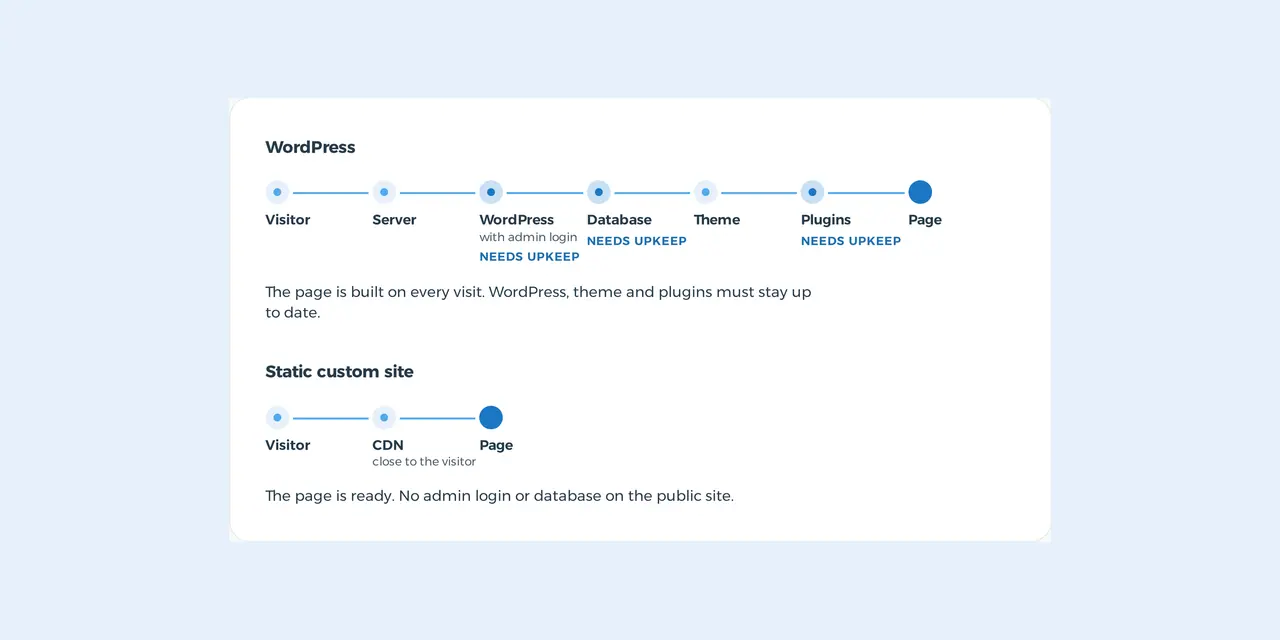
Every visit runs the whole stack
On WordPress, a visit without a cache wakes the server, the database, the theme and every active plugin before a single byte goes out. On a static site the page already exists and is simply sent.
That is why the server answer time weighs so much on WordPress, and why a good page cache often wins more than any image work. We measure both, page weight and server time, and fix the one that costs most.
The usual brakes and their fix
| Brake | How you spot it | What we do |
|---|---|---|
| Slow server | The first byte is slow, even on an empty page | A page cache, a newer PHP version, or hosting that fits your traffic |
| No page cache | Every visitor makes the database work again | A cache that stores whole pages and refreshes them on a change |
| Heavy page builder | Hundreds of kilobytes of scripts and styles on every page | Switch off what is not needed, or rebuild the heaviest pages in the block editor |
| Too many plugins | Plugin scripts on pages where they do nothing | Remove plugins, or load their scripts only where they serve |
| Oversized images | Photos of several MB shown 400 pixels wide on a phone | Resize to the real width, modern formats, load when they come into view |
| Third-party scripts | Chat, maps, video and trackers holding the page up | Defer until after load, or replace with something lighter |
The technical side of each fix, with Google's values, is in our guide how to improve website speed. On a site we rebuilt for Villa Lidia, a holiday villa in Umbria, the home page went from 8.4 MB to 1.4 MB and the images together from 51 MB to 17 MB. On WordPress that kind of image work is the easy part; the server is usually the bigger one.
How a speed job runs
- Measure your busiest pagesThe home page, your main service or product, and the page most visitors land on from Google. On a phone, with the values Google itself uses.
- List the brakesServer, cache, builder, plugins, images and third-party scripts. For each one we estimate what it costs and what the work is, and you choose what happens.
- Work on a copyWe work on a staging copy, so your visitors notice nothing. There you also check that forms, cart, payment and translations still work.
- Go live and measure againAfter the switch we measure the same pages again. You see before and after side by side, per page.
- Keep it fastOne new plugin or a video on the home page can undo it all. We tell you what to watch, or keep an eye on it when we maintain the site.
Speed up, or rebuild
Speeding up is usually enough. Sometimes the build caps every gain, for instance when a heavy builder runs through every page and each year needs more plugins to keep going.
| Situation | What we advise |
|---|---|
| Good site, slow server or no cache | Speed up: hosting, cache and PHP in order |
| A few heavy pages, the rest fine | Speed up, and rebuild those pages in the block editor |
| A heavy builder everywhere, many plugins, also insecure | Rebuild in WordPress with a light theme, or move off it |
| You want to be done with updates | A new site without database or plugins |
If a rebuild makes sense, we build WordPress with a light block theme and a handful of known plugins; see WordPress website development, or compare in custom website or WordPress. A new site through our website design service starts from 1,500 euro. When a site moves, your addresses in Google move with it; that work is described in website migration services.
Slow and outdated often go together. Every old plugin is a chance for an attacker; read is WordPress safe, and hacked website repair if you see strange pages or redirects. The CMS detector shows what your site runs. Want someone to keep it fast and updated? That is website maintenance. We work remotely, in English or Dutch, with any host in Europe; get in touch with your address and a temporary admin login.
Questions buyers ask
What does WordPress speed optimization cost?
It depends on the brakes: a cache and a newer PHP version are quick, replacing a heavy builder takes longer. After the measurement you see per brake what it costs and what it gains, and you choose.
Can I do it myself with a plugin?
A cache plugin helps when the server is slow and no cache runs yet. It does not fix a heavy builder, too many scripts or slow hosting, and a badly set cache can break forms or a cart. Measure before and after with the speed test.
Do I have to change host?
Not always. Sometimes a cache or another PHP version at the same host does it. If the first byte stays slow on an empty page, the server is the cause and new hosting wins most.
Will something break?
That is why we work on a copy and test forms, cart and payment before anything goes live. You approve the staging version.
Will my site pass Google's limit afterwards?
We say so after measuring, not before. On a good server with a cache and light pages it is within reach; with a builder in every page, a rebuild is sometimes the only road.
Website design
How VBS helps you with this
We build your site from design to copy, imagery and code, in one team, so that Google and your buyers find it and get in touch.
- Design and copy built on your buyers' questions
- Fast, multilingual when you need it, at a fixed price from 1,500 euros
- Forms, cookieless analytics and hosting on AWS
How we approach it is on our page about Website design.
Slow on a phone?
Send us the address. We measure your busiest pages, tell you where the time goes and what it takes to win it back.
Rather get in touch right away?