On this page
Most comparisons of these two tools are written for a US start-up with one language and a credit card. A company in Belgium, the Netherlands or Germany asks different questions. How much does French or German cost on top? Where does the data sit? What does the invoice look like for my accountant? This page answers those, and puts a third option next to the two builders: a site written in code. For a wider view of the market, see the WordPress alternatives or the Wix alternatives. If you are torn between Webflow and a classic CMS, read Webflow or WordPress.
How the two tools approach design
Webflow turns HTML and CSS into a visual interface. You place containers, give them classes and style them. Someone who knows how the web works can build nearly anything, and the result stays tidy. A marketer without that background will need time to learn it.
Framer starts from the canvas. You draw frames, set breakpoints and press publish. A designer coming from Figma can have a first page live the same afternoon. Large sites with many repeated templates are where you feel the lighter structure.
Both count as low-code: you can drop in your own components when the visual tools run out. And both ship AI features. Framer gives every paid plan monthly credits for its agents and for translation. Webflow AI drafts sections, components and copy. Useful for a first draft; read what an AI website builder can and cannot do before you lean on it.
What each plan gives you
Dollar prices per month billed yearly, from each pricing page in November 2026. Both add tax at checkout based on where you are.
- Free plan
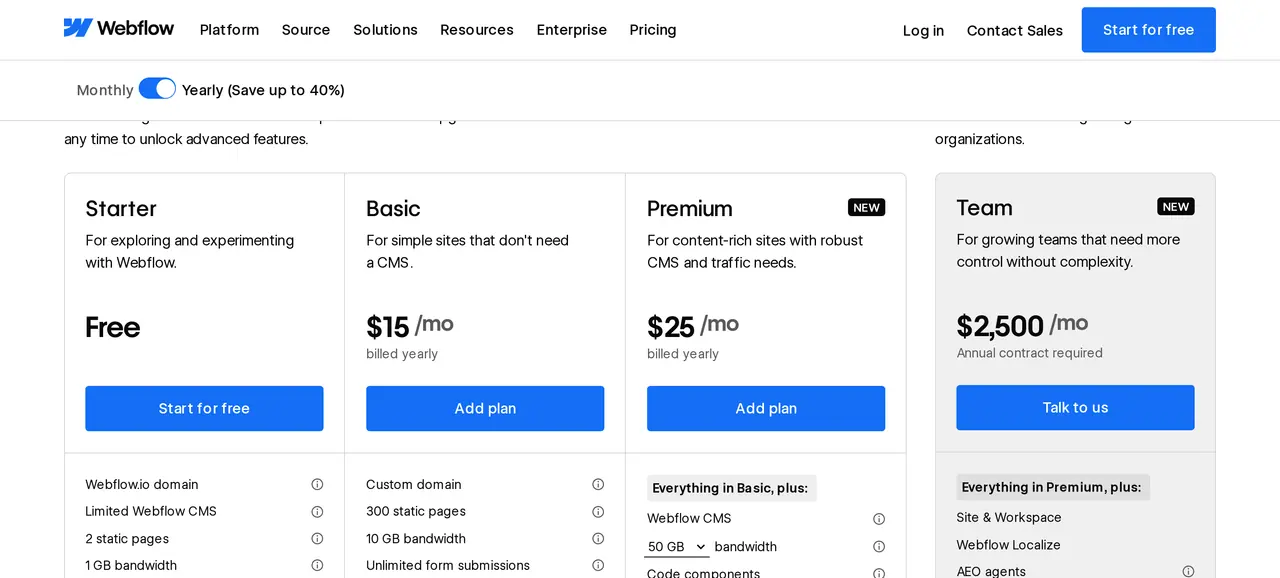
- WebflowStarter on a webflow.io address, 2 pages, 50 CMS items
- FramerFree on a Framer domain, meant for non-commercial use
- Cheapest plan with your own domain
- WebflowBasic at 15 dollars: 300 static pages, no CMS
- FramerBasic at 10 dollars: 30 pages, 2 CMS collections, 1,000 items
- Plan for a content-heavy site
- WebflowPremium from 25 dollars: 20,000 CMS items in 40 collections
- FramerPro at 30 dollars: 150 pages, 10 collections, 2,500 items
- Monthly bandwidth
- Webflow10 GB on Basic, 50 GB on entry Premium, tiers up to 2.5 TB
- Framer50 GB on Basic, 100 GB on Pro, extra at 40 dollars per 100 GB
- Redirects and staging
- Webflow301 redirects on every paid site plan
- FramerRedirects, staging and branching from Pro
- Online shop
- WebflowE-commerce plans from 29 dollars with Stripe, PayPal and Apple Pay
- FramerNo shop plan on the pricing page
Framer costs less to start. Webflow gives you far more CMS room once your content grows past a few dozen entries.
Running a site in several EU languages
Take an English site that also needs Dutch, French and German. That is three extra locales on top of the primary language.
| Three extra languages | Webflow Localize Essential | Framer locales |
|---|---|---|
| Per month, billed yearly | 27 dollars | 60 dollars |
| Per month, billed monthly | 36 dollars | 75 dollars |
| Most extra languages allowed | 3, or 10 on Localize Advanced | 20 |
| Machine translation | 10,000 words a month | Uses your monthly credits |
Webflow is cheaper per language, but Essential stops at three locales. Translated URL slugs and automatic visitor routing only come with Localize Advanced, at 29 dollars per locale a month billed yearly. Framer charges more per language and lets you go further. For search, what matters most is that each version has its own address and correct hreflang tags. How we set that up for Belgian sites is in a website in French and Dutch, and the wider approach is on multilingual website development.
Contracts, data and tax for an EU company
- Data processing agreementFramer makes its DPA part of the terms of service, under Article 28 of the GDPR. Webflow publishes a DPA with the EU standard contractual clauses for transfers outside the EEA.
- Where the servers areFramer B.V. is a Dutch company in Amsterdam, but its privacy statement says the servers it uses are in the United States. Webflow, Inc. is based in San Francisco and runs on AWS across several regions.
- Law and refundsFramer's terms fall under Dutch law, with the courts of Amsterdam. Framer also states that customers in the EU can get a refund within 14 days of buying a subscription.
- Tax on the invoiceWebflow quotes dollars per site plus applicable taxes at checkout. Framer adds tax based on your location. Enter your VAT number when you buy and show the first invoice to your accountant.
A data processing agreement covers the platform. Your own forms, cookies and analytics are still yours to get right; the guide to a GDPR compliant website walks through them. Converting dollar prices into a Belgian figure with or without VAT is quicker with the Belgian VAT calculator.
One more Belgian point: since 2026, Belgian VAT-registered companies exchange structured e-invoices with each other over Peppol. A supplier without an establishment in Belgium, such as Webflow or Framer, falls outside that rule, so their invoice is booked like any other foreign purchase.
If you plan to sell, check payment methods first. Webflow lists Stripe, PayPal and Apple Pay for its shop. Belgian buyers expect Bancontact, and Dutch buyers iDEAL. Compare Mollie and Stripe for those, or look at a dedicated web shop.
Billed monthly or billed yearly
The same items in dollars per month, November 2026. Yearly billing is shown first, monthly second.
| Aspect | Webflow | Framer |
|---|---|---|
| Entry plan with a custom domain | Basic: 15 or 25 dollars | Basic: 10 or 15 dollars |
| Plan with the larger CMS | Premium: 25 or 39 dollars | Pro: 30 or 45 dollars |
| One extra language | Localize Essential: 9 or 12 dollars | Locale: 20 or 25 dollars |
| A colleague who also designs | Full seat: 39 or 45 dollars | Editor: 20 or 30 dollars |
| A colleague who only edits content | Limited seat: 15 or 19 dollars | Content editor: 10 or 15 dollars |
Yearly billing takes a third or more off the plans themselves. Framer also includes a domain on yearly plans.
Seats add up faster than plans
The plan is often the smaller part of the bill. In Webflow, the free Starter workspace includes one full seat; a colleague who only changes text needs a limited seat, and anyone who designs needs a full seat. In Framer, the workspace owner is free, viewers who comment are free, and Basic and Pro allow up to ten people with edit access.
Picture a team of one designer and two marketers who write copy. In Framer that is two content editors at 10 dollars each. In Webflow it is two limited seats at 15 dollars each. Those amounts run every month, also in months when nobody edits. If a predictable monthly fee is what you want, compare it with a pay monthly website.
Speed, search and room to grow
Both serve your pages from a CDN. Framer Basic uses 20 locations and Pro more than 300; Webflow says global. In practice, heavy video, many fonts and long animations slow down any builder. Measure with Core Web Vitals, test with the website speed test and read how to improve website speed.
For search, both cover titles, descriptions, sitemaps and redirects. Webflow's pricing page also lists schema markup, canonical tags and per-item indexing control. A site that grows from search mostly needs many good pages: one per service, per question and per region. That is where 30 pages on Framer Basic and 300 on Webflow Basic lead to different futures.
When a custom coded site makes more sense
The third option is not a builder. A site written in Next.js has no editor subscription, no page ceiling and no price per language. You pay for the build, then for hosting. Text changes go through a headless CMS you choose, or through your developer. You lose the freedom to drag things around on a canvas, and some teams miss that.
It pays off when you need three or four languages with dozens of pages each, or when the site should belong to you for the long run. Business Centrum runs that way in four languages, as a static export. For a single launch page it is too much; Framer is the faster tool there. The trade-offs against a classic CMS are in custom website or WordPress, and what a build costs in general is in the website cost guide.
Moving from one to the other
Plan on rebuilding the layout when you switch builders. Content is easier: Webflow exports each CMS collection as a CSV file, which gives you a clean starting point. Its code export, available from the Core workspace plan, leaves the CMS content out. Whatever you move to, give every changed address a 301 redirect and follow the checklist for a migration without losing search traffic. Not sure what a competitor runs on? The CMS detector tells you in seconds.
Would you rather describe the site to an AI and let it write the code, then read our Lovable alternatives first. Forms on either builder can feed your CRM or inbox through an automation tool, which we compare in n8n vs Power Automate. For paid traffic to a fresh launch, see TikTok Ads vs Meta Ads.
Checks for either tool, ahead of signing up
- Count your pages per language for the next two years, not just today.
- Count the people who will edit, and which of them also design.
- Decide which languages you need and whether each needs its own URL.
- Check whether you will sell online and which payment methods your buyers expect.
- Read the data processing agreement and note where the servers are.
- Choose yearly or monthly billing knowing the renewal date.
- Keep your domain with a registrar you control, not inside the builder.
Questions people ask before choosing
Is Framer better than Webflow?
It is different. Framer is faster for a designer building a compact brand site. Webflow handles large amounts of structured content and bigger teams with more control.
Which one is cheaper for a site in three languages?
On yearly billing, Framer Basic with two locales costs 50 dollars a month and Webflow Premium with two Localize Essential locales costs 43 dollars. Framer Basic is limited to 30 pages and 2 CMS collections, so many companies end up on Pro.
Is Framer a European company?
Yes. Framer B.V. is registered in Amsterdam and its terms fall under Dutch law. Its privacy statement says the servers it uses are in the United States, with transfers covered by the Data Privacy Framework or model clauses.
Can I pay in euro?
Webflow lists all prices in US dollars. Framer shows dollars on its pricing page and accepts credit cards, and PayPal in some regions. Your bank converts the amount, so the euro figure moves a little each month.
Can I leave without losing everything?
Your content, yes: Webflow exports CMS collections as CSV, and you keep your domain if it sits with your own registrar. Webflow's code export gives you the static pages as HTML and CSS, but moving into another builder still means rebuilding the layout there.