On this page
- 01The four plans in euro
- 02What UK users pay
- 03What each plan gives you
- 04Worked examples
- 05Where you pay more than you thought
- 06Which plan fits what you want to do
- 07Clean your list before you pay
- 08Moving without losing your list
- 09When another tool is cheaper
- 10What the price does not cover
- 11Have it run for you
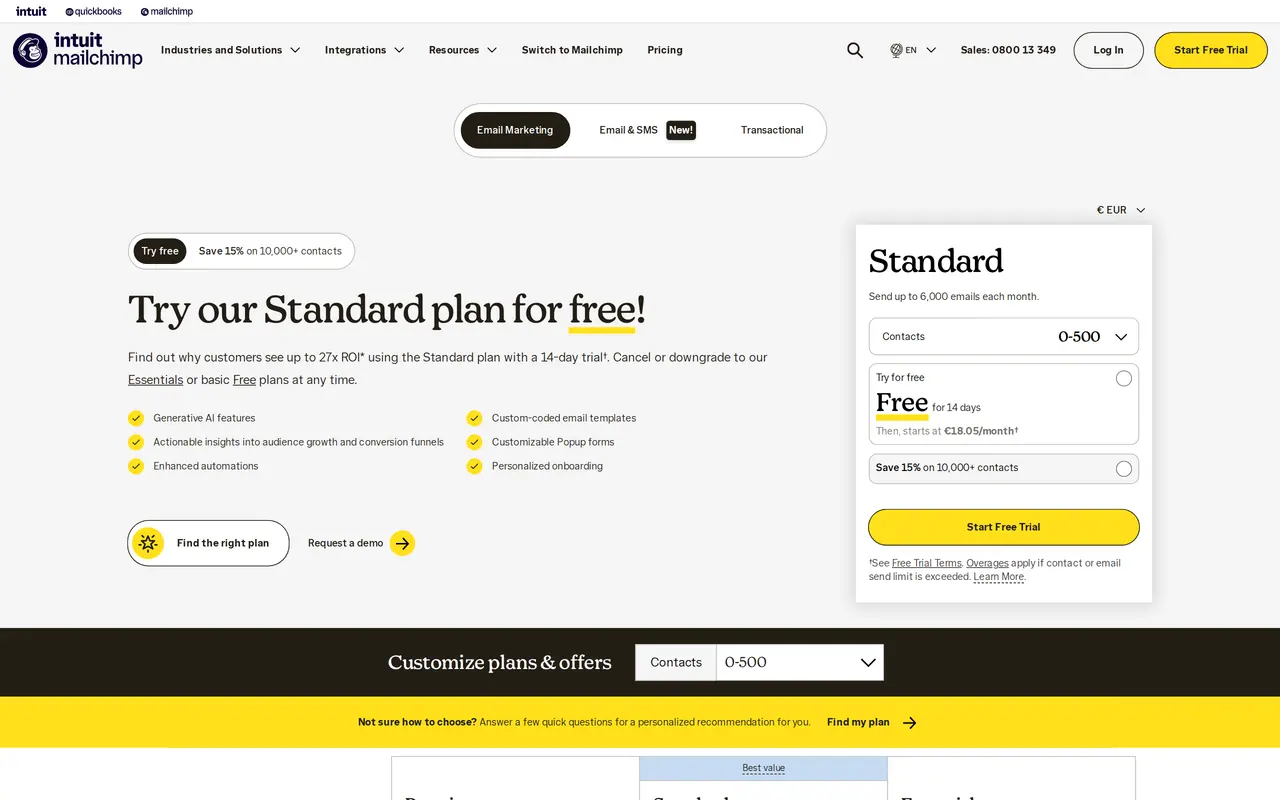
Mailchimp has four plans. Free costs nothing for 250 contacts and 500 emails a month. Essentials starts at 11.73 euro a month, Standard at 18.05 euro and Premium at 315.88 euro, each for the smallest list. The price rises with your number of contacts, and the sending limit is a multiple of those contacts: 10 times on Essentials, 12 times on Standard, 15 times on Premium.
Two things make Mailchimp dearer than the page suggests. Unsubscribed contacts count towards your price until you archive them. And whoever goes over the limit pays overage fees. This guide puts the plans side by side, works through a few examples and says when another tool is cheaper.
The four plans in euro
| Plan | Price a month | Contacts | Emails a month | Users |
|---|---|---|---|---|
| Free | 0 euro | 250 | 500, at most 250 a day | 1 |
| Essentials | from 11.73 euro | by your tier | 10 times your contacts | 3 |
| Standard | from 18.05 euro | by your tier | 12 times your contacts | 5 |
| Premium | from 315.88 euro | by your tier | 15 times your contacts | Unlimited |
Mailchimp prices in euro on 1 November 2026. You can try Standard and Essentials free for 14 days. From 10,000 contacts, Mailchimp gives 15 percent off in the first year.
What UK users pay
On the UK page, Mailchimp shows prices in pounds, excluding VAT. A comparison site recorded on 30 September 2026 that Essentials started at 57.03 pounds a month and Standard at 76.04 pounds a month for 2,501 to 5,000 contacts. The jump from the entry price shows how strongly the contact tier drives the bill. Pick your own tier on the pricing page before you compare.
What each plan gives you
Free is a trial. You get the editor, a form and a simple automated email, but at 250 contacts you soon outgrow it, and Mailchimp stops sending when you hit the limit. Essentials adds templates, more users and support. Standard is the plan most small businesses need: automated flows with several steps, segments by behaviour and the best send time per reader. Premium is for big teams and lists, with unlimited users and extended testing.
Unsubscribed contacts count
Mailchimp counts subscribed, unsubscribed and non-subscribed contacts towards your plan. Someone who unsubscribed still costs you money until you archive or delete them. Archiving takes a few clicks and you keep the history.
Worked examples
An example makes the logic clear. A bakery with 400 contacts on Standard may send 12 times 400, which is 4,800 emails a month. A weekly newsletter to the whole list is about 1,700 emails a month: well within the limit. A consultancy with 400 contacts on Essentials may send 4,000 emails a month, also enough for a weekly email.
| List and rhythm | Emails a month | Fits in | Cost per year |
|---|---|---|---|
| 200 contacts, one email a month | 200 | Free | 0 euro |
| 400 contacts, one email a week | about 1,700 | Essentials or Standard (0 to 500 contacts) | from 140.76 or 216.60 euro |
| 400 contacts, flows by behaviour | varies | Standard (0 to 500 contacts) | from 216.60 euro |
Yearly prices are the monthly price of the smallest plan times twelve. Grow above 500 contacts and you move to a higher tier, and the price rises with it. The exact amounts per tier show on Mailchimp's pricing page when you pick your number of contacts.
Where you pay more than you thought
Overage fees come when you have more contacts or emails than your plan allows. Mailchimp charges those separately. Unsubscribed contacts push up your tier. And a list full of old, unknown addresses costs money and brings more spam complaints. A clean list is cheaper and arrives better. How to keep spam complaints low and what Gmail has asked since 2024 is in email marketing strategy. Whether your domain is ready, our DMARC checker shows.
How Mailchimp and Brevo make you pay
- Charges for
- MailchimpNumber of contacts, unsubscribed too
- BrevoNumber of emails you send
- Free
- Mailchimp250 contacts, 500 emails a month
- Brevo300 emails a day
- Paid entry
- MailchimpEssentials from 11.73 euro a month
- BrevoStarter from 7 euro a month
- Cheaper for
- MailchimpA small list that sends often
- BrevoA big list that rarely sends
Which plan fits what you want to do
Pick the plan on what you want to do, not on what your list counts today. A monthly newsletter to customers needs no ten-step automation. A webshop that follows up an abandoned cart does. If three colleagues work in the account, Free is out, because that plan has one user.
| You want | Plan that will do | Why |
|---|---|---|
| One newsletter a month, small list | Free | Enough emails, one user will do |
| A regular newsletter with your own template and no Mailchimp logo | Essentials | Templates, three users, support |
| A welcome flow and emails by behaviour | Standard | Flows with several steps and segments |
| A big team with many lists and tests | Premium | Unlimited users and extended testing |
Torn between Essentials and Standard? Try Standard for 14 days. If you use no flow in those two weeks, Essentials is enough.
Clean your list before you pay
Because unsubscribed contacts count, cleaning is the fastest saving. Start with a segment of everyone who unsubscribed and archive it. Then look at addresses that have not opened or clicked for a year. Send them a short email asking whether they want to stay, and archive whoever does not respond. Addresses that Mailchimp marks as cleaned, because they no longer exist, already do not count.
| Step | What you do | What it gives you |
|---|---|---|
| Archive unsubscribed | Segment by status, archive | A lower tier, history stays |
| Ask the sleepers | One email after twelve months of silence | A list of people who really read |
| Merge duplicates | Same person with two addresses | Fewer contacts, correct data |
| Check imports | Only addresses with consent | Fewer spam complaints |
A smaller list that reads arrives better than a big one that stays silent. Gmail and Outlook look at who opens your emails and who reports them as spam.
Moving without losing your list
If you pick another tool, export your contacts with their status, tags and sign-up date. That date is your proof of consent; without that field you start over. Set up the new tool on your own domain with new SPF and DKIM records, and leave the old ones in place until the last email through Mailchimp has gone. Rebuild your flows in the new tool and test them with your own address. For the first weeks, send to your most active readers, so the new tool builds a good name with Gmail. Only then cancel Mailchimp.
When another tool is cheaper
Mailchimp is strong in templates, integrations and automated flows. But with a big list you email once a month, you pay Mailchimp for contacts you rarely use. Tools that charge per email sent, such as Brevo, are often cheaper then. MailerLite starts with Comfort from 12 dollars a month and Power from 25 dollars, with 10 percent off on a yearly plan. Flexmail, a Belgian tool, charges 17 euro a month for 1,000 contacts. An overview of when which tool fits is in Mailchimp alternatives. Just starting? Read create a newsletter for free first.
What the price does not cover
The tool sends, but it does not write or design. Count time for the copy, the images and the follow-up. How to build a newsletter is in how to write a newsletter, and whether your subject line stays readable on a phone shows in the subject line tester. Flows that go beyond email, with your CRM or calendar involved, fall under marketing automation. Linking Mailchimp to a CRM? Read what a CRM costs. And to see how much of your budget email may take, work it out with the marketing budget calculator.
Have it run for you
Want someone to set up your Mailchimp, clean your list or send your newsletter each month? Look at our email marketing services. Flows that touch your CRM or calendar we build under AI and automation. A question about your own account? Send us a message.
The questions that remain
Is Mailchimp free?
The Free plan is free for 250 contacts and 500 emails a month, at most 250 a day. Above that you pay.
Do unsubscribed contacts count?
Yes. Mailchimp counts subscribed, unsubscribed and non-subscribed contacts towards your plan. Archived and deleted contacts do not count.
What happens if I go over my limit?
On a paid plan, Mailchimp charges overage fees. On Free, sending stops until you are back under the limit.
Is there a discount for a year?
From 10,000 contacts, Mailchimp gives 15 percent off in the first year. For smaller lists the page shows no yearly discount.