Job ads online
Recruitment advertising that reaches people and stays legal
Job boards wait for active seekers. Ads on Meta, Google and LinkedIn reach the people who are not looking yet, if the text and the targeting follow the rules.
Most people who would be good at your job are not on a job board today. They are on Facebook in the evening, on Instagram on the bus, on LinkedIn at lunch. Recruitment advertising puts the job in front of them, with pay, hours and place, and an apply form that takes a minute.
Two sets of rules shape it: the Equality Act, which makes discriminatory job adverts unlawful in Great Britain, and the platforms' own employment rules, which limit who you can target. This page covers both, then the campaigns that bring applicants.
Where to advertise a job
Each channel reaches a different kind of candidate.
- Who you reach
- Meta (Facebook, Instagram)people nearby, not looking yet
- Google and LinkedInpeople searching a job title, or by profession and seniority
- Best for
- Meta (Facebook, Instagram)hourly, shift and local roles
- Google and LinkedInskilled, office and senior roles
- Targeting limits
- Meta (Facebook, Instagram)employment category: no age, gender or narrow location
- Google and LinkedInGoogle: by search; on LinkedIn by job title, skills and company
- Application
- Meta (Facebook, Instagram)a lead form or a short page
- Google and LinkedInyour careers page or an easy apply form
- Cost
- Meta (Facebook, Instagram)low per click, many unsuitable applicants
- Google and LinkedInhigher per click, more qualified
For drivers, warehouse staff, care workers or hospitality, start on Meta. For engineers, finance or management roles, start with LinkedIn or Google.
The Equality Act and your job advert
Under the Equality Act 2010 a job advert that suggests you would treat applicants differently because of a protected characteristic can be unlawful in England, Wales and Scotland. The EHRC's guidance gives examples that still turn up in ads every week.
| Avoid | Why | Write instead |
|---|---|---|
| waitress, salesgirl, postman | suggests a sex | waiting staff, sales assistant, postal worker |
| young and dynamic team | suggests an age | an energetic team, a fast-paced team |
| mature person | suggests an age | someone with experience of X |
| native English speaker | can suggest race or nationality | fluent English, spoken and written |
| recent graduate | can exclude older applicants | at least two years of experience in X, if needed |
There are narrow exceptions, called occupational requirements in Schedule 9 of the Act, for example a women's refuge that needs female staff. If you rely on one, say so in the ad and be ready to explain why.
Meta's employment category
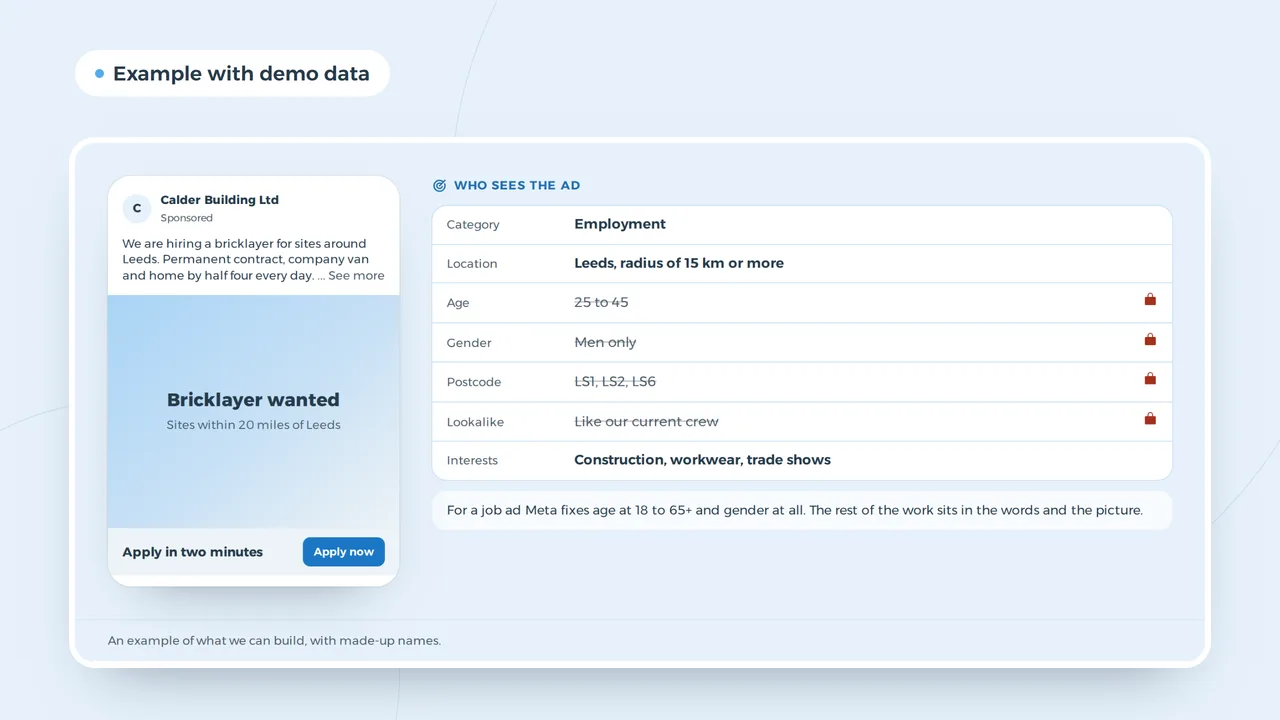
A job ad on Facebook or Instagram must be declared as an employment ad. Meta then fixes the age at 18 to 65+, removes gender targeting, needs a radius of at least 15 km in Europe and blocks lookalike audiences and exclusions. That is why the creative matters: you cannot narrow the audience by age, so the photo, the pay and the hours do the selecting. Our glossary entry on the special ad category lists the full rules.
A job ad with pay, hours and a short apply form
Who sees the ad
- Category
- Employment
- Location
- Leeds, radius of 15 km or more
- Age
- 25 to 45
- Gender
- Men only
- Postcode
- LS1, LS2, LS6
- Lookalike
- Like our current crew
- Interests
- Construction, workwear, trade shows
For a job ad Meta fixes age at 18 to 65+ and gender at all. The rest of the work sits in the words and the picture.
An example of what we can build, with made-up names.
What a job ad needs to work
People decide in a second whether a job is for them. The ads that bring applicants show the role, the pay, the hours and the place in the first line, a real photo of the workplace or the team, and a button to apply.
- Pay in the adAds with a pay range get more relevant applicants and fewer drop-outs at the interview.
- Hours and shift patternDays, nights, weekends: the thing a candidate checks first.
- A short formName, phone, a few yes or no questions. Ask for a CV later.
- A careers pageFor people who want to read more, with the team and what a day looks like.
Keep the primary text between 50 and 150 characters for the feed, and test it in the Facebook ad preview. For Google, a responsive search ad for "warehouse jobs Leeds" or "HGV driver jobs" works when the landing page shows the job straight away.
Job ads on LinkedIn and Google
On LinkedIn you can target by job title, skills, seniority and company, which suits roles where the skill matters more than the place: engineers, accountants, account managers. Clicks cost more than on Meta, so the ad and the job page must do the filtering. Google reaches people who search the job title and the town; a search campaign for "HGV driver jobs Doncaster" works when the page shows the job, the pay and a short form straight away. Google does not offer a separate job ad format for this, so the landing page does the work.
| Role | First channel | Second channel |
|---|---|---|
| Warehouse, driver, care, hospitality | Meta, local radius | Google search on job title plus town |
| Trades and technicians | Meta and Google | LinkedIn for supervisors |
| Office and professional | Google and Meta retargeting of careers page visitors | |
| Senior and specialist | a direct approach next to the ads |
Measuring cost per hire
Count applications as the first result and hires as the real one. A lead form makes it easy to apply and easy to apply carelessly; compare the share of applicants who turn up to an interview per channel before you move budget. Tag every link with the UTM builder, so your applicant tracking or Analytics shows which ad brought whom. Our guide to LinkedIn ads cost and Facebook ads cost explain the price per click on each.
Employer branding next to job ads
Ads bring applicants for one role. Employer branding makes people want to work for you before you advertise: posts about the team, the work and the people who stayed. Your LinkedIn company page and regular posts through social media management make each job ad cheaper, because people already know the name.
For recruitment agencies
Agencies advertise for many clients, often the same roles in different towns. One campaign per role family and region, a template ad that changes only the place and pay, and a shared careers site with a page per vacancy keep it manageable. If you are setting up an agency, read how to start a recruitment agency in the UK, and see recruitment agencies for the software side.
Agencies and direct employers
A recruitment agency advertises for clients, a direct employer for itself. The rules on wording are the same for both, but an agency also has to be clear that it is an agency, and often advertises roles without naming the client. Candidates are more careful with those ads, so pay, location and the type of contract matter even more. An agency that advertises the same role on several boards should tag each link, so it knows which board brings the people its clients hire.
For a direct employer the careers page and the company page carry more weight: candidates check who you are before they apply. Start with how to post a job on LinkedIn for office roles and how to post a job on Facebook for roles on site.
Questions about job ads
- Can I target job ads at under-25s?
- No. Meta fixes the age at 18 to 65+ for employment ads, and an age limit in the text can breach the Equality Act. Describe the role and the training instead.
- Can I ask for a driving licence?
- Yes, if the job needs it. A real job requirement is fine; a requirement that excludes people without a reason is not.
Google Ads
How VBS runs recruitment campaigns
We check every advert against the EHRC examples, declare the employment category on Meta, and measure applications and interviews from the start. Campaigns run under our Facebook and Instagram ads service and Google Ads service. A corporate video of the team at work makes a strong job ad; for Les Terrasses de Durbuy we made the reels that ran as Meta ads.
More applicants for the jobs you cannot fill?
Send us the role, the pay and the place. We tell you which channel and which ad to start with.
Rather get in touch right away?