On this page
You can post a job on LinkedIn for free, from your own profile or from your company page. For more reach you promote it with a daily or total budget, and LinkedIn shows it to people who match on job title, experience and location. For office roles, IT, sales and management, LinkedIn often brings the best candidates, even if it brings fewer applications than a general job board.
This guide shows the difference between free and promoted, how the budget works, what a good LinkedIn job post contains, and when an ad in the feed reaches more people than a job post. The wider choice between channels, and the equality rules every job ad must follow, is in recruitment advertising.
Posting a job in six steps
- Start from the Jobs tab or your pageChoose to post a job, and link it to your company page so candidates see who you are.
- Pick a title people search for"Maintenance Engineer, Leeds" rather than "Asset Hero". Candidates search by the usual name of the role.
- Set location and work typeOn site, hybrid or remote, with the town. It decides who sees the job.
- Write the descriptionWhat the job is, what you offer, what is required and what is a bonus. Pay included if you can.
- Add screening questionsA few must-haves, such as a driving licence or the right to work in the UK.
- Choose free or promotedFree for a first look; promoted with a budget when you need applicants fast.
Free or promoted
LinkedIn lets you post jobs for free, with limited reach. How many free jobs you can have open at once, and how long they stay visible, changes regularly; check it in your account before you plan. A promoted job gets a budget and shows higher in job search results and in alerts to candidates who match.
| Free job post | Promoted job | |
|---|---|---|
| Cost | nothing | a daily or total budget |
| Visibility | lower in the list, fewer alerts | higher in the list, more alerts to matching candidates |
| How long | limited, and LinkedIn can lower it | as long as the budget runs |
| Insights | basic | views, clicks and applications per day |
| Back to free | not applicable | not possible; you can pause or close it |
What a promoted job costs
You choose a daily budget or a total budget. LinkedIn charges per click or per applicant, depending on your market, and the price moves with how many other employers want the same people. A job for a developer in London costs more per applicant than one for an administrator in Hull. With a total budget the job pauses by itself when the money is spent; with a daily budget it runs until you close it.
Start with a small total budget and a run of two weeks. After a week you see how many applications come in and how many fit. What LinkedIn advertising costs in general is in LinkedIn ads cost; a first budget for all your marketing is in the marketing budget calculator.
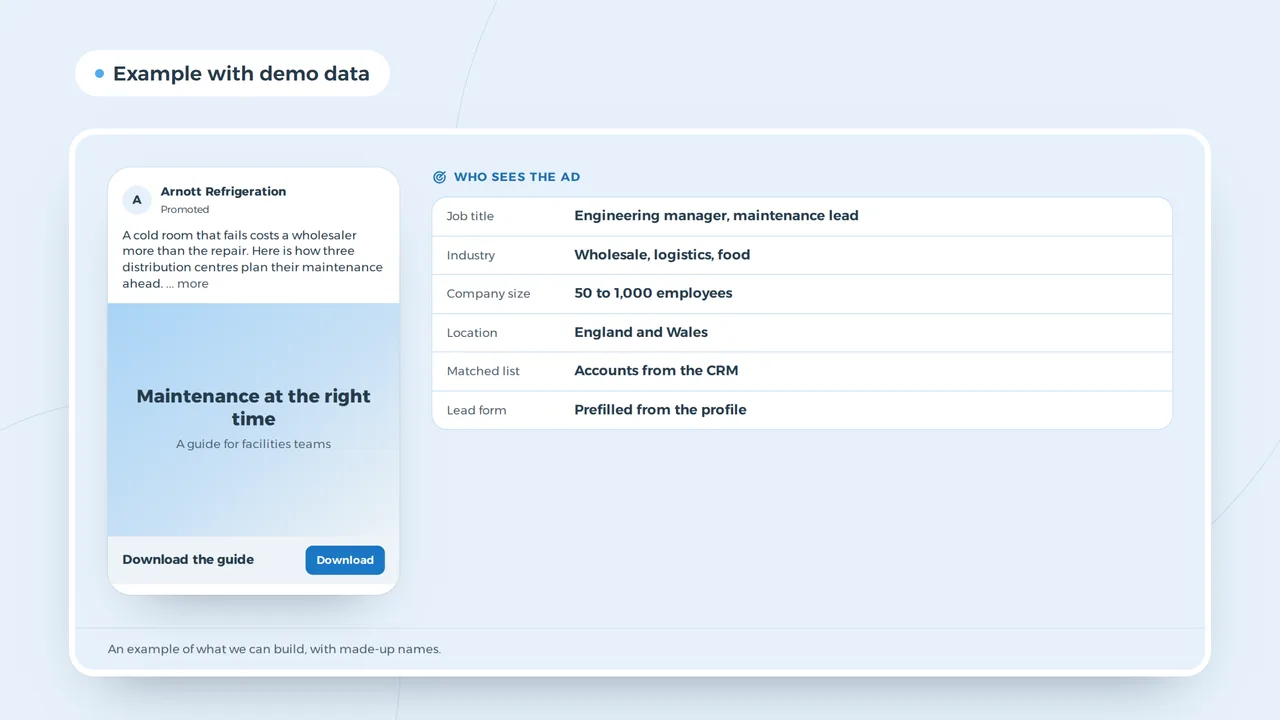
A promoted post in the LinkedIn feed
Who sees the ad
- Job title
- Engineering manager, maintenance lead
- Industry
- Wholesale, logistics, food
- Company size
- 50 to 1,000 employees
- Location
- England and Wales
- Matched list
- Accounts from the CRM
- Lead form
- Prefilled from the profile
An example of what we can build, with made-up names.
A job post that stands out
On LinkedIn you compete with dozens of other jobs for the same role. Candidates first see the title, your logo, the place and sometimes the pay. Then they read a few lines. Those lines must answer one question: why work here instead of where I am now?
| Part | Weak | Strong |
|---|---|---|
| Title | Rockstar Developer | Backend Developer, Java, Manchester |
| First line | We are a fast-growing company | You build the planning that 300 lorries follow every morning |
| Pay | competitive | 42,000 to 50,000 pounds plus pension |
| Way of working | flexible | three days at home, two in the Manchester office |
| Profile | ten requirements | four requirements and two that are a bonus |
Long lists of requirements mostly put off good candidates who do not tick every box. Split what is required from what is nice. And follow the equality rules: no age, no "young team", no "recent graduate" unless the role is a graduate scheme you can justify, and a job title for everyone. Under the Equality Act 2010 a job ad may not suggest that you would treat someone less favourably because of a protected characteristic. In the EU, the Pay Transparency Directive means applicants must get the starting pay or its range before the interview; putting it in the post is the simplest way.
Let your network share it
A job from a company page with few followers reaches few people. Ask your team to share it with a line of their own: "We are looking for a colleague in our Leeds team, who do you know?" A post from a person often reaches more people on LinkedIn than a post from a page. When to post is in the best time to post on LinkedIn, and how the feed decides what it shows is in the LinkedIn algorithm. No proper page yet? Start with a LinkedIn company page.
A candidate who checks your page
Anyone who clicks your job almost always looks at your company page and at the profiles of people who work there. An empty page, an old logo or no posts for a year cost you candidates. A few posts about the work, the team and a project do more than a long text about values. That is what employer branding means in practice.
A job post or a LinkedIn ad
A job post reaches people who are looking. Most good candidates are not looking; they have a job. A sponsored post or a video in the feed reaches them by job title, industry, company size and experience, whether they browse jobs or not.
| Job post | Ad in the feed | |
|---|---|---|
| Reaches | people who search or get job alerts | people by job title, industry and experience |
| Format | the job listing | image, video, carousel or document |
| Good for | roles with active candidates | scarce profiles who are not looking |
| Cost | per click or applicant | per click or per thousand views |
For a scarce engineer or sales manager an ad often finds more fitting candidates than a job post. For a role with plenty of applicants the job post is enough. Seasonal or hourly roles often go faster on Facebook and Instagram; see how to post a job on Facebook.
The page behind the job
Many candidates apply in LinkedIn with Easy Apply. Others click through to your site. A careers page that loads on mobile, shows the pay and lets people apply in a few fields keeps them. A form that asks for a CV upload on a phone and an account loses them. If you hire often, a page per role with a short video or quote from a colleague is worth building; landing page design shows how.
Tracking where applicants come from
If you post the same job on LinkedIn, Facebook and job boards, tag each link with the UTM builder. Then you see which channel brought the people you hired, not only the most applications. Recruitment agencies that place candidates for clients have their own setup; see marketing for recruitment agencies.
When to close the job
Close or pause a job as soon as you have enough good candidates for interviews. A job that stays open for weeks after you stopped reading applications costs budget and leaves people waiting. Send everyone who applied a short answer; on LinkedIn your name is visible, and candidates talk to each other.
Questions about jobs on LinkedIn
Is posting a job on LinkedIn free?
You can post a job for free, with limited reach. LinkedIn changes the limits on free posts regularly, so check them in your account. More reach costs a daily or total budget.
Can I post a job from my company page?
Yes. Link the job to your company page so it shows under the Jobs tab and candidates see who you are.
Can I turn a promoted job back into a free one?
No. You can pause or close a promoted job, but not change it back to a free post.