Intranet
Intranet development for a team that opens it every day
An intranet that only shows news is one nobody opens. An intranet where you request leave, send in a receipt and find the right form is one people use. That is the one we build.
A notice board or a place to work
Most intranets start as a notice board: a start page with news from management and a folder of documents. Three months later nothing new has been posted and everyone is back to searching their inbox.
An intranet stays alive when it takes over a task your team does every week. Requesting leave, filing an expense, reporting a defect or opening the latest rota. The news comes along by itself, because people are there anyway.
What belongs on a small business intranet
Not everything has to go on it. Start with what your team asks reception, HR or the owner most often.
| Part | What your team does there | Why it matters |
|---|---|---|
| Announcements | Read, with a tick when read | You know who has seen a new rule |
| Documents | Find the right form or policy | One version instead of five in inboxes |
| Requests | Leave, expenses, equipment, a certificate | Every request reaches the right person and can be followed up |
| Reports | A defect, an incident, a question for IT | Nothing gets lost in a group chat |
| Who is who | Colleagues per department and who to call for what | New people find their way |
| Rota and schedule | Their own shifts and who is in today | No more photos of the rota going round |
Each part can start small. A leave request is a form with an approval; how far that can go is on the leave management software page. For receipts and mileage there is the expense claim app, and for defects and questions an internal ticketing system. Guests at reception sign in through a visitor management system.
The start page of an intranet that works
Good morning, Lotte
Search a document, colleague or procedure
Announcements
New site workwear from Monday
Ines, safety
41 of 52 read
Office closed on 11 November
Tom, admin
52 of 52 read
Quick requests
Opened most
- 1Work regulations 2026
- 2Procedure for an accident on site
- 3Material order form
Example of what we can build, with made-up names.
An intranet for drivers who are never in the office
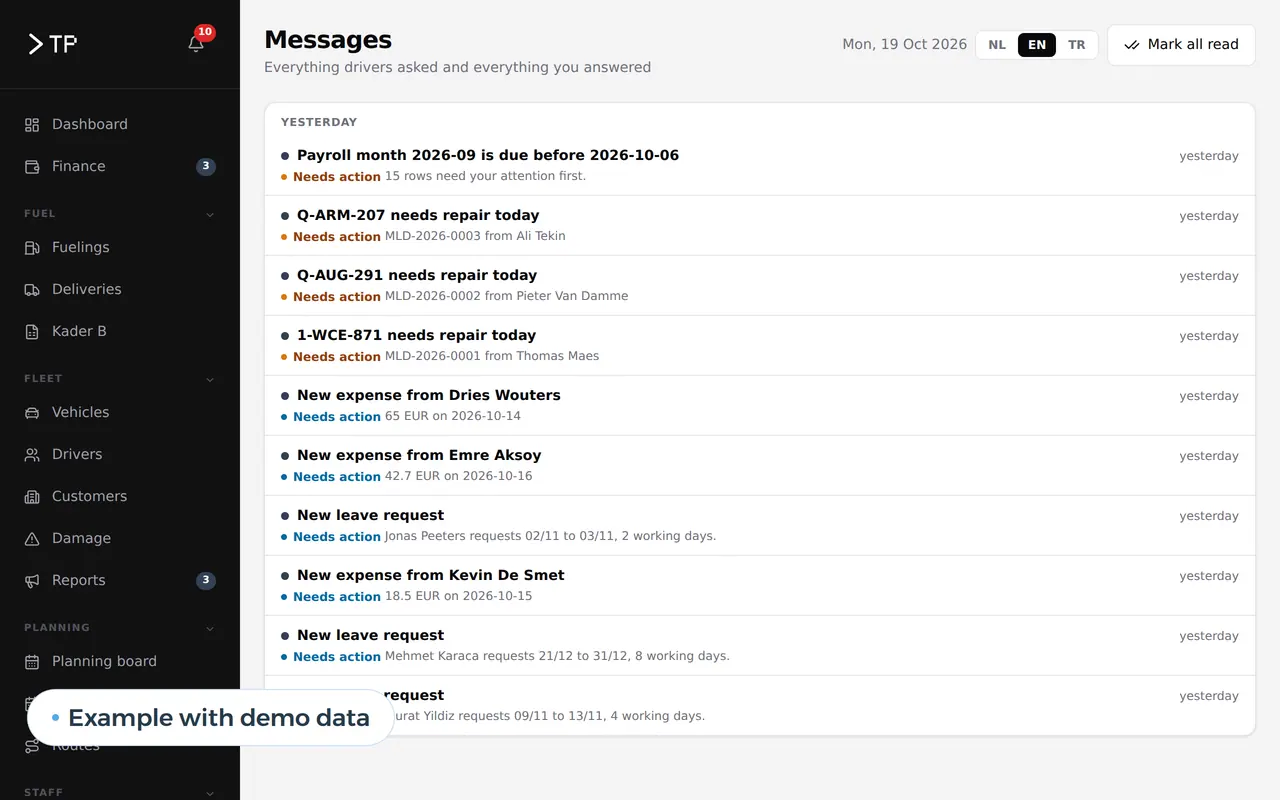
For a Belgian transport company we built a platform with its own part for the drivers. On their phones they request leave, send in receipts, see their appointments and report a problem with the truck or an accident. They can do that in Dutch, English and Turkish. They log in with a tile showing their name and four digits, no password.
In the office everything arrives in five queues, so each request lands with the right person. The staff file warns about documents that are about to expire. It is not an intranet with a start page full of news, but it does what an intranet should do: the team finds what it needs, wherever it is. The full story is in the DA Logistics case.
What makes an intranet usable
- On the phoneAnyone who is not at a desk opens the intranet on their phone, without an app store.
- In your team's languagesDutch, French, English or Turkish, set per person.
- Easy sign-inWith a work account, a link by email or a name tile with a code.
- Search that finds thingsOne search field across documents, people and requests.
- Rights per roleA driver sees something different from the bookkeeper or the owner.
- Notifications that arriveA new announcement or an approved request arrives as a message.
SharePoint, a package or a custom intranet
If you already work with Microsoft 365, you have SharePoint and can set up an intranet there. For an office where everyone sits at a desk that is often a good start. A custom intranet pays off when your team works differently from an office.
| SharePoint | Intranet package | Custom intranet | |
|---|---|---|---|
| Licence | Included in most Microsoft 365 business plans | Per user per month | No licence per user |
| People without an office account | Every user needs an account | Every user needs a licence | A sign-in that fits, also for drivers or floor staff |
| Requests with approval | Through Power Automate, with set-up work | Whatever the package offers | The way your process runs |
| Link with your own software | Limited to connectors | Limited to what the package knows | Direct |
| Languages per user | Microsoft's languages | The package's languages | Any language your team speaks |
The trade-off is worked out on SharePoint intranet alternatives. The general question is covered in build vs buy software, and low-code builders in Retool alternatives.
How we build an intranet
- A week of questionsWe note which questions your team asks HR, reception and the owner for a week. That list becomes the content of the first version.
- A clickable designYou see the start page and three tasks on desktop and phone, tested by two colleagues who have never seen it.
- Build and connectWe build the parts, the admin screen and the link to your work accounts and existing software.
- Start with one taskOn day one the intranet replaces one thing everyone does, such as the leave request. The rest follows.
Why intranets go unused, and how to prevent it
A new intranet usually dies of three things, and each one is solved in the design.
It gives nothing back. If all you do there is read, you stop going. Put at least one task on it that your team has to do, such as requesting leave or checking the rota. Then everyone opens it at least once a week.
It only works in the office. Half of a small company's team works in a warehouse, on the road or at a client. An intranet that does not work on a phone misses that half. We build it as a PWA: a web app on the home screen without an app store.
The old channels stay open. As long as leave can also be requested by text to the boss, it will keep going by text. Agree from which day a request only goes through the intranet, and stick to it.
What an intranet is exactly, and how it differs from an extranet, is explained in the glossary under intranet.
Integrations with what you already run
An intranet gets stronger the more it knows about your other systems.
- SchedulingPersonal shifts come from your staff scheduling software, and worked hours from a time tracking app.
- StaffContracts, certificates and expiry dates live in employee records software. An employee sees their own documents, HR sees everything.
- Your packagesPayroll, accounting or your ERP through API integration services.
- ClientsIf you also want to show clients something, build a separate client portal for that, with its own rights.
- AIAn assistant that answers questions about the staff handbook from your own documents. What that takes is in AI for HR.
We build an intranet as a web application, so it runs in the browser and on the phone with the same software.
What intranet development costs and what drives it
A custom intranet has no price per user but a build price. That depends on the number of parts, the integrations and the languages. A start page with announcements, documents and a leave request is a manageable project. Every extra part with an approval, such as expenses or reports, adds to it.
Work out your own case with the software development cost calculator. How custom projects are priced in general is in the guide on custom software development cost.
Questions about intranet development
How big does a company need to be for an intranet?
There is no lower limit. With ten people it pays off if your team works in different places or the same questions come back every week. With fifty people it becomes hard to do without.
Can people without a work email sign in?
Yes. Floor staff or drivers without a company account sign in with a link by text message or email, or with a name tile and a code on a shared phone.
Can we start with one part and add more later?
We recommend it. Start with the task that costs the most time, and add a part each month once the previous one is in use.
What happens to the documents on our server or in Dropbox?
They move along, but not all of them. We first list what your team actually opens: policies, forms, procedures and templates. That goes onto the intranet, with an owner per document. Old versions and archives stay where they are.
What about privacy?
An intranet holds data about your team, so the GDPR applies. An employee sees their own requests and documents; HR and the owner see more. The system logs who opens what.
Who manages the content?
You do, through an admin screen. Announcements, documents and who sees what change without us.
Want to know what an intranet could do for your team? Get in touch.
Web application
How VBS helps you with this
We build software in the browser for your whole team, on every computer and phone, around the way you work.
- Roles and permissions per person
- Links to your accounting and your email
- Releases without downtime, with backup and rollback
How we approach it is on our page about Web application.
Which question do you get every single week?
Tell us what your team handles by email, text and paper today. We sketch the first version of your intranet and the first task it takes over.
Rather get in touch right away?