On this page
An online shop can show its products with a photo and a price on Google through two kinds of campaign: standard Shopping and Performance Max. Both take their ads from the same product feed in Merchant Center. The difference is who steers. In Shopping you decide what to bid per product group, and you see which searches you appeared for. In Performance Max Google steers across all its channels towards your goal, and you see less of how it gets there.
No campaign wins every time. The choice depends on your tracking, your number of sales, your margin per product and how much time you have to adjust. This comparison sets the differences side by side, with what changed in 2024 and 2025.
Shopping and Performance Max side by side
The same feed, a different split of the work.
- Where you appear
- Standard Shoppingsearch results, Shopping tab, Images
- Performance MaxSearch, Shopping, YouTube, Display, Gmail, Discover, Maps
- What you supply
- Standard Shoppingyour product feed
- Performance Maxyour feed plus headlines, images, videos and audience signals
- Bidding
- Standard Shoppingmanual per product group, or smart with target ROAS
- Performance Maxsmart only: maximise conversions or conversion value, with an optional target
- Search terms
- Standard Shoppingfull report
- Performance Maxreport and insights, less detail per channel
- Exclusions
- Standard Shoppingnegative keywords and lists
- Performance Maxup to 10,000 negative keywords per campaign, brand exclusions
- Tracking needed
- Standard Shoppingrecommended
- Performance Maxessential, with a value per sale
- Work per week
- Standard Shoppingmore: bids and search terms
- Performance Maxless steering, more images and feed
Shopping is the pick for control and for a shop still learning what sells. Performance Max is the pick for reach, once your tracking and your images are in order.
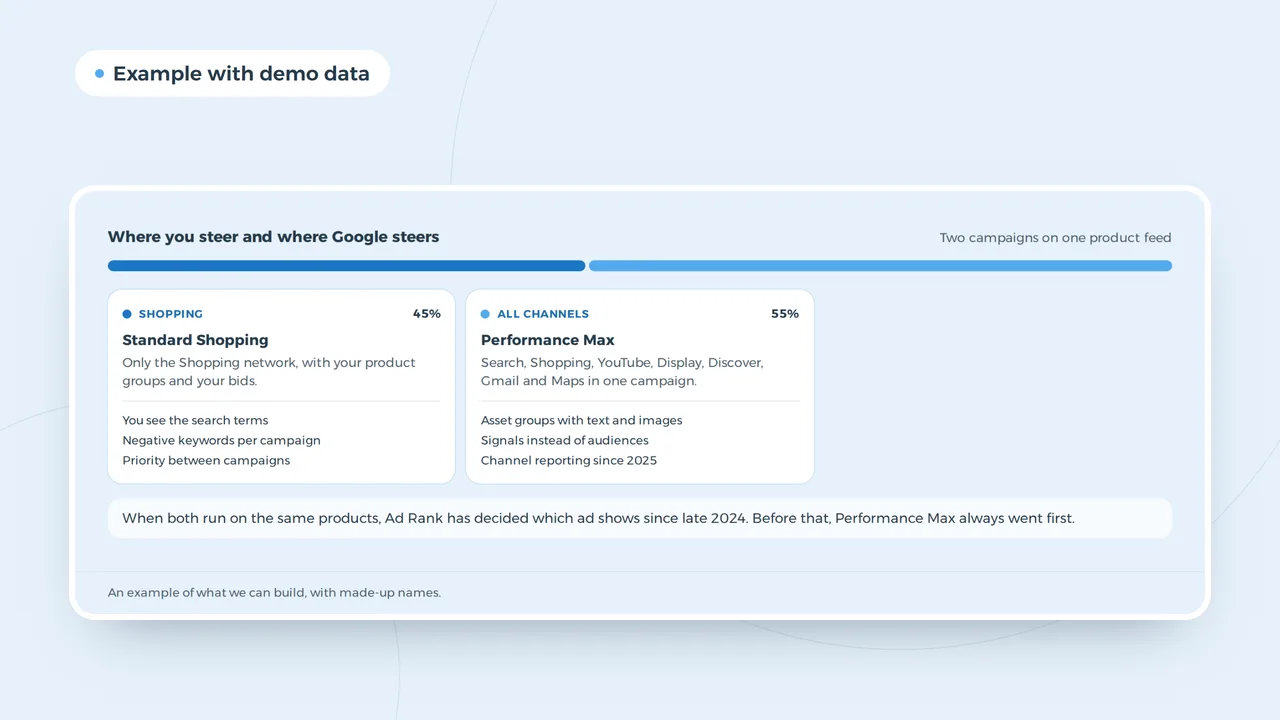
A Performance Max campaign next to Shopping
When both run on the same products, Ad Rank has decided which ad shows since late 2024. Before that, Performance Max always went first.
An example of what we can build, with made-up names.
The auction change of October 2024
Until October 2024 Performance Max had priority: if a product sat in both campaigns, Google showed the ad from Performance Max. Since then Ad Rank decides, just as it does between two ordinary campaigns. A well run Shopping campaign can win again against Performance Max for the same products, so running them side by side pays off once more.
In 2025 Performance Max gained more control: up to 10,000 negative keywords per campaign, a channel report and a search terms report. It is still less transparent than Shopping, but the biggest complaint of the early years, that you could neither see nor exclude where your money went, has shrunk. Google is moving its other automated campaigns the same way, as in the switch from dynamic search ads to AI Max.
Your product feed decides both
Whichever campaign you pick, the ad comes from your feed. A product title such as "Chair" loses to "Aluminium stacking garden chair anthracite", because Google matches the words in the title to a search. A feed with correct prices, stock, brand, GTIN and good photos is the first job, for every bidding strategy.
| Feed field | Why it counts |
|---|---|
| Title | decides which searches you appear for |
| Price and stock | must match your site, or the product is disapproved |
| GTIN and brand | link your product to what Google already knows |
| Image | the first impression, with no text or logo over it |
| Custom labels | margin, season or bestseller, to group on |
Cases where standard Shopping wins
Shopping wins when you have few sales a month. A smart bidding strategy needs conversions to learn from; with a handful a month it guesses. In Shopping you then bid per product group yourself and adjust on what you see. Shopping also wins when margins differ a lot between products: with custom labels for margin you give the products with the best margin a higher bid.
And Shopping wins when your tracking is not right yet. Performance Max steers on the conversions you send it. If your tracking counts a click on "add to basket" as a sale, or misses half your orders because of a cookie banner without Consent Mode, Google steers on the wrong numbers. Set up GA4 and your conversions first, and read how the consent mode change in Google Analytics affects what you see.
Cases where Performance Max wins
Performance Max wins when your tracking is reliable, with the real value per order, and when you have enough sales to learn from. It also wins when you have images and video: your products then appear not only in the search results, but also on YouTube, in Gmail and on Display, in front of people who had not searched yet. And it covers remarketing without a separate campaign, using your audience segments as a signal.
If you supply few images of your own, Google fills the gap with what it takes from your site. That sometimes works, but your own video of a product in use usually beats an automatic slideshow of product photos.
Running both side by side
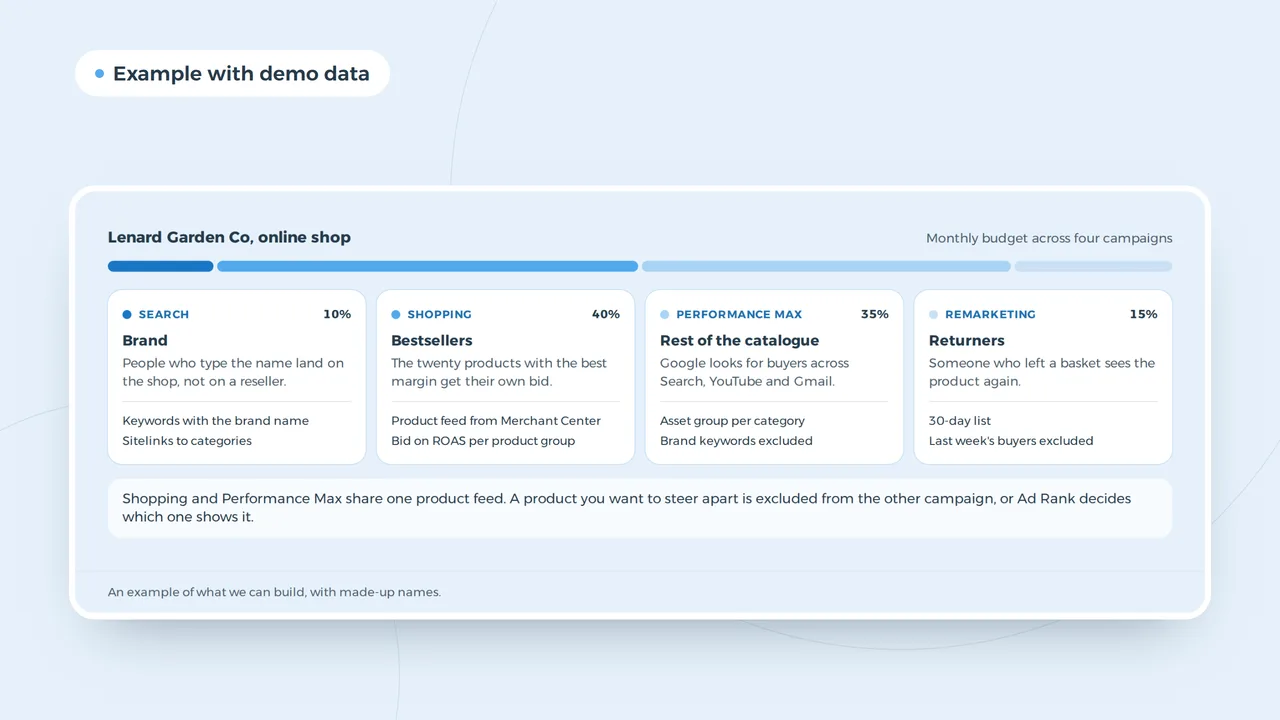
Many shops run both. The most common setup: a Shopping campaign for your brand terms or your bestsellers, so you keep control there, and Performance Max for the rest of the range. Exclude in each campaign what the other one covers, or they bid against each other. Since Ad Rank decides, the reports show which campaign won the auction.
| Setup | Shopping | Performance Max |
|---|---|---|
| Starter, tracking not complete | all products | not yet |
| Growing shop | bestsellers and brand terms | rest of the range |
| Large shop with images and video | testing new products | most of the budget |
| Shop with thin margins | products with margin, own bid | excluded, or a high target ROAS |
What each campaign may cost
In the end you steer both campaigns on ROAS: revenue per pound of advertising. Which ROAS you need to make a profit depends on your margin. With a gross margin of 40 percent you need a ROAS of 2.5 to break even, on product cost alone. Work it out with the ROAS calculator and read at ROAS why that number means nothing without margin. What a click roughly costs is in Google Ads cost, and you can plan a monthly budget with the Google Ads budget calculator.
A target ROAS set too high leaves a campaign barely spending. One set too low buys revenue without profit. Start around your break even point and adjust month by month.
Moving from Shopping to Performance Max
If you have run Shopping for years and want to try Performance Max, do not switch everything at once. Pick a category that sells well but is not your bestseller, put it in a Performance Max campaign and exclude it from Shopping. Let it run six to eight weeks on the same budget as before, and compare revenue per pound and margin, not clicks. If it does better, move the next category across. If it does worse, you only risked part of your revenue.
Give each campaign its own links with the UTM builder, so Analytics shows which campaign brought which order. Rising revenue in Performance Max that runs in step with falling revenue in Shopping is no gain; it is the same customer by another route. So look at total revenue from Google, not per campaign.
Mistakes we see in online shops
- Starting Performance Max without trackingGoogle then optimises on what it can see, often clicks on the basket.
- Leaving brand terms in Performance MaxThe campaign looks strong because it counts people who were looking for you anyway.
- Every product in one product groupThen you bid as much on your bestseller as on an item that never sells.
- A feed with short titlesThe difference between a product that appears and one that does not.
- Switching after two weeksA smart bidding strategy needs weeks to learn.
A small business that sells services rather than products starts elsewhere; the plan for that is in Google Ads for small business.
Questions about Shopping and Performance Max
Does Performance Max still take priority over Shopping?
No. Since October 2024 the ad with the highest Ad Rank wins, whichever campaign it comes from.
Can I exclude keywords in Performance Max?
Yes, up to 10,000 per campaign. They work on Search and Shopping, not on YouTube or Display.
Do I need images for Performance Max?
A campaign with only your feed works, but then Google fills in the rest. Your own images and video give you more say over how your brand looks.