Google Ads for online shops
Google Ads for ecommerce stores that bid on margin
A shop that sells for 100,000 a year at a loss on every order is not a success. Here is how an account steers on what you keep.
Google Ads for an online shop runs on one thing more than any other: the product feed. The title, price, image and availability that Google shows come from the data you send to Merchant Center. A good feed with a simple campaign beats a clever campaign on a poor feed, every time.
This page goes through the feed, the choice between Shopping and Performance Max, how to bid on margin, and the order in which a small shop builds its account.
Search, Shopping or Performance Max
Three campaign types a shop uses, each for its own job.
- Where it shows
- Shoppingthe Shopping tab and product ads in search
- Performance MaxSearch, Shopping, YouTube, Display, Gmail and Maps
- What you control
- Shoppingbids per product group, search terms report
- Performance Maxgoal, budget, assets and signals; Google chooses the rest
- Needs
- Shoppinga clean feed
- Performance Maxa clean feed, images, video and solid conversion data
- Good for
- Shoppingbestsellers and products with a clear margin
- Performance Maxa wide catalogue once tracking is right
- Risk
- Shoppingmore work to manage
- Performance Maxspend on brand searches and channels that do not sell
Most shops start with Shopping on their best products and a brand search campaign, then add Performance Max for the rest of the catalogue.
The feed decides what people see
Google writes your product ad from the feed. A title like "Lounge set Bali" says little to someone searching "grey rattan corner sofa with cushions". A title that names product type, material, colour and size wins the search and the click.
| Feed field | Weak | Strong |
|---|---|---|
| Title | Lounge set Bali | Rattan corner sofa grey, 5 seats, with cushions |
| Image | product on a busy terrace | product on white, plus lifestyle images as extra |
| Price | differs from the site | the same as the checkout, including VAT |
| Availability | always in stock | synced with your stock at least daily |
| Product type | empty | your own category path, for bidding per group |
| Custom label | empty | margin band, season or bestseller flag |
A mismatch between feed and site gets products disapproved, so let the shop platform send the feed rather than a spreadsheet. Shopify, WooCommerce and Lightspeed all have a channel for it. If you are still choosing a platform, see Shopify or WooCommerce. Which of the two campaign types fits your catalogue, we weigh up in Google Shopping vs Performance Max.
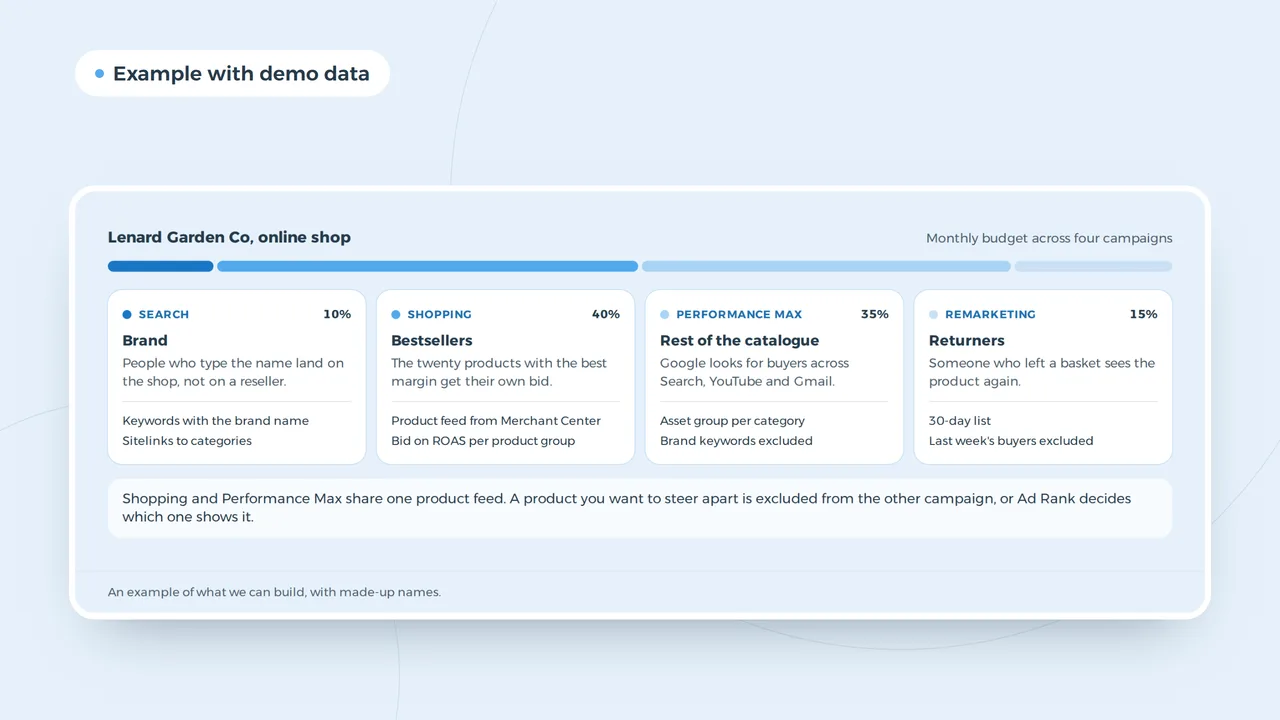
The account of an online shop
Shopping and Performance Max share one product feed. A product you want to steer apart is excluded from the other campaign, or Ad Rank decides which one shows it.
An example of what we can build, with made-up names.
Bid on margin, not on revenue
Target ROAS tells Google to bring in a certain revenue per pound or euro spent. The trap is that a 400 percent ROAS means something different on a product with a 60 percent margin than on one with 15 percent. Group your products by margin with a custom label, and give each group its own ROAS target. Better still, pass the profit of each order as the conversion value instead of the revenue, so Google bids on what you keep.
Work out the ROAS you need to break even with the ROAS calculator, and read what the number means in ROAS. For a product at 40 percent margin you break even at a ROAS of 250 percent, before shipping and returns.
The order for a small shop
| Step | Campaign | Why |
|---|---|---|
| 1 | conversion tracking with order value | without it no smart bidding works |
| 2 | brand search | cheap clicks you would otherwise lose to resellers |
| 3 | Shopping on your 20 best margin products | control and fast feedback |
| 4 | Performance Max for the rest of the catalogue | reach once the data is right |
| 5 | remarketing for abandoned carts | people who nearly bought |
Exclude your brand from Performance Max, or it takes credit for sales that brand search would have brought in anyway. How remarketing works for a shop, including dynamic ads that show the product someone viewed, is in Google Ads remarketing.
Seasons and stock
A shop in garden furniture sells in spring, a shop in heaters in autumn. Raise the budget a few weeks before the season, not during it, so the campaign has time to learn. Pause or lower bids on products that are nearly out of stock; an ad for a product you cannot deliver costs the click and the customer.
Tracking a shop needs
Every order with its value, the products in it and whether it was a new customer. Use the tag or GA4, with consent mode, because in the UK and the EU a tracking cookie needs consent first. How to set up GA4 is in Google Analytics 4 setup; the cookie rules are in UK cookie law. Tag links in emails and social posts with the UTM builder, so you can see what the ads add on top.
SEO next to ads
Paid and organic results compete for the same searches. A product page that ranks well lowers what you need to spend on that product. For category pages and buying guides, ecommerce SEO pays back over years; ads fill the gap while it grows.
Rules for shops that sell restricted products
Alcohol, supplements, medicines, weapons and some cosmetics fall under restricted policies at Google. Some need certification, some can only be advertised in certain countries, some not at all. Check the policy before you put those products in the feed, or they will be disapproved and can drag the account down. What Google asks before your first ad runs is in Google Ads advertiser verification.
Reading the account each week
A shop account needs a short weekly look, not a daily one. Four reports tell you almost everything. The search terms report shows which searches triggered your Shopping ads; add the irrelevant ones as negatives. The products report shows which items take budget without selling; lower their bids or move them to a separate group. The Merchant Center diagnostics show disapproved products and feed errors. And the conversion report shows whether new customers and returning customers come in at the ratio you expect.
| Report | What to look for | Action |
|---|---|---|
| Search terms | searches that do not match the product | add as negative |
| Products | spend without sales over four weeks | lower bid, new group or exclude |
| Merchant Center diagnostics | disapprovals, price or stock mismatch | fix the feed at the source |
| Conversions by customer type | mainly returning customers | check brand exclusion in PMax |
Change one thing at a time and wait a week or two before you judge it. Smart bidding needs time to settle after every change, and a shop that adjusts targets daily never lets it learn.
Returns, shipping and the real margin
A product with a high return rate, such as clothing or shoes, earns less than its price suggests. Count returns and shipping in the margin you bid on, or the account will push products that look profitable and are not. A shop with free shipping above a threshold can also use that threshold in its ads, because it is a reason to buy more than one item.
Questions from online shops
- What budget does an online shop need for Google Ads?
- Enough for Google to learn: in practice, a daily budget that buys at least a few sales a week on your main campaign. The budget calculator shows what a budget buys at your click price.
- Are free product listings worth it?
- Yes. With a feed in Merchant Center your products can show for free in the Shopping tab. It costs nothing extra once the feed exists.
- Should I advertise every product?
- No. Products with a thin margin or low stock often cost more than they bring. Start with the products that make money.
Google Ads
How VBS runs shop accounts
We start with the feed and the tracking, then build brand search, Shopping and Performance Max in that order, with bids per margin group. If the shop itself needs work first, we build it: webshop development and Google Ads from one team. What a shop costs to build is in ecommerce website cost.
Ads that pay for themselves?
Send us your shop and your margins. We show which products are worth advertising first.
Rather get in touch right away?