Google Ads for SMEs
Google Ads for small business, without wasting the first budget
Most small accounts lose money in the first month on settings nobody changed. Start small and exact, measure, and grow what works.
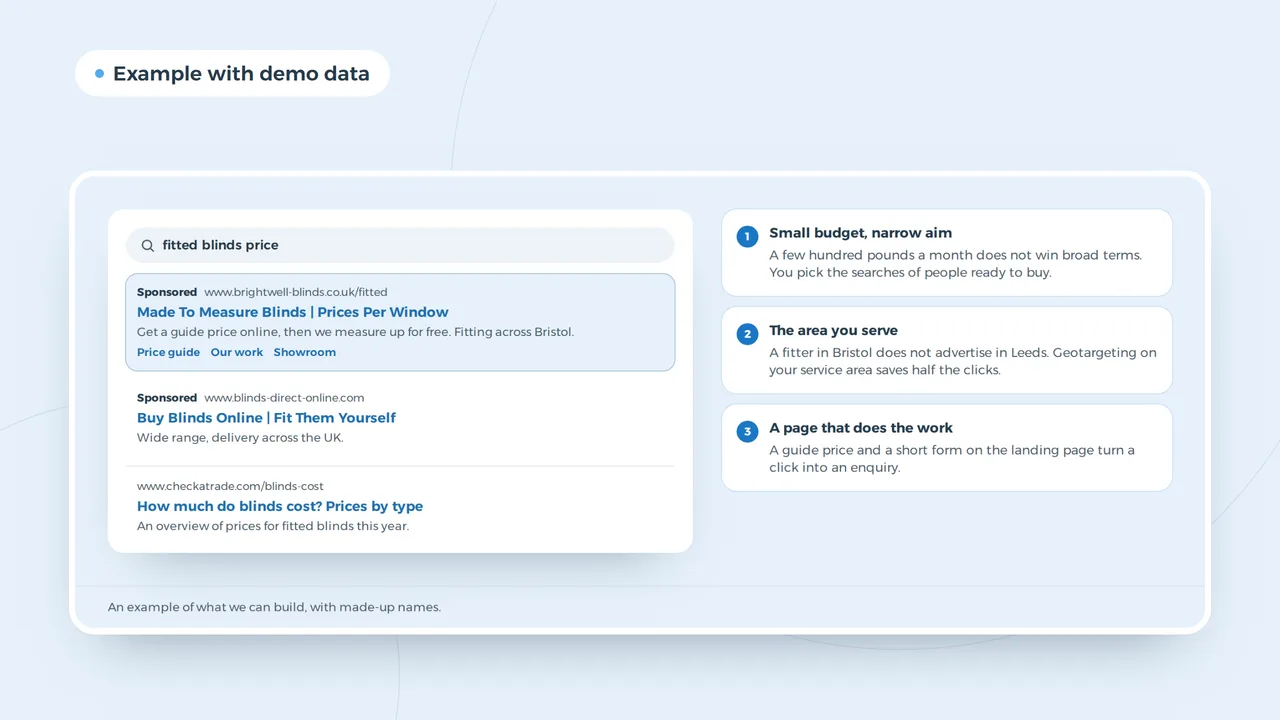
A small budget has no room for broad settings.
A big advertiser can afford to test everything. A small business with a few hundred pounds a month cannot. Google Ads still works at that size, but only if the first campaign is narrow: the searches closest to a sale, the area you actually serve and a page that turns a click into a call or a form.
This page is the setup we use for small accounts: what to switch on, what to switch off, what to measure, and when to add more.
Why small accounts lose money in month one
Google's defaults are built for reach. A new search campaign often starts with the Display Network switched on, location set to presence or interest, broad match keywords and automatic bidding without any conversions to learn from. Each of those sends clicks to people who will never buy.
| Default | What it does | What we set |
|---|---|---|
| Search partners and Display | ads on other sites and apps | Search only at first |
| Presence or interest | people who read about your area | presence only |
| Broad match on everything | loosely related searches | phrase and exact on the core words |
| Maximise clicks with no cap | cheap, irrelevant clicks | a cost cap, then conversions once you have them |
| Ads all day | clicks when no one answers | your opening hours |
The full walkthrough is in how to set up Google Ads. The point here is the order: narrow first, wider later.
The first campaign for a small business
- One goalCalls, forms or bookings. Pick the one that pays the bills.
- MeasurementThat goal counted as a conversion and tested before launch.
- Ten to twenty searchesThe words a buyer types, in phrase and exact match.
- Your area and hoursPresence only, a radius you serve, ads when you answer.
- A page per serviceThe ad promises one thing; the page delivers it.
- Weekly search termsAdd negatives every week for the first two months.
Search campaign or Performance Max to start
Both are Google Ads; they behave differently on a small budget.
- Where it shows
- Search campaignGoogle Search
- Performance MaxSearch, YouTube, Display, Gmail, Maps and Discover
- Control
- Search campaignyou choose the words
- Performance MaxGoogle chooses with your goal and assets
- What it needs
- Search campaigna good list of searches
- Performance Maxconversion data, images, video and text
- Small budget
- Search campaignworks from day one
- Performance Maxspreads thin across channels
- Reports
- Search campaignyou see every search term
- Performance Maxless detail per channel
Start with search. Add Performance Max once you have steady conversions and good images, if your business sells something people browse.
What a click costs and what you can afford
There is no fixed price. Your cost per click comes out of an auction based on your bid, the quality of your ad and the search itself. A plumber in a city pays more than a dog groomer in a village. The Google Ads cost guide explains the auction, and the budget calculator turns a monthly budget into a number of clicks and leads at your price per click.
Work it backwards. If one in ten clicks becomes an enquiry and one in three enquiries becomes a customer, you need about thirty clicks per customer. Multiply by your cost per click and compare it with what a customer is worth. If the number does not work, fix the page or the offer before you raise the budget. For shops, the ROAS calculator does the same sum with revenue, and ROAS explains the ratio.
Ads that earn the click
A responsive search ad has up to 15 headlines and 4 descriptions. Google mixes them, so every headline must work on its own. Put the service and the place in one, a reason to choose you in another, and what happens next in a third. A good click-through rate is a sign the ad matches the search; what is a good CTR gives the ranges. More patterns are in Google Ads examples.
The page after the click
Sending a paid click to your homepage wastes it. A landing page per service, with the same words as the ad, your number at the top and one clear action, converts far better. If your site cannot do that, a small business website or a single landing page design fixes it before you spend on clicks.
Measuring without guessing
Count what pays: calls from the ad, taps on your number, forms and bookings. Set it up in Google Analytics 4 and import those goals into Google Ads. Tag every link you share elsewhere with the UTM builder, so your newsletter and social posts show up apart from the ads. Then you know which channel pays, rather than which one is busiest.
When to grow
Grow when a campaign brings customers at a cost you accept for a month or more. Then add a second service, widen the area, or test a new match type. If you also want long-term visibility without paying per click, read SEO or Google Ads. For ads beyond Google, our guide to local advertising compares the channels.
Small-business campaigns by type of business
| Business | First campaign | Counts as a result |
|---|---|---|
| Trade or home service | the main service plus your town | a call or a quote form |
| Shop with a webshop | your best-selling products by name | a sale with its value |
| Practice or salon | the treatment plus your town | an online booking |
| Business service | the problem you solve, in the words buyers use | a contact form or a call |
| Restaurant or venue | your name and "near me" searches | a booking or directions |
Two things matter more for a small business than for a large one. First, your Google Business Profile: people who see your ad also see your reviews on the map, and a weak profile costs you clicks you paid for. Second, your brand name: someone searching your name will find you anyway, so keep brand searches in their own small campaign, or leave them out at the start, and judge the rest on new customers. For the basics of being found locally without ads, see local SEO tips and how to create a Google Business Profile.
Ads per trade
The ad itself changes with the trade. A roofer sells on response time and a visible guarantee, a dental practice keeps to practice information under the GDC rules, and a firm that sells to other firms needs a longer path with a quote form and a CRM, as in Google Ads for B2B. The format is the same for all of them: a responsive search ad with up to 15 headlines that Google combines per search.
Not sure Google is the right channel at all? How to advertise a business puts Google, Meta, LinkedIn and offline side by side, with what each one is good for.
Questions from small businesses
What is the minimum budget for Google Ads?
Google has no minimum. You need enough budget for about thirty clicks per expected customer each month, at your cost per click, to learn anything.
Should I use Smart campaigns?
They are simple, but give less control and fewer reports. A small search campaign set up by hand usually wastes less.
How long before it works?
Measurement and the first negatives take two to four weeks. Judge a campaign after a month of clean data, not after a week.
Google Ads
How VBS runs small accounts
We set up one campaign with measurement first, the way Park & Wash got a Meta pixel behind consent with Contact and Lead events, and review the search terms every week until the waste stops. Then we grow what works. It is part of our Google Ads service; Google may also ask you to complete advertiser verification, which we help with.
A first campaign that pays its way?
Tell us what you sell and where. We tell you which searches to start with.
Rather get in touch right away?