On this page
- 01How Google Ads remarketing works
- 02Consent changes everything
- 03Dynamic remarketing for online shops
- 04Remarketing in search
- 05Remarketing for services and B2B
- 06Your own customer list
- 07Where the click lands
- 08Who may not use remarketing
- 09Lists to start with on a small site
- 10What to show people on a list
- 11Frequency and exclusions
- 12Measuring what remarketing really adds
- 13Remarketing in a shop campaign
People who looked once already know you.
A visitor who read your prices is closer to buying than anyone who has never heard of you. Remarketing spends your budget on them first.
How Google Ads remarketing works
The Google tag on your site adds each visitor to a list, called a data segment in Google Ads. You decide which pages or actions put someone on a list and how long they stay on it. You then show ads to that list on Display, YouTube and in Gmail, or raise your bid when someone on the list searches on Google again.
A list has to be big enough before it serves. For Display, Search and YouTube that is at least 100 active users in the last 30 days. A small site with a few hundred visitors a month can run one or two lists, not ten. You can keep people on a list for up to 540 days, but for most businesses 30 to 90 days is plenty.
| List | Who is on it | Typical duration |
|---|---|---|
| All visitors | everyone who visited | 30 days |
| Price or product page | people who looked at what it costs | 30 to 60 days |
| Started form or cart | people who almost converted | 7 to 30 days |
| Customers | people who bought or signed | exclude, 180 days or more |
| Your customer list | emails you upload, with consent | until you refresh it |
The same idea on Meta is called retargeting; the general term is explained in retargeting.
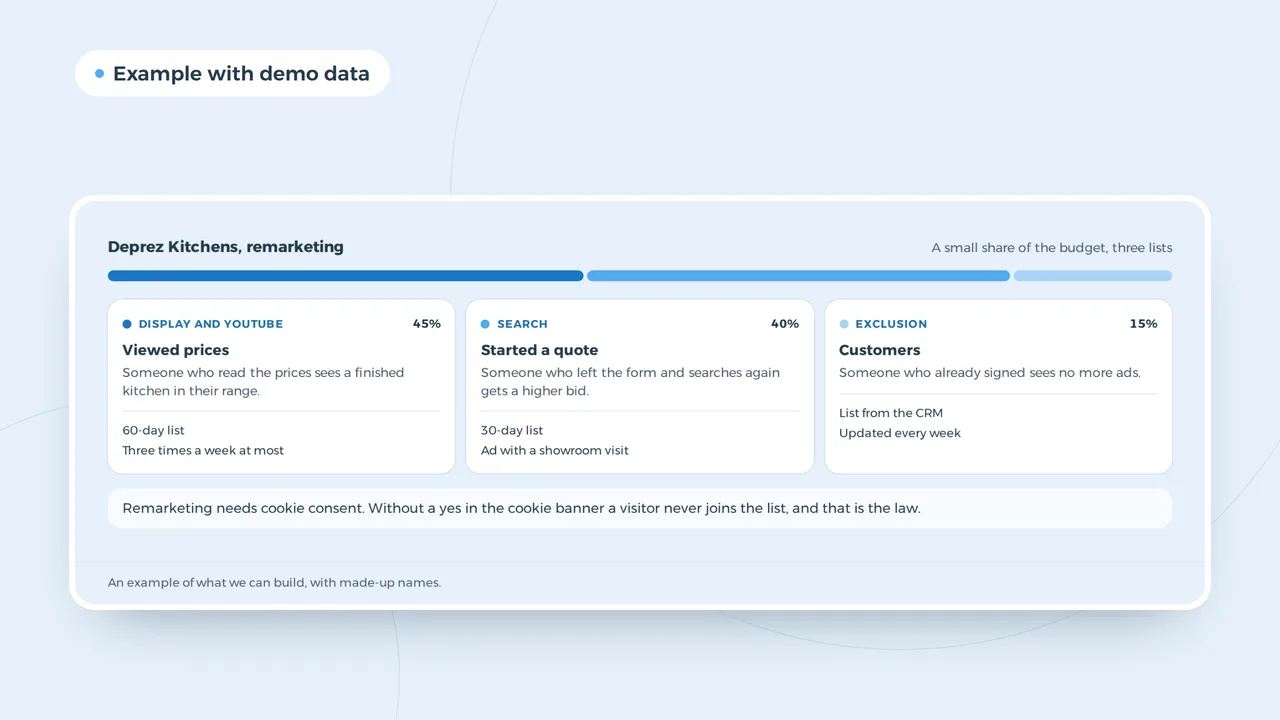
Remarketing lists from visitor to customer
Remarketing needs cookie consent. Without a yes in the cookie banner a visitor never joins the list, and that is the law.
An example of what we can build, with made-up names.
Consent changes everything
In the UK and the EU, a remarketing cookie needs consent before it is set. Visitors who decline do not end up on a list. With consent mode, the Google tag adjusts to each visitor's choice: no cookies without consent, and Google models part of the missing conversions. Your lists will therefore be smaller than your traffic suggests, often by half or more.
That is not a reason to skip the banner. It is a reason to make sure the banner works properly and to count on smaller lists. The rules for a banner are in UK cookie law and do I need a cookie banner. Check what your site sets before consent with the cookie scanner.
Dynamic remarketing for online shops
A shop can show each visitor the exact products they looked at, with photo and price from the feed. That is dynamic remarketing. It needs a Merchant Center feed and a tag that passes the product ID on product, cart and purchase pages. In Performance Max it is built in. A cart abandoner who sees the sofa they left behind is a warm lead; someone who sees it for the twentieth time in a month is irritated. How a shop sets up its account is in Google Ads for ecommerce.
Remarketing in search
Remarketing lists for search ads do not show a banner. They raise your bid, or change your ad, when someone who visited before searches on Google again. That is often the best use of a list: the person is searching now, and they already know you. A kitchen fitter can bid higher when a former price page visitor searches "kitchen showroom" again, and lower or not at all for someone new.
Remarketing on Google or on Meta
Both work. They reach people in different moments.
- Where
- Google AdsDisplay, YouTube, Gmail, and higher bids in search
- MetaFacebook and Instagram feed, Stories and Reels
- Moment
- Google Adswhile searching or reading elsewhere
- Metawhile scrolling
- Strong for
- Google Adspeople searching again, shops with a feed
- Metavisual products, offers, events
- Tag
- Google AdsGoogle tag with consent mode
- MetaMeta pixel with consent
- Special rules
- Google Adsno lists on sensitive categories
- Metajobs, housing and credit in a special category
A shop often runs both. A service business starts with search lists on Google, where the intent is clearest.
Remarketing for services and B2B
A service business has no product feed, but it does have pages that show intent: prices, a quote form, a case study, a booking page. Build a list for each, and show those people the next step. Someone who read the price page sees a finished project in their budget. Someone who started the quote form sees a short reason to finish it. In B2B the sales cycle is long, so a list of 90 days with a low frequency fits better; more in Google Ads for B2B.
Your own customer list
With Customer Match you upload email addresses of customers or subscribers who agreed to it. You can exclude them from acquisition campaigns, show them a new product, or use them as a signal for Performance Max. Only upload people who gave consent for this use, and refresh the list regularly.
Where the click lands
A returning visitor has seen your home page. Send them to the page that matches the list: the product they viewed, the quote form they left, a case in their sector. A dedicated landing page per list often doubles what remarketing adds. Tag the URLs with the UTM builder, so Analytics shows remarketing visits apart.
Who may not use remarketing
Google's personalised advertising policy forbids remarketing on sensitive categories. A clinic cannot build a list of visitors to a page about a medical condition. A debt adviser cannot follow people who read about money trouble. The list may exist in Analytics; it may not be used for ads. In health, finance and similar sectors, build lists on neutral pages such as the contact page or opening hours, or skip remarketing altogether. Meta has its own version of these rules; see why was my Facebook ad rejected.
Lists to start with on a small site
A site with a few thousand visitors a month cannot fill ten lists. Start with three and add more only when they serve.
| List | Rule | Use |
|---|---|---|
| All visitors, 30 days | every page | search: raise bids on your main keywords |
| Intent pages, 60 days | prices, quote, product pages | Display and YouTube with a case or offer |
| Customers, 540 days | thank-you page after a purchase or signed quote | exclude from acquisition |
Combine lists where it helps: intent page visitors who did not reach the thank-you page are the people you most want back. Google Ads lets you build that as a custom combination. Check after a month whether each list reaches the minimum size; a list that stays below it does nothing and only clutters the account.
What to show people on a list
The ad that brought someone the first time does not bring them back. A returning visitor needs a new reason: a finished project close to theirs, a short answer to the doubt that stopped them, a deadline that is real, or a review from a customer like them. A kitchen fitter shows a finished kitchen in the same price range; a shop shows the product with its delivery time; a B2B supplier shows a spec sheet or a case. Avoid fake urgency, which Google and Meta both reject, and avoid ads that make clear you know what someone looked at in a sensitive area.
Frequency and exclusions
Set a frequency cap on Display and YouTube, for example three impressions per person per week. Exclude customers who already bought, people who applied for a job, and visitors who spent a second on the site. Rotate the ad every few weeks, so the people on the list do not see the same image for months.
Measuring what remarketing really adds
Remarketing looks brilliant in reports, because it shows ads to people who were likely to come back anyway. Look at view-through conversions with caution and judge on clicks and on incremental results. A simple test: pause remarketing for a few weeks, or run it for half your list only, and compare. Then work out whether the extra sales pay for the spend with the ROAS calculator.
Remarketing in a shop campaign
For an online shop the campaign type decides how remarketing runs. In a Standard Shopping campaign you add your lists yourself and raise the bid for people who viewed a product or left a cart. In Performance Max you hand the same lists to Google as audience signals, and Google decides where and how often they see your products. The trade-off between control and reach is in Google Shopping vs Performance Max.
Questions about remarketing
Is remarketing the same as retargeting?
Practically, yes. Google calls it remarketing, Meta and most others say retargeting. The idea is the same: ads for people who visited before.
How big must my list be?
For Display, Search and YouTube at least 100 active users in the last 30 days. Smaller lists do not serve.
Does remarketing work without cookies?
Only partly. Without consent a visitor is not added to a list. Customer lists and search signals still work, within their own consent rules.