On this page
An ad works when it shows up where your customer is looking.
Most small businesses start advertising on the channel they use themselves. That is the wrong reason. The question is where your customer is when they need what you sell: searching, scrolling, reading a trade site, or driving past.
This guide lines up the channels, shows how to set a first budget, lists the rules that apply per sector in the UK and the EU, and ends with how to see whether it pays.
The channels side by side
| Channel | Who you reach | Format | Good for |
|---|---|---|---|
| Google Search | people searching right now | text, call button | services and products people search for |
| Google Shopping | buyers comparing products | product, price, photo | online shops |
| YouTube | viewers by topic or interest | video | explaining, brand, products with a demo |
| Facebook and Instagram | people in an area or with an interest | image, video, carousel | local, consumer, jobs, events |
| people by job title and industry | image, video, document | B2B, hiring | |
| TikTok | a younger audience, by interest | short video | consumer products, food and drink, hiring |
| Print, radio, signs | local or broad | varies | local shops, awareness |
Not sure between the two largest? Read Meta ads or Google Ads. For a business selling to other businesses, the mix of Google and LinkedIn is in Google Ads for B2B. If most customers live within a few miles, start with local advertising.
Search or scroll: the first choice
Every channel falls on one side of a line. On one side, people look for you: they type a need into Google and pick an answer. On the other, you interrupt them: they scroll through Facebook or watch a video and your ad appears. Search costs more per click and converts better, because the need is already there. Social media costs less per view and needs a stronger image and offer, because nobody asked.
A plumber, a solicitor or a locksmith starts with search: nobody scrolls for a plumber until the pipe bursts. A restaurant, a gym or a clothing shop often does better on Instagram, because the picture creates the wish. Many businesses end up using both, with search for demand that exists and social media to create more.
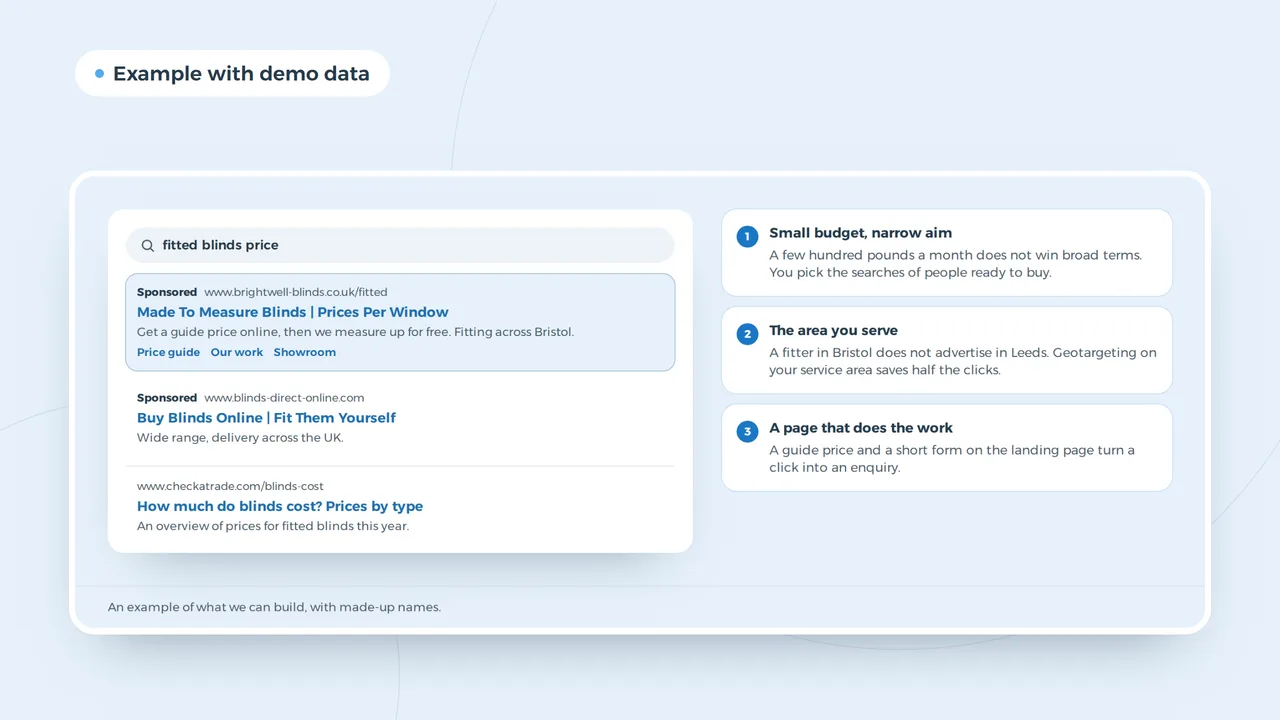
A search ad for a small business
- Small budget, narrow aimA few hundred pounds a month does not win broad terms. You pick the searches of people ready to buy.
- The area you serveA fitter in Bristol does not advertise in Leeds. Geotargeting on your service area saves half the clicks.
- A page that does the workA guide price and a short form on the landing page turn a click into an enquiry.
An example of what we can build, with made-up names.
What advertising costs
Online you set your own budget. The price per click or per thousand views depends on your sector, your area and how many competitors bid for the same people. A click on "divorce solicitor" costs many times a click on "bike shop". Averages from a blog say little about your market.
| Channel | How you pay | Where to find the numbers |
|---|---|---|
| Google Ads | per click | Google Ads cost |
| Meta | per thousand views or per click | Facebook ads cost |
| per click, per view or per message | LinkedIn ads cost | |
| TikTok | per thousand views or per click | TikTok ads cost |
Work out a first budget from the other side: what is a customer worth, how many enquiries do you need for one customer, and what may one enquiry cost? The marketing budget calculator does that sum for all channels, and the Google Ads budget calculator shows what a daily budget buys in clicks. Is Google Ads free to start? Partly; see is Google Ads free.
Five questions before you spend a penny
- Who is the customer?A person at home, a buyer at a company, a job seeker? Each one sits on a different channel.
- Do they search for you?If yes, start with search. If not, start where they scroll or read.
- What may a customer cost?Take the value of a customer and your margin. That sets your ceiling per enquiry.
- Where does the click land?A page for that one offer, with a clear next step. Not your home page.
- How will you count results?Calls, forms and sales, measured before the first ad runs.
Rules that apply per sector
Advertising is not a free space. In the UK every online ad falls under the CAP Code, enforced by the ASA: no misleading claims, proof for what you promise, and special rules for children, alcohol, gambling and health. On top of that, the platforms have their own policies, and some professions have their own regulator.
| Sector | What applies | Where it bites |
|---|---|---|
| Health and pharmacy | Google's healthcare policy, MHRA rules on medicines | no prescription drug ads; online pharmacies need certification |
| Financial services | FCA rules on financial promotions, Google's financial services verification | the promotion must be approved by an authorised firm |
| Dentists, solicitors, accountants | their regulator's rules on publicity | no claims you cannot prove, no pressure |
| Jobs, housing and credit on Meta | the Special Ad Category | no age or gender choice, a radius of at least 15 km |
| Political and social issues | Meta and Google stopped these ads in the EU in October 2025 | campaigns on a law or election in the EU |
| Alcohol, gambling | CAP Code and platform rules | age limits, no appeal to under 18s |
Before your first Google ad runs, Google asks you to verify who you are; see how Google Ads advertiser verification works. Jobs, homes and loans on Facebook need the Special Ad Category. Ads about a law or an election in the EU are covered in are political ads allowed in the EU. If Meta rejects an ad anyway, read why was my Facebook ad rejected.
Measure before you spend
An ad without measurement is a guess you pay for. Before the first euro goes out, make sure you count what matters: calls from the ad and the site, sent forms, bookings, sales. In the UK and the EU most tracking needs consent first; how that works is in UK cookie law. Tag every link outside Google Ads with the UTM builder, so Analytics knows where a visitor came from. Then judge each channel on cost per customer, not on clicks or likes.
The page after the click
Most money in advertising is lost after the click. Someone who clicks on "fitted blinds Bristol" and lands on a home page with a slider and a welcome text leaves. A landing page with the offer from the ad, a price indication, examples and one clear button doubles what the same budget brings in. If your site cannot do that, fix that first; a small business website is the base for every channel.
Write ads you can test
Write two or three versions of every ad, with a different reason to click: speed, price, quality, location. Test search ads in the responsive search ad preview and Facebook ads in the Facebook ad preview, so you see what people read before they click. Examples by trade are in Google Ads examples.
Free channels next to paid ones
A Google Business Profile costs nothing and shows you on the map for local searches; see create a Google Business Profile. SEO takes longer but keeps working when you stop paying; the trade-off is in SEO or Google Ads. Reviews, a newsletter and word of mouth do not replace ads, but they make every ad work better.
Questions about advertising a business
Where should a small business advertise first?
Where customers look for what you sell. For most service businesses that is Google Search and a Google Business Profile; for visual products and local hospitality it is often Instagram.
How much should I spend on advertising?
Start from what a customer may cost you, not from a percentage. Test one channel for a month with a budget you can afford to lose, then scale what brings customers.
Can I advertise without a website?
On Facebook and Instagram, yes, with a lead form. On Google you can use a call ad or your Business Profile. But a page for your offer almost always lowers the cost per customer.