On this page
- 01Google Ads on your own patch
- 02Your Business Profile is free visibility
- 03Facebook and Instagram around your premises
- 04Offline local advertising
- 05A plan for your first three months
- 06What a local ad says
- 07When people search in another language
- 08Mistakes in local advertising
- 09Measuring what local brings in
Local advertising means your ad only appears to people in your area, at the moment they need you. For most small businesses it comes down to three channels: Google Ads set to presence in your area, your Google Business Profile with reviews, and Facebook and Instagram in a radius around your premises. A few offline options still work too, as long as you measure them.
This guide sets the channels side by side, shows how to set them up so you do not pay for clicks from outside your area, and gives a plan for a first budget.
People who search and people who scroll
Two channels, two kinds of local customer.
- Who you reach
- Google Adspeople searching now: "hairdresser york"
- Facebook and Instagrampeople nearby who are not searching
- Area
- Google Adstowns, postcodes or a radius, on presence
- Facebook and Instagrama radius around your address, from 1 km
- Format
- Google Adstext with call button, address and hours
- Facebook and Instagramphoto, video, carousel
- Good for
- Google Adsservices with a direct need
- Facebook and Instagramnew shop, offer, event, vacancy
- You pay
- Google Adsper click
- Facebook and Instagramper thousand impressions or per click
A heating engineer or a solicitor starts on Google. A new bakery, a restaurant or a shop with an offer starts on Meta. Many local businesses need both, with a small budget on each.
Google Ads on your own patch
The most important setting is tucked away. By default Google shows your ad to people in your area and to people who show interest in your area, wherever they are. Someone in Manchester planning a weekend in York then sees your ad for a plumber in York. Set the option to presence: only people who are in your area or regularly go there.
| Setting | Default | For a local business |
|---|---|---|
| Location option | presence or interest | presence |
| Area | country | towns, postcodes or a radius |
| Ad schedule | always | your opening hours, or when you answer the phone |
| Networks | search and display | search only at the start |
| Assets | none | call, location, sitelinks, prices |
Draw your area around where your customers really live. A hairdresser draws people from a few miles, a kitchen showroom from a much wider area. Give towns where you work often a higher bid. A worked example for a trade is in Google Ads for plumbers, and the general question is answered in how Google Ads works for local businesses.
Your Business Profile is free visibility
Someone searching "bakery near me" first sees a map with three businesses. You do not buy those spots with Google Ads; you earn them with a complete Google Business Profile, reviews and a site that names your area. Link the profile to Google Ads and your ad shows your address and distance as well. That is local SEO, and it is usually the cheapest local advertising there is. Setting it up is covered in create a Google Business Profile.
- The right category, opening hours, phone and address.
- Photos of your premises, your team and your work, new ones every quarter.
- Ask for a review after every job, and reply to each one.
- Posts for offers, new products or holiday closures.
Reviews are the part most businesses neglect. A short link sent by text after the job does more than a sign at the till; make one with the Google review link generator, and read how to get more Google reviews for the rest.
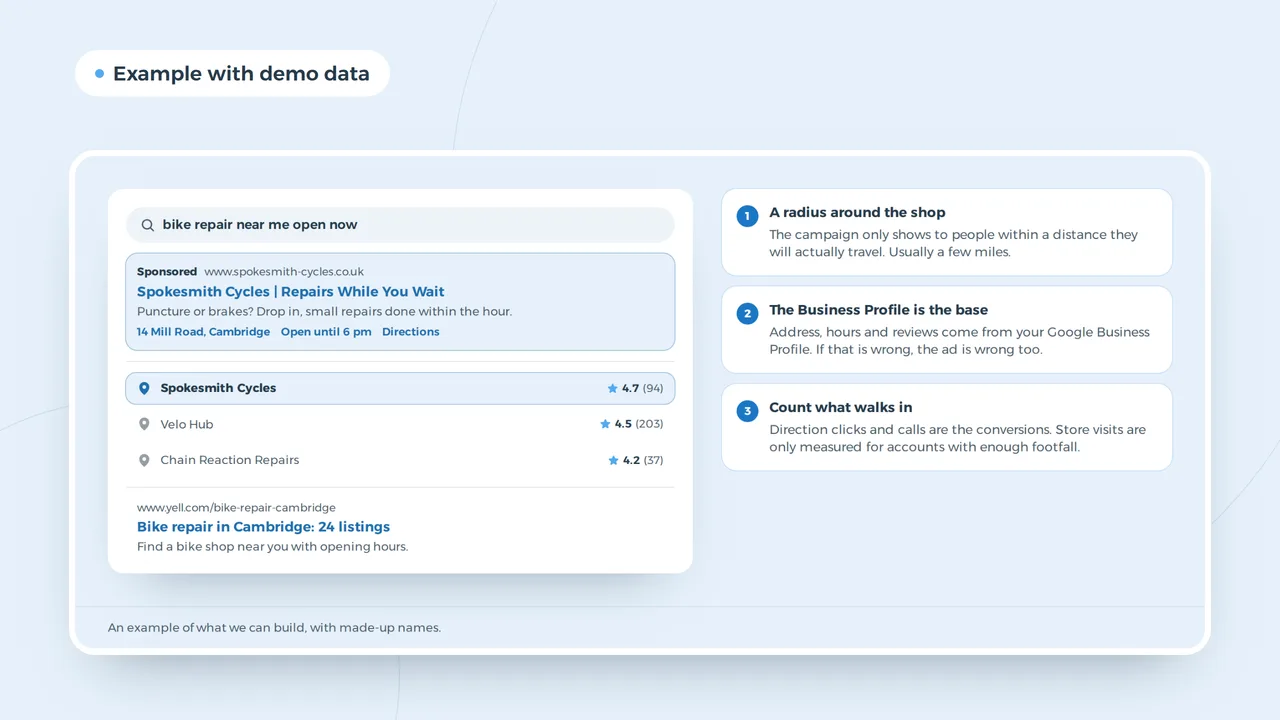
An ad and the map for a local business
- A radius around the shopThe campaign only shows to people within a distance they will actually travel. Usually a few miles.
- The Business Profile is the baseAddress, hours and reviews come from your Google Business Profile. If that is wrong, the ad is wrong too.
- Count what walks inDirection clicks and calls are the conversions. Store visits are only measured for accounts with enough footfall.
An example of what we can build, with made-up names.
Facebook and Instagram around your premises
On Meta you choose a radius around your address. For a business people walk or cycle to, a few kilometres is enough. Pick the objective that fits what you need: reach for a new shop, traffic to an offer page, messages when people tend to ask questions. Regular customers already see your posts; an ad is for the people who do not know you yet. A full plan for this channel is in Facebook ads for local businesses.
Two exceptions: an ad for a job, a home or a loan falls under the Meta special category, with a radius of at least 15 km and no choice of age. More on that at Special Ad Category. How to build an ad that stands out in the feed, you can try in the Facebook ad preview.
| Local business | Channel first | What you show |
|---|---|---|
| Baker, butcher, deli | Meta | the counter, the season, a new product |
| Hairdresser, beauty salon | Meta and your profile | the work, the online booking link |
| Plumber, roofer | Google Ads | call button, area, response time |
| Dentist, physiotherapist | your profile and your site | practice information, within the professional rules |
| Restaurant | Meta and your profile | dishes, terrace, booking button |
| Garage, bike shop | Google Ads and your profile | services, servicing, appointments |
Offline local advertising
A leaflet through the door, an ad in the parish magazine, a board outside a job or sponsoring the local football club: it still works, certainly with an older audience. The problem is that you cannot see what it brings. Put a short link or QR code of its own on every printed piece, made with the UTM builder, or an offer code. Your analytics then show which leaflet brought visitors.
A plan for your first three months
| Month | What you do | Budget |
|---|---|---|
| 1 | complete Business Profile, ask for reviews, tracking on your site | no ad budget |
| 2 | Google Ads on your main service, on presence, with a call asset | a fixed daily budget |
| 3 | Meta in a radius around your premises, with an offer or a season | a small daily budget on top |
How much you need a month depends on your sector and your area. Work out how many clicks your budget buys with the Google Ads budget calculator, and read what a click typically costs in Google Ads cost. For Meta, the ranges are in Facebook ads cost.
What a local ad says
A local ad wins on three things: the town, the speed and the proof that you really are nearby. Put the town in your headline, because someone searching "roofer leeds" clicks the ad that says Leeds. Say when you can come or when you are open. And show something a business from far away cannot: your address, your reviews, a photo of your own work in the area.
So a roofer does not write "Quality roofing at competitive prices", but "Roofer in Leeds, free survey within the week". A shop does not write "Wide range", but "Open Sundays, parking at the door". More ads written out in full are in Google Ads examples. What works per sector is on the pages for roofers and retail shops.
When people search in another language
In parts of every big city a share of your customers search in another language than English. Google shows your ad to people whose device or Google settings use the language you target, so an English only ad misses them. If that group matters to you, build a second ad group in their language with a page in that language behind it. Without that page the click is lost: someone who searches in Polish and lands on an English page goes back.
Mistakes in local advertising
- The whole country as your areaYou pay for clicks from people you will never serve.
- Ads outside your opening hoursSomeone who calls at midnight and gets no answer calls the next business.
- The home page as landing pageAn offer deserves its own page with the offer at the top; see landing page design.
- No reviewsAn ad with a map full of reviews for a competitor next to it loses.
- Too much at onceA small budget spread over five channels shows nowhere long enough to learn anything.
A restaurant or a hotel also needs a site that loads on a phone in a couple of seconds, with the menu and the booking button visible straight away. More local tips are in local SEO tips.
Measuring what local brings in
A local customer calls, walks in or sends a message. You do not measure that with clicks alone. Count calls from your ad and taps on your number, direction requests in your Business Profile, and ask new customers how they found you. A simple tally at the till sometimes says more than a report. If your site sets tracking cookies, you need consent first; see do I need a cookie banner.
Questions about local advertising
What is the cheapest way to advertise locally?
A complete Google Business Profile with reviews. It is free and appears on the map for local searches. Ads come on top.
How small can my area be in Google Ads?
You can choose a radius of one kilometre or a list of towns. Too small means few searches; start a little wider and adjust.
Do leaflets still work?
With a local audience they sometimes do. Put a link or code of their own on them, so you know whether they bring anything in.