On this page
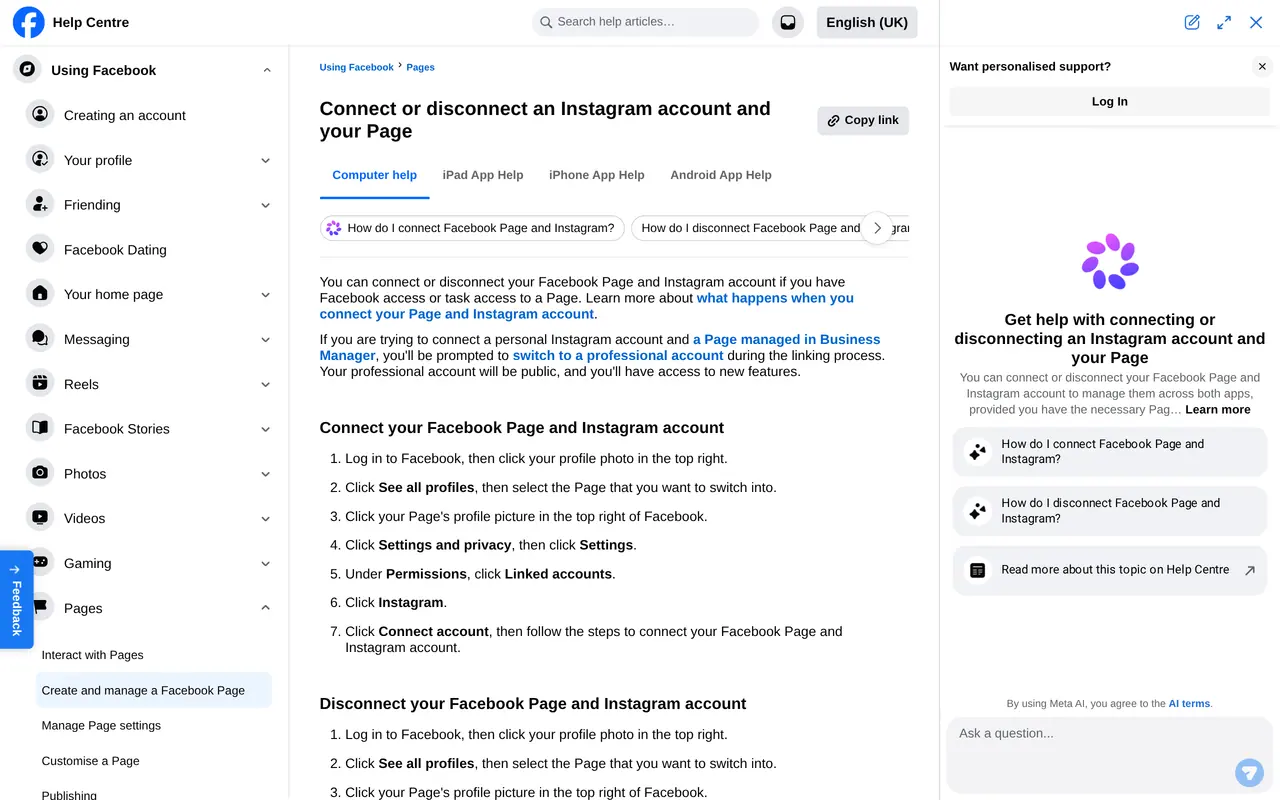
You link a Facebook page to Instagram from the page: switch into the page, open Settings, choose Linked accounts, then Instagram, and click Connect account. You sign in to Instagram and confirm. If your Instagram account is still a personal account, Facebook first asks you to switch it to a professional account.
It is a five-minute link, but it decides a lot. Without it you cannot create Instagram ads from your page, messages arrive in two places and you post everything twice. This guide walks through the steps, explains the difference with what Meta Business Suite does, and tells you what to do when the button does not work.
What the link gives you
| Without the link | With the link |
|---|---|
| Facebook and Instagram messages read separately | One inbox in Meta Business Suite for both |
| Every post placed twice | One post made and placed on both channels |
| Instagram ads only from the Instagram app | Ads for both channels from Ads Manager |
| Insights per app | Insights side by side in Business Suite |
| Each channel with its own admins | Access through the page and your portfolio |
Before you start
Three things need to be in place. You have access to the page: Facebook access or task access is enough, according to the help centre. You know the login of the Instagram account. And you know whether that account is already professional. Unsure about your access? Read how to add an admin to a Facebook page first. No page yet? Start with Facebook page setup for business.
The steps from your page
Link it in seven steps
- Switch into your pageClick your profile picture, choose See all profiles and pick the page.
- Open the settingsClick the page's profile picture, choose Settings and privacy, then Settings.
- Linked accountsUnder Permissions, find Linked accounts and choose Instagram.
- Connect accountClick Connect account. Choose whether Instagram messages may appear in your inbox; leave that on.
- Sign in to InstagramUse the login of the business account, not your own account.
- Switch if neededIf the account is personal, Facebook asks you to make it professional. Choose business or creator.
- Confirm and checkOnce confirmed, Instagram shows under Linked accounts with your account name.
Business Suite does not link by itself
This is where it often goes wrong. In Meta Business Suite you can add an Instagram account to your business portfolio, through Settings, Business assets and Add assets. That is useful: your company then owns the account and you can give colleagues and agencies access. But Meta says it plainly: adding an Instagram account to your portfolio does not connect it to a page. You make that link separately, with the steps above or in the page settings inside Business Suite.
Anyone advertising who wonders why Instagram is missing from the list of placements nearly always finds the reason here.
Disconnecting or linking another account
You disconnect in the same place: switch into your page, choose Manage and then Linked accounts, and remove the connection with Instagram there. Your posts, followers and messages stay on each channel; only the shared management goes. Ads that used Instagram as a placement then no longer run through that account.
Linking another account works only once the old one is disconnected, because a page is linked to one Instagram account at a time. Taking over a business, or did a former employee use their own account? Disconnect first, change the password of the Instagram account and link again with an account you control. That way your channel does not depend on someone who has left.
What changes when you switch to a professional account
A professional account is always public. If you had a private account with approved followers, anyone can see your posts after switching. You also get insights, a contact button, a category on your profile and the option to advertise. You choose between a business account and a creator account; for a small business, business is the logical choice.
Using your personal Instagram as a business account? Consider a separate account for the business. Family photos stay off your business profile, and a colleague can run the account without looking into your private life.
When the link fails
| Problem | Fix |
|---|---|
| Linked accounts is missing | You have not switched into the page, or you are looking at your own profile |
| Instagram says the account is already linked | Disconnect it from the other page first, from that page |
| The sign-in will not complete | Sign out of the Instagram app first, and try on a computer |
| Instagram is missing from your ad placements | The link is missing: adding it to your portfolio is not enough |
| A colleague cannot see the messages | Give them page access with the messages task |
To disconnect, use the same screen: Linked accounts, Instagram, then Disconnect account. Your posts and followers stay on both channels.
What you then manage in one place
| Task | After the link | Without the link |
|---|---|---|
| Messages | Facebook and Instagram in one inbox in Business Suite | Two apps, two inboxes |
| Scheduling | Plan one post for both channels at once | Each channel separately |
| Ads | Instagram as a placement in Ads Manager | Only boosting from the Instagram app |
| Numbers | Reach and responses of both side by side | Looked up separately |
| Access | Someone with task access manages both | Each account shared separately |
Do not schedule the same post blindly on both channels. Instagram is about the image and a short caption, Facebook takes a longer explanation and a link. Images in the right size for each channel are in social media image sizes, and the rhythm per channel in the Instagram algorithm in 2026. To see whether a post lands, work out your engagement with the engagement rate calculator.
After the link, give access through the page and Business Suite, not by sharing your Instagram password. Who can do what is in add an admin to a Facebook Page. A steady plan for both channels starts with a social media plan template.
Also agree on who in your company looks after the link. Give at least two people full control of the page, and keep the Instagram login in a company password manager, not on a private phone. When someone leaves, remove their access to the page and the account. How to give and remove access is in add admin to Facebook page. After every change in your team, check that Instagram messages still arrive in the Business Suite inbox.
After the link
Now you can post to both channels at once. Do it with an eye for each channel: an upright video or a 4 by 5 carousel works differently on Instagram than on Facebook. The sizes per channel are in social media image sizes. Read how the Instagram algorithm in 2026 decides who sees your post, and check when your audience reads in the best time to post on social media. Use the same name on both channels; how to adjust it on Facebook is in change Facebook page name.
Going to advertise? See what Facebook ads cost and how the Meta pixel measures what an ad brings in. For Les Terrasses de Durbuy we made reels and carousels, and the golf reel ran as an ad on Meta; the story is in our work for Les Terrasses.
Want someone else to keep both channels going? You can have us manage your Facebook page, set up Facebook and Instagram ads or take on your whole social media management.
Linking, unlinking and accounts
Does my Instagram account need to be a business account?
It must be a professional account: business or creator. A personal account is switched over while linking.
Can one Instagram account link to two pages?
No, an Instagram account belongs to one page. Disconnect it from the other page first.
Do I lose followers when I unlink?
No. Followers and posts stay on each channel. Only the shared inbox and the ads across both channels go.
Can I link from the app?
Yes, in the Facebook app through your page and its settings, or in the Business Suite app under Settings. A computer is usually smoother.